
dbfimaflmomgldabcphgolbeoamjogji
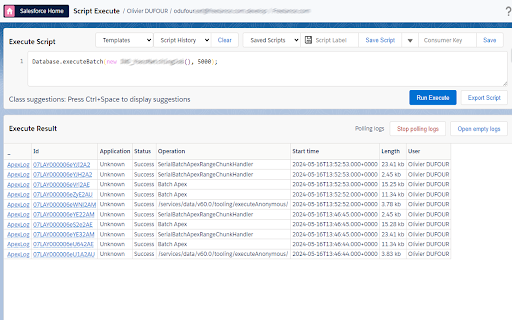

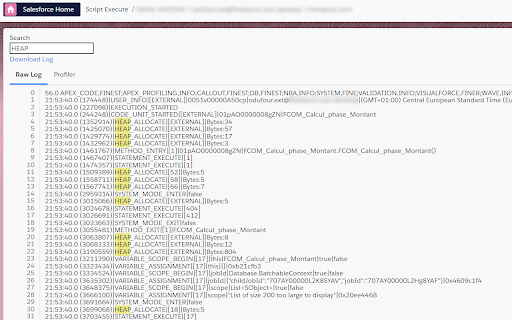
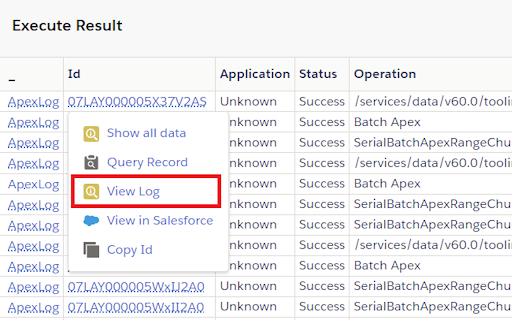

Productivity tools for Salesforce administrators and developers to inspect data and metadata directly from the Salesforce UI. Salesforce Inspector Advanced - The Ultimate Developer Toolkit for Salesforce Transform your Salesforce development workflow with this comprehensive browser extension designed for developers, admins, and architects. Salesforce Inspector Advanced provides powerful tools to inspect, analyze, and optimize your Salesforce org. 🔍 INSPECT & ANALYZE • Object & Field Inspector: Deep dive into object metadata, field usage analysis, and relationship mapping • Flow Analyzer: Comprehensive flow analysis detecting performance issues, security vulnerabilities, and best practice violations with actionable recommendations • Org Analyzer: Identify unused resources, code quality issues, security vulnerabilities, and migration opportunities across your entire org 💾 DATA MANAGEMENT • Advanced SOQL/SOSL Editor: Intelligent code editor with autocomplete, syntax highlighting, and inline suggestions for fields, objects, and relationships • Data Export: Query and export data with advanced filtering, sorting, column management, and support for GraphQL • Data Import: Bulk import with Bulk API support, hard delete capabilities, and smart field mapping • Inline Editing: Edit records directly in the data export view with bulk update capabilities ⚡ APEX DEVELOPMENT • Apex Runner: Execute anonymous Apex, batch jobs, and queueable classes with real-time log monitoring • Log Viewer: Advanced log analysis with flame charts, profiler, resource tracking (SOQL, DML, callouts), and unit test execution with code coverage • Code Editor: Full-featured editor with syntax highlighting, auto-indentation, and intelligent suggestions for Apex classes and methods 🔧 METADATA & DEPLOYMENT • Metadata Browser: Explore and download metadata with automatic package.xml generation • Metadata Import: Streamlined metadata deployment with relationship handling 🌐 API & INTEGRATION • API Explorer: Test Salesforce APIs with templates, history, and response formatting for REST, Bulk API, Chatter, Reports, and more • Platform Event Manager: Subscribe, monitor, and publish platform events, push topics, and change data capture events 🤖 AI-POWERED FEATURES • AI Flow Analysis: Leverage ChatGPT, Claude, Mistral, or Agentforce to analyze flows and generate SOQL queries • Intelligent Suggestions: Context-aware autocomplete for fields, picklist values, and relationships 🎨 USER EXPERIENCE • Customizable Interface: Custom favicon colors, editable shortcuts, and personalized settings • Quick Access Popup: Fast access to common tasks, user management, and org navigation • Modern UI: Clean, responsive interface with keyboard shortcuts and intuitive navigation 🔒 SECURITY • OAuth 2.0 with PKCE: Secure authentication with support for external connected apps • Security Analysis: Detect SOQL injection vulnerabilities, XSS risks, and access management issues Perfect for developers who need to: • Analyze and optimize Salesforce Flows • Query and manipulate data efficiently • Debug Apex code with advanced log analysis • Manage metadata and deployments • Test APIs and integrations • Identify org health issues and optimization opportunities Whether you're building new features, debugging issues, or maintaining your org, Salesforce Inspector Advanced provides the tools you need to work faster and smarter. https://github.com/dufoli/Salesforce-Inspector-Advanced This extension is based on the original Salesforce inspector extension made by Søren Krabbe and Salesforce inspector reloaded by Thomas Prouvot.

Lightning Studio
Build Salesforce LWC development easy and fastest. 💻 𝑯𝒐𝒘 𝒕𝒐 𝑼𝒔𝒆 𝑳𝒊𝒈𝒉𝒕𝒏𝒊𝒏𝒈 𝑺𝒕𝒖𝒅𝒊𝒐: ● Log in to Salesforce and click the Lightning Studio icon located in the browser’s top-right corner (Standard Chrome extension toolbar). ● Wait for the icon to turn blue, indicating it’s ready to use. ● For first-time installations, refresh the page before accessing the extension. 🔎𝑭𝒆𝒂𝒕𝒖𝒓𝒆𝒔:───────────────────────────────────────────────────── ✔ 𝐑𝐚𝐩𝐢𝐝 𝐃𝐞𝐯𝐞𝐥𝐨𝐩𝐦𝐞𝐧𝐭: Build and manage Lightning Web Components (LWC), Aura Components, Apex Classes, Lightning Message Service (LMS), and Lightning Types from a single interface. ✔ 𝐅𝐢𝐥𝐞 𝐌𝐚𝐧𝐚𝐠𝐞𝐦𝐞𝐧𝐭: Create and maintain individual files for LWC, Aura, and Lightning Type components with ease. ✔ 𝐃𝐞𝐩𝐥𝐨𝐲𝐦𝐞𝐧𝐭 ⁽ᵇᵉᵗᵃ⁾: Deploy Salesforce metadata using package ZIP files for controlled and reliable deployments. ✔ 𝐁𝐚𝐜𝐤𝐮𝐩: Download selected components, folders, or full metadata backups as ZIP files. deployments. ✔ 𝐂𝐨𝐝𝐞 𝐅𝐢𝐧𝐝𝐞𝐫: Search across LWC, Apex, and Aura code from one place. ✔ 𝐆𝐫𝐚𝐩𝐡𝐐𝐋 𝐄𝐱𝐩𝐥𝐨𝐫𝐞𝐫: Execute and test GraphQL queries directly within Salesforce. ✔ 𝐑𝐄𝐒𝐓 𝐀𝐏𝐈 𝐄𝐱𝐩𝐥𝐨𝐫𝐞𝐫 ⁽ᵇᵉᵗᵃ⁾: Test and run Salesforce REST APIs through an intuitive interface. ✔ 𝐀𝐧𝐨𝐧𝐲𝐦𝐨𝐮𝐬 𝐀𝐩𝐞𝐱 ⁽ᵇᵉᵗᵃ⁾: Run Apex code anonymously and review execution results with detailed debug logs. ✔ 𝐒𝐎𝐐𝐋 𝐭𝐨 𝐆𝐫𝐚𝐩𝐡𝐐𝐋: Seamlessly convert SOQL queries into GraphQL format. ִ✔ 𝐂𝐨𝐝𝐞 𝐂𝐨𝐦𝐩𝐚𝐫𝐢𝐬𝐨𝐧: Quickly identify code changes using an integrated diff checker. ✔ 𝐉𝐒𝐎𝐍 𝐭𝐨 𝐀𝐩𝐞𝐱 ⁽ᵇᵉᵗᵃ⁾: Convert JSON payloads into Apex wrapper classes for faster API integration and development. ✔ 𝐁𝐞𝐚𝐮𝐭𝐢𝐟𝐢𝐞𝐫 ⁽ᵇᵉᵗᵃ⁾: Format and beautify JSON and XML for improved readability and debugging. 📝 𝑬𝒅𝒊𝒕𝒐𝒓 𝑬𝒙𝒑𝒆𝒓𝒊𝒆𝒏𝒄𝒆: ────────────────────────────────────────────── ● 𝐐𝐮𝐢𝐜𝐤 𝐃𝐞𝐩𝐥𝐨𝐲𝐦𝐞𝐧𝐭: Save and deploy changes instantly with 𝗖𝗧𝗥𝗟+𝗦 (Window) or ⌘+𝗦 (Mac). ● 𝐋𝐖𝐂 𝐒𝐧𝐢𝐩𝐩𝐞𝐭𝐬: Access a full library of 𝘀𝗵𝗼𝗿𝘁𝗰𝘂𝘁 𝗸𝗲𝘆𝘀 for faster LWC development. ● 𝐓𝐡𝐞𝐦𝐞 𝐌𝐨𝐝𝐞𝐬: Switch between 𝗗𝗮𝗿𝗸 𝗠𝗼𝗱𝗲 and 𝗟𝗶𝗴𝗵𝘁 𝗠𝗼𝗱𝗲 for a personalized coding experience. ───────────────────────────────────────────────────────────── 🌐𝐃𝐨𝐜𝐮𝐦𝐞𝐧𝐭𝐚𝐭𝐢𝐨𝐧: https://nisar-99.github.io/lightning-studio ───────────────────────────────────────────────────────────── 🛡️𝐒𝐞𝐜𝐮𝐫𝐢𝐭𝐲 ★ 𝘓𝘰𝘤𝘢𝘭 𝘋𝘢𝘵𝘢 𝘖𝘯𝘭𝘺: 𝘈𝘭𝘭 𝘥𝘢𝘵𝘢 𝘴𝘵𝘢𝘺𝘴 𝘰𝘯 𝘺𝘰𝘶𝘳 𝘥𝘦𝘷𝘪𝘤𝘦; 𝘯𝘰𝘵𝘩𝘪𝘯𝘨 𝘪𝘴 𝘴𝘦𝘯𝘵 𝘵𝘰 𝘦𝘹𝘵𝘦𝘳𝘯𝘢𝘭 𝘴𝘦𝘳𝘷𝘦𝘳𝘴. ★ 𝘕𝘰 𝘛𝘩𝘪𝘳𝘥-𝘗𝘢𝘳𝘵𝘺 𝘚𝘩𝘢𝘳𝘪𝘯𝘨: 𝘞𝘦 𝘥𝘰𝘯’𝘵 𝘴𝘩𝘢𝘳𝘦 𝘥𝘢𝘵𝘢 𝘸𝘪𝘵𝘩 𝘢𝘯𝘺 𝘵𝘩𝘪𝘳𝘥-𝘱𝘢𝘳𝘵𝘺 𝘴𝘦𝘳𝘷𝘪𝘤𝘦𝘴. ★ 𝘕𝘰 𝘓𝘦𝘨𝘢𝘭 𝘋𝘪𝘴𝘤𝘭𝘰𝘴𝘶𝘳𝘦𝘴: 𝘕𝘰 𝘱𝘦𝘳𝘴𝘰𝘯𝘢𝘭 𝘥𝘢𝘵𝘢 𝘪𝘴 𝘴𝘩𝘢𝘳𝘦𝘥 𝘧𝘰𝘳 𝘭𝘦𝘨𝘢𝘭 𝘰𝘳 𝘰𝘵𝘩𝘦𝘳 𝘱𝘶𝘳𝘱𝘰𝘴𝘦𝘴. ★ 𝘕𝘰 𝘋𝘢𝘵𝘢 𝘊𝘰𝘭𝘭𝘦𝘤𝘵𝘪𝘰𝘯: 𝘞𝘦 𝘥𝘰𝘯’𝘵 𝘤𝘰𝘭𝘭𝘦𝘤𝘵, 𝘴𝘦𝘭𝘭, 𝘰𝘳 𝘶𝘴𝘦 𝘱𝘦𝘳𝘴𝘰𝘯𝘢𝘭 𝘪𝘯𝘧𝘰𝘳𝘮𝘢𝘵𝘪𝘰𝘯. ★ 𝘗𝘳𝘪𝘷𝘢𝘤𝘺 𝘣𝘺 𝘋𝘦𝘴𝘪𝘨𝘯: 𝘌𝘹𝘵𝘦𝘯𝘴𝘪𝘰𝘯 𝘧𝘶𝘯𝘤𝘵𝘪𝘰𝘯𝘴 𝘴𝘦𝘤𝘶𝘳𝘦𝘭𝘺 𝘸𝘪𝘵𝘩 𝘮𝘪𝘯𝘪𝘮𝘢𝘭 𝘥𝘢𝘵𝘢 𝘶𝘴𝘦. ───────────────────────────────────────────────────────────── 💡𝐖𝐞 𝐕𝐚𝐥𝐮𝐞 𝐘𝐨𝐮𝐫 𝐅𝐞𝐞𝐝𝐛𝐚𝐜𝐤 Your suggestions help us improve! Feel free to share any feedback or ideas to make the app even better.

Salesforce Log Inspector
This app helps you inspect, analyze, and optimize your Salesforce debug log. ──────────: 𝑭𝒆𝒂𝒕𝒖𝒓𝒆𝒔 :────────── 🗂️ 𝐋𝐨𝐠 𝐄𝐱𝐩𝐥𝐨𝐫𝐞𝐫 - Quickly browse log rows with search and highlighted code for easy identification of key details. 🌿𝐑𝐚𝐰 𝐓𝐫𝐞𝐞 - View displays your Apex logs in a structured tree format. Instead of scrolling through long, unformatted text, you can explore the log hierarchy with expandable and collapsible nodes. 🐞 𝐀𝐩𝐞𝐱 𝐃𝐞𝐛𝐮𝐠 - View only 𝚂𝚢𝚜𝚝𝚎𝚖.𝚍𝚎𝚋𝚞𝚐() outputs for simplified troubleshooting, excluding other log details. 📅 𝐄𝐱𝐞𝐜𝐮𝐭𝐢𝐨𝐧 𝐓𝐢𝐦𝐞𝐥𝐢𝐧𝐞 - Visualize code execution over time with a flame chart and detailed event tooltips. 🔗 𝐄𝐱𝐞𝐜𝐮𝐭𝐢𝐨𝐧 𝐓𝐫𝐞𝐞 - Explore the method call path with key metrics like DML, SOQL counts, and execution times. 🔎 𝐄𝐱𝐞𝐜𝐮𝐭𝐢𝐨𝐧 𝐀𝐧𝐚𝐥𝐲𝐬𝐢𝐬 - Identify time-consuming methods to pinpoint performance bottlenecks for optimization. 🛢️ 𝐒𝐎𝐐𝐋 𝐀𝐧𝐚𝐥𝐲𝐬𝐢𝐬 - Find the most executed and time-consuming SOQL queries and those with the most extensive result sets. 🧮 𝐃𝐌𝐋 𝐀𝐧𝐚𝐥𝐲𝐬𝐢𝐬 - Identify the most frequent and slowest DML operations to optimize data processing. 🤖 𝐅𝐥𝐨𝐰 𝐀𝐧𝐚𝐥𝐲𝐬𝐢𝐬 -Quickly identify which Flows ran and how often in this execution. ──────────────────────────────────────────────────── 🌐𝐃𝐨𝐜𝐮𝐦𝐞𝐧𝐭𝐚𝐭𝐢𝐨𝐧: https://nisar-99.github.io/salesforce-log-inspector ──────────────────────────────────────────────────── 🛡️𝐒𝐞𝐜𝐮𝐫𝐢𝐭𝐲 ★ 𝘓𝘰𝘤𝘢𝘭 𝘋𝘢𝘵𝘢 𝘖𝘯𝘭𝘺: 𝘈𝘭𝘭 𝘥𝘢𝘵𝘢 𝘴𝘵𝘢𝘺𝘴 𝘰𝘯 𝘺𝘰𝘶𝘳 𝘥𝘦𝘷𝘪𝘤𝘦; 𝘯𝘰𝘵𝘩𝘪𝘯𝘨 𝘪𝘴 𝘴𝘦𝘯𝘵 𝘵𝘰 𝘦𝘹𝘵𝘦𝘳𝘯𝘢𝘭 𝘴𝘦𝘳𝘷𝘦𝘳𝘴. ★ 𝘕𝘰 𝘛𝘩𝘪𝘳𝘥-𝘗𝘢𝘳𝘵𝘺 𝘚𝘩𝘢𝘳𝘪𝘯𝘨: 𝘞𝘦 𝘥𝘰𝘯’𝘵 𝘴𝘩𝘢𝘳𝘦 𝘥𝘢𝘵𝘢 𝘸𝘪𝘵𝘩 𝘢𝘯𝘺 𝘵𝘩𝘪𝘳𝘥-𝘱𝘢𝘳𝘵𝘺 𝘴𝘦𝘳𝘷𝘪𝘤𝘦𝘴. ★ 𝘕𝘰 𝘓𝘦𝘨𝘢𝘭 𝘋𝘪𝘴𝘤𝘭𝘰𝘴𝘶𝘳𝘦𝘴: 𝘕𝘰 𝘱𝘦𝘳𝘴𝘰𝘯𝘢𝘭 𝘥𝘢𝘵𝘢 𝘪𝘴 𝘴𝘩𝘢𝘳𝘦𝘥 𝘧𝘰𝘳 𝘭𝘦𝘨𝘢𝘭 𝘰𝘳 𝘰𝘵𝘩𝘦𝘳 𝘱𝘶𝘳𝘱𝘰𝘴𝘦𝘴. ★ 𝘕𝘰 𝘋𝘢𝘵𝘢 𝘊𝘰𝘭𝘭𝘦𝘤𝘵𝘪𝘰𝘯: 𝘞𝘦 𝘥𝘰𝘯’𝘵 𝘤𝘰𝘭𝘭𝘦𝘤𝘵, 𝘴𝘦𝘭𝘭, 𝘰𝘳 𝘶𝘴𝘦 𝘱𝘦𝘳𝘴𝘰𝘯𝘢𝘭 𝘪𝘯𝘧𝘰𝘳𝘮𝘢𝘵𝘪𝘰𝘯. ★ 𝘗𝘳𝘪𝘷𝘢𝘤𝘺 𝘣𝘺 𝘋𝘦𝘴𝘪𝘨𝘯: 𝘌𝘹𝘵𝘦𝘯𝘴𝘪𝘰𝘯 𝘧𝘶𝘯𝘤𝘵𝘪𝘰𝘯𝘴 𝘴𝘦𝘤𝘶𝘳𝘦𝘭𝘺 𝘸𝘪𝘵𝘩 𝘮𝘪𝘯𝘪𝘮𝘢𝘭 𝘥𝘢𝘵𝘢 𝘶𝘴𝘦. ──────────────────────────────────────────────────── ❤️𝐂𝐫𝐞𝐝𝐢𝐭: I would like to acknowledge and thank 𝗦𝗮𝗹𝗲𝘀𝗳𝗼𝗿𝗰𝗲 (𝖣𝖾𝗏𝖾𝗅𝗈𝗉𝖾𝗋 𝖢𝗈𝗇𝗌𝗈𝗅𝖾) and 𝗖𝗲𝗿𝘁𝗶𝗻𝗶𝗮 (𝖵𝖲 𝖢𝗈𝖽𝖾 𝖤𝗑𝗍𝖾𝗇𝗌𝗂𝗈𝗇) for the inspiration and creative influence that helped shape this work. ──────────────────────────────────────────────────── 💡𝐖𝐞 𝐕𝐚𝐥𝐮𝐞 𝐘𝐨𝐮𝐫 𝐅𝐞𝐞𝐝𝐛𝐚𝐜𝐤 Your suggestions help us improve! Feel free to share any feedback or ideas to make the app even better. ────────────────────────────────────────────────────

Salesforce Colored Favicons
Updates the standard favicon on Salesforce tabs with colored versions to help differentiate between different organizations. Supports both Classic and Lightning Experiences and includes separate icons for production, sandbox, and develop/scratch orgs. To use the extension, simply navigate to a Salesforce org and the extension will automatically select a random color for it then update the favicon with that color. Now every time you visit that org, the colored favicon will be displayed instead of the default Salesforce favicon. At this point you can also visit the options page to change the color for any org you've visited.

Salesforce advanced Code searcher
By using the advanced quick find you can get your code few clicks shorter. Also, you can search any string your code Using this extension you can search your code components your salesforce instance: 1) apex Classes 2) Apex Triggers 3) visualforce Pages 4) Visualforce Components 5) Lighting Component In addition to the above you can use this extension to jump to classes / pages / triggers from the advanced quick find section on the left hand side. How to make it work in Lightning: 1) We embed the extension in the setup page. Please navigate to the setup home page where you can find the extension injected in the right. 2) You need to authorize (this is a one time activity) for the application to make the API calls. 3) On clicking the button, you will be navigated to the Salesforce to authorize. Once you have successfully completed the authorization, you will be redirected back to the home page. 4) Once this is done, all the functionalities will be enabled. Both the below section get added in the set-up pages, so this is only useful for developers and Admins, this tool will not make any sense for salesforce users. 1) Advanced Quick Find section:This part gets added in side navigation bar on all set-up pages. Select the code component that you want to go to, then start typing the name of the code,an autocomplete suggestion pops up, select the one that you want to go to. 2) Developer Utilities: 2.1) This component get added in force.com home page only. Let's say you want to know where you have hard-coded a profile name in your code, like if(profile.name =='sys Admin'){//you're doing something}. Right now to find this out you have to either go thru all the code individually or create a force.com project in eclipse and then search there. There's no way we can do this directly in salesforce. This string search will help you do that. You have to check the code components in which you want to search the code, enter a string in the input text field and hit enter. You will be presented with a list of code components where the string is used. 2.2 ) Code Coverage Extract: You can View and download the code coverage in your org. 2.3 ) This extension now allows you to lint the lightning code via the Lightning Linter tab. 2.4 ) You can now run PMD against your code 2.5 ) Added a new tab which will allow the users to view the record and its child information . update 1.22 Improved the static code analysis functionality update 1.15 Added the LWC Editor with Autocompleting for html & xml files. update 1.10 Added the ability to get the record Information by just giving the record Id. update 1.8, 1.9 Added support for the application to work on lightning update 1.4.2 Added support for Custom label Addes support for Apex PMD Update 1.1.1 Expanded the quick search scope to Email Templates, Validation Rule, Workflow Rule, Custom Object Added edition checks. Update 1.2 Update the UI to be more in sync with Lightning Update 1.3 Added Code coverage Extract section allowing user to view and download the code coverage. Update 1.3.3: UPdated the cookie issue. NOTE: 1) Salesforce's REST API is used to accomplish the above functionalities Update 1.3.5 1) Added support to delete all the Debug logs 2) Added a button on traceflag to renew the startDate / expiration date.
