
gdjfanbphogooppaefebaaoohdcigpoi
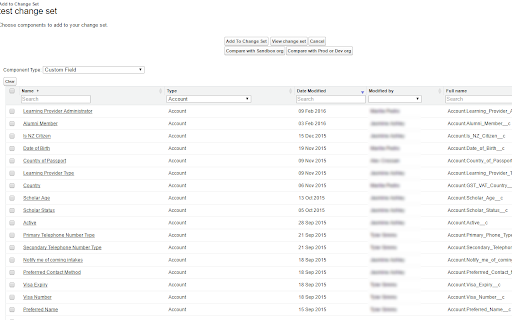


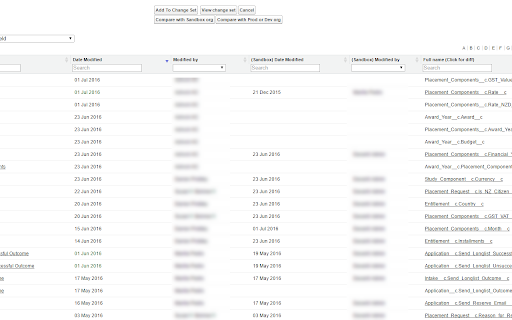

Enhances the Salesforce change set. Adds last changed date and allows sorting, searching, validation and comparison with other orgs. A Chrome extension to improve the usability of Salesforce change sets NEW! Release 3.1.4 Optimizations for large organization Release 3.1.3 - Fix Compare and allow multiple orgs to be connected. - Add the ability to validate and deploy changes directly to other orgs. - Ability to select components from different types and add them at once. - Added a new Change Set Cart where the user can see what are the items have been added without needing to leave the add screen. - Persistent cart panel with sync badge, search, virtualised list, filterable chips. - Export/Import package.xml from cart and both page toolbars. - Bulk Remove via Tooling API DELETE (no A4J reload dance). - Single-row Remove without page reload. - Hide native Import entry point. - Fix lighting page issue. Release 3.0.2 Supports Chrome extensions best practices and manifest v3 updated better loading of components for large orgs. Features include: - Includes the last modified date and user and api name for each item. - Automatically ordered by most recent modified first - Filter/Search/Order by any field. - Sets all pages to show the 1000 rows. If more than 1000 items in a page, asks if you want to continue to retrieve more. - View and Search on items in the change set. This allows you to see the whole change set and search to make removing much easier. - Compare to another org (uses OAuth2.0 -- no username or password information is seen or stored by this extension). - Shows the last modified date and user for the compared org as well. - Click the file name to see a diff of the metadata file between orgs. Note that there is a delay when loading large pages and you may need to disable other chrome extensions that alter the change set page. Release 3.0.0. Lightning compatible! Fixed issue with Validation. Added Quick Deploy. Updated compare files content to compare all files (for example, in a Aura Component). Fixed issue with constantly spinning wheel if there is an error. Added ability to change API Version. Removed extension from all pages except change sets. Release 2.2.0 Now includes Validation helper. Log into another org and validate the change set. Release 2.1.2 Fixed bug with Quick Links on VF page even when disabled Fixed bug with Sharing Criteria Rules Release 2.1.1 Fixed bugs with hanging when no content. Merged with "beta" extension -- new features such as download zip file of the change set. Release 2.02 Now can compare files between orgs. Log in to a sandbox or dev/prod org. Uses Oauth2.0 for authorization -- no user or password information is seen or stored locally. Shows the last modified date and user for the compared org. Click the name and see a diff comparison of the two. Release 1.4 Updated to add ability to keep getting 1000 more items on pages. (Salesforce will only retrieve 1000 a time.) Added in a "clear" function to clear the search filters. Clear is automatically called before items are added to change set -- this is because of a bug where the items will not be added unless they are visible. Release 1.3 Updated to support workflows, reports, email templates and many more.

Salesforce DevTools
Salesforce DevTools is a powerful Salesforce developer chrome extension for doing the below things : ・Quickly generate Apex code / SOQL, exporting query results to Excel file. ・Quickly access to new record page, list page and object setting page of any object. ・Quickly search object fields and check its usage. ・Display fields API name on Salesforce object detail page. ・Exporting Objects Definition to Excel file. ・Exporting Objects Fields Definition to Excel file. ・Exporting Objects Page Layout Definition to Excel file. ・Exporting Objects List View Definition to Excel file. ・Exporting Flow Definition to Excel file. ・Salesforce data modal (ERDs) generator. ・All Check / Select on profile edit page and field permissions edit page. ・Mass edit, mass delete, mass clone custom fields (Only Classic). ++++++++++++++++++++++++++++ Release notes ++++++++++++++++++++++++++++ 2026/01/1 ・Added features of "Export Flow Definition". -------------------------------------- 2023/04/10 ・Added features of mass edit, mass delete, mass clone custom fields on Lightning. -------------------------------------- 2022/01/30 ・Added feature of searching object fields and show its usage. -------------------------------------- 2021/04/05 ・Added feature of exporting Object definition (FULL) and fixed bugs. -------------------------------------- 2020/09/07 ・Added feature of exporting List View definition and fixed bugs. -------------------------------------- 2020/06/07 ・Fixed Lighting active bug and Japanese language document exporting bug. -------------------------------------- 2020/04/12 ・Improved feature of Query Editor. -------------------------------------- 2020/01/06 ・Added feature of exporting object page layout. -------------------------------------- 2019/08/18 ・Added feature of Multi Check on field permission edit page. -------------------------------------- 2019/05/13 ・Added features of mass edit, mass delete, mass clone custom fields -------------------------------------- 2019/03/24 ・Fixed issues. -------------------------------------- 2018/12/17 ・Reactivated feature of Debug Log Viewer. ・Added feature of searching Debug Log. ・Fixed issues. -------------------------------------- 2018/11/12 ・Improved UX of feature exporting object API reference to Excel file. ・Added Query Editor feature to all Objects. ・Added feature of exporting query result to Excel file -------------------------------------- 2018/09/25 ・Added support for cloudforce orgs. -------------------------------------- 2018/09/03 Major Release ・ Added support for Lightning! ・ Improved UX of feature Object Reference Doc generating. ・ Improved UX of feature All Check. -------------------------------------- 2018/04/17 ・Improved ERDs UX, fixed bugs. -------------------------------------- 2017/10/11 ・Improved Debug Log Viewer UX. -------------------------------------- 2017/05/29 ・Added feature of query editor and csv data exporting. -------------------------------------- 2017/04/23 ・Added feature of ERDs generator. -------------------------------------- 2017/02/06 ・Fix bugs. -------------------------------------- 2017/01/30 ・Added features of SOQL generator and Apex debug log viewer. -------------------------------------- 2016/12/20 ・Fixed export excel bugs. -------------------------------------- 2016/12/06 ・Improved UI, fixed bugs. -------------------------------------- 2016/11/25 ・Added features that allows you to enable it on custom domain. -------------------------------------- 2016/08/21 Major Release ・Added features of exporting objects definition to excel file. -------------------------------------- 2016/05/18 ・ Added support for Visualforce Page. -------------------------------------- 2016/04/04 ・ Added the features of object searching and object quick access. -------------------------------------- 2016/03/31 ・ Added support for generating Apex Code include blank fields -------------------------------------- 2016/03/28 ・ Added support for RecordType ・ Added hint for Quick Access Menu Turned Off

Download Salesforce Change Set package.xml
This extension will add Download button on Inbound/Outbound Change Set page allowing you to download package.xml of its components. ********* v8.2 (9 Sep 2024)********* - Enhanced Options Page. ********* v6.0.0 (4 Aug 2020)********* - Added lightning support and code fixes. ********* v5.0.0 (2 Aug 2019)********* - Enhanced logic to display button all the times, in both inbound and outbound changeset ********* v4.0.0 (29 Mar 2019)********* - Fixed intermittent issues of button disappearing - Fixed issue of the button not appearing on Inbound changeset - Added feature to generate package.xml even if the user is not on the 1st page of a list of components. As always, do share valuable feedback. If you have any query please raise a ticket @ http://support.satrangtech.com/ For detailed release notes, please visit: https://docs.google.com/document/d/1jClOrTu0fP0_8iZjKbFa-V-b4_85Lpp_DrxYSiEhs14/edit

Salesforce.com Enhanced Formula Editor
Enhances Salesforce formulas with syntax highlighting, autocomplete, formatting, field analysis, and syntax checking. Use this extension to save time and headaches working with Salesforce formulas. It helps you quickly understand the structure of a Salesforce formula, debug it, and edit it. This extension requires a paid license key subscription and offers a free 14-day trial. Watch the video and visit the extension's website for examples of the below features: https://www.enhancedformulaeditor.com/ When you visit a Salesforce formula edit page it will automatically enhance the formula text field with a code editor or provide an Open button to use the code editor in a popup window. This includes Flow formulas, Process Builder formulas, formula fields, validation rule formulas, workflow rule formulas, and field update formulas. The extension is updated during each Salesforce quarterly release to support the latest API versions and the latest formula functions. Editor Features Include: - Syntax highlighting - Tabbing (tab and shift-tab) - Parentheses matching - Format button - Autocompletion - Review Changes - Automated Syntax Checking A new button named "Analyze Fields" is added to formula pages that loads details about the fields found in the formula. Field details include: - Field type - How many times it is used - Formula field compile sizes - Field record values - Picklist values - Sub formulas Have an issue or a great idea for this extension? Visit the support tab above to leave feedback. Updates 1/4/2026 - fix for obtaining session access token when httponly is enabled 10/12/2024 - support Chrome manifest v3 3/5/2023 - Format button support for Flows and Process Builders 6/12/2022 - Summer 2022 updates (new functions, latest api version) 2/8/2022 - Added automatic syntax checking 1/26/2022 - Added a Review Changes button to highlight what was changed 1/8/2022 - Autocomplete now searches in the middle of field names/functions 12/14/2021 - Added font family dropdown so fixed-width/monospace fonts can be used 12/12/2021 - Added field/function autocomplete for some instances 11/7/2021 - Added OAuth API Access for orgs that don't have the sid cookie available 8/7/2021 - Format formula improvements 6/8/2021 - Added support for cloudforce.com 3/21/2021 - Now supports flow and process builder formulas 2/15/2021 - Resize editor by dragging and dropping the bottom right corner 1/30/2021 - Picklist options now list the API Name and Label 1/9/2020 - Updated licensing system 11/22/2020 - Updated to use the latest metadata API version 6/30/2020 - Updated to use the latest metadata API version 1/6/2019 - Fixed some bugs handling decimal numbers 9/5/2018 - Added a button that formats the formula for you 7/11/2018 - Editor now remembers your font size 6/24/2018 - Now works with Lightning 3/1/2017 - Editor now remembers what size you made it 8/12/2015 - New "Load Field Details" button 7/11/2015 - Insert buttons for fields and functions work now 1/9/2012 - Fixed text wrapping in nowrap mode.

EasyCrud(Salesforce)
Assign your CRUD and FLS for Salesforce in Bulk from Single Screen This Extension allows Salesforce Admins/Developers to assign CRUD and FLS Permissions from Single Screen. There are also features that provides ability to export permissions in CSV and also generate dashboard for the permissions.
