
ehgmhinnhggigkogkbhnbodhbfjgncjf
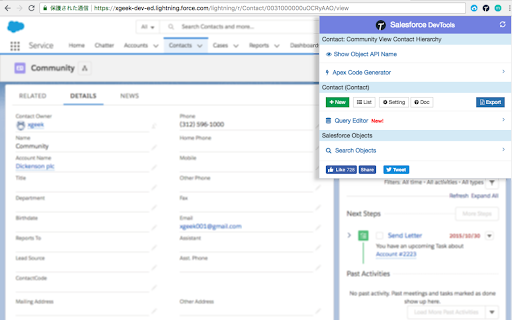


Salesforce DevTools is a powerful Salesforce developer chrome extension for doing the below things : ・Quickly generate Apex code / SOQL, exporting query results to Excel file. ・Quickly access to new record page, list page and object setting page of any object. ・Quickly search object fields and check its usage. ・Display fields API name on Salesforce object detail page. ・Exporting Objects Definition to Excel file. ・Exporting Objects Fields Definition to Excel file. ・Exporting Objects Page Layout Definition to Excel file. ・Exporting Objects List View Definition to Excel file. ・Exporting Flow Definition to Excel file. ・Salesforce data modal (ERDs) generator. ・All Check / Select on profile edit page and field permissions edit page. ・Mass edit, mass delete, mass clone custom fields (Only Classic). ++++++++++++++++++++++++++++ Release notes ++++++++++++++++++++++++++++ 2026/01/1 ・Added features of "Export Flow Definition". -------------------------------------- 2023/04/10 ・Added features of mass edit, mass delete, mass clone custom fields on Lightning. -------------------------------------- 2022/01/30 ・Added feature of searching object fields and show its usage. -------------------------------------- 2021/04/05 ・Added feature of exporting Object definition (FULL) and fixed bugs. -------------------------------------- 2020/09/07 ・Added feature of exporting List View definition and fixed bugs. -------------------------------------- 2020/06/07 ・Fixed Lighting active bug and Japanese language document exporting bug. -------------------------------------- 2020/04/12 ・Improved feature of Query Editor. -------------------------------------- 2020/01/06 ・Added feature of exporting object page layout. -------------------------------------- 2019/08/18 ・Added feature of Multi Check on field permission edit page. -------------------------------------- 2019/05/13 ・Added features of mass edit, mass delete, mass clone custom fields -------------------------------------- 2019/03/24 ・Fixed issues. -------------------------------------- 2018/12/17 ・Reactivated feature of Debug Log Viewer. ・Added feature of searching Debug Log. ・Fixed issues. -------------------------------------- 2018/11/12 ・Improved UX of feature exporting object API reference to Excel file. ・Added Query Editor feature to all Objects. ・Added feature of exporting query result to Excel file -------------------------------------- 2018/09/25 ・Added support for cloudforce orgs. -------------------------------------- 2018/09/03 Major Release ・ Added support for Lightning! ・ Improved UX of feature Object Reference Doc generating. ・ Improved UX of feature All Check. -------------------------------------- 2018/04/17 ・Improved ERDs UX, fixed bugs. -------------------------------------- 2017/10/11 ・Improved Debug Log Viewer UX. -------------------------------------- 2017/05/29 ・Added feature of query editor and csv data exporting. -------------------------------------- 2017/04/23 ・Added feature of ERDs generator. -------------------------------------- 2017/02/06 ・Fix bugs. -------------------------------------- 2017/01/30 ・Added features of SOQL generator and Apex debug log viewer. -------------------------------------- 2016/12/20 ・Fixed export excel bugs. -------------------------------------- 2016/12/06 ・Improved UI, fixed bugs. -------------------------------------- 2016/11/25 ・Added features that allows you to enable it on custom domain. -------------------------------------- 2016/08/21 Major Release ・Added features of exporting objects definition to excel file. -------------------------------------- 2016/05/18 ・ Added support for Visualforce Page. -------------------------------------- 2016/04/04 ・ Added the features of object searching and object quick access. -------------------------------------- 2016/03/31 ・ Added support for generating Apex Code include blank fields -------------------------------------- 2016/03/28 ・ Added support for RecordType ・ Added hint for Quick Access Menu Turned Off

Salesforce Simplified
Salesforce Recent Components For Salesforce Developers Salesforce Simplified is a Chrome extension designed for Salesforce and Omnistudio developers/administrators to enhance their productivity by making useful data points easily accessible directly from the UI. When working on any module, having your recently created or modified data readily available allows you to work faster and save time by avoiding unnecessary clicks. With the advanced search feature of Salesforce Simplified, you can access your code with just a few clicks. For Vlocity/Omnistudio, it provides access to: This extension is designed to streamline your workflow, making it easier to manage and access critical information.

Apex Debugger
Debug Salesforce apex code with ease Apex debugging with ease. Improved debug logs for Salesforce. Press Shift+d from any salesforce page to open Logs. Click on extension to configure keyboard shortcuts. IMPORTANT! If your org has "Require HttpOnly attribute" option enabled (in Setup -> Security -> SessionSettings) you need to set session ID variable manually. For this click on the extension icon and fill in the last field. Disabling ""Require HttpOnly attribute" adds security risk and should not be done in production orgs. IMPORTANT2! Manifest 3 support from version 0.8. I do expect some bugs. Please report in GitHub. • Search in logs • Filter logs • Delete all logs • Add current User • Indent structured data such as sObject, List, XML or JSON • Improved view with custom themes • Any Id in logs is a link to respective Object page (Class, Trigger, Validation Rule e.t.c) • Lightning compatible PS If you want to report an issue please use GitHub issues (https://github.com/motiko/sfdc-debug-logs/issues). Or contact me by email. I don't see notifications from Chrome Web Store reviews.

Record and Metadata Comparator for Salesforce
Compare Record data values and object metadata in Salesforce Compare Object Metadata and it's record values in Salesforce (now supports Lightning!) and see all differences in just four clicks! Credits: 1. sorenkrabbe for his extension "salesforce-inspector" available @ https://chrome.google.com/webstore/detail/salesforce-inspector/aodjmnfhjibkcdimpodiifdjnnncaafh I have used the code shared by him to improvise and develop this extension. I would share the code of this extension on github soon. 2. Maninder Singh for enabling the extension to work in Lightning -https://www.linkedin.com/in/mansinghinder/ This extension compares any two objects or its records (could be from same org or different orgs) and highlights all the differences found. It can show you the following Please watch the video tutorial available @ http://youtu.be/mkarbbYWveY to understand the exact functionality and its uses. 1. Open up the custom object definition or it's list view or any of it's record in salesforce. This is your source record. Click on the extension icon and then click on the "Select Source Record" button. 2. After that, open up the custom definition of the same object or it's list view or the record (could be from same org or different org). This is your target record. Click on the extension icon and then click on the "Select Target record" button. 3. The extension would create a popup and in that show you all the differences that were found. Steps to compare Record Values: 1. open any record from a standard/custom object in one org. This is your source record. Click on the extension icon and then click on the "Select Source Record" button. 2. After that, open up any other record for the same object (could be from same org or different org). This is your target record. Click on the extension icon and then click on the "Select Target record" button. 3. The extension would create a popup and in that show you all the differences that were found. Do recommend the extension with you friends and colleagues if you like it. Also, if you like the extension, please don't forget to Rate it on the Chrome Extension Webstore. Thanks again and I hope this extension saves your time and makes you more productive! For any queries: rajivashokbhatt+metadatacomparator@gmail.com

EasyCrud(Salesforce)
Assign your CRUD and FLS for Salesforce in Bulk from Single Screen This Extension allows Salesforce Admins/Developers to assign CRUD and FLS Permissions from Single Screen. There are also features that provides ability to export permissions in CSV and also generate dashboard for the permissions.
