
dcfecmnffjopafbbbaepgopfcphnoham
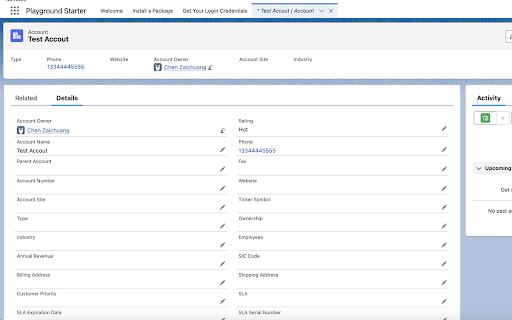


Salesforce Show API Name The easiest way to view and copy API names in Salesforce 1. Shows API names for all fields and objects 2. Works in both Classic and Lightning 3. Copy single or multiple fields with one click On any Salesforce record page: 1. Click the extension icon to show/hide API names INSTALLATION Get it from the Chrome Web Store or install manually from: https://github.com/ChenZaichuang/salesforce_show_api_name

Why Salesforce
Stuff that Salesforce should have added already... Adding flow and user tabs into setup. Add custom flow and user tabs to Salesforce setup. Tired of typing in "f-l-o-w" into the setup search. There has to be a better way?! Why not use all the space in the setup tab menu that Salesforce already give us? Well that's exactly what this extension does. I don't know about you but I've probably typed in user and flow into the setup at least a thousand time and it makes me go... why Salesforce.

Lightning Studio
Build Salesforce LWC development easy and fastest. 💻 𝑯𝒐𝒘 𝒕𝒐 𝑼𝒔𝒆 𝑳𝒊𝒈𝒉𝒕𝒏𝒊𝒏𝒈 𝑺𝒕𝒖𝒅𝒊𝒐: ● Log in to Salesforce and click the Lightning Studio icon located in the browser’s top-right corner (Standard Chrome extension toolbar). ● Wait for the icon to turn blue, indicating it’s ready to use. ● For first-time installations, refresh the page before accessing the extension. 🔎𝑭𝒆𝒂𝒕𝒖𝒓𝒆𝒔:───────────────────────────────────────────────────── ✔ 𝐑𝐚𝐩𝐢𝐝 𝐃𝐞𝐯𝐞𝐥𝐨𝐩𝐦𝐞𝐧𝐭: Build and manage Lightning Web Components (LWC), Aura Components, Apex Classes, Lightning Message Service (LMS), and Lightning Types from a single interface. ✔ 𝐅𝐢𝐥𝐞 𝐌𝐚𝐧𝐚𝐠𝐞𝐦𝐞𝐧𝐭: Create and maintain individual files for LWC, Aura, and Lightning Type components with ease. ✔ 𝐃𝐞𝐩𝐥𝐨𝐲𝐦𝐞𝐧𝐭 ⁽ᵇᵉᵗᵃ⁾: Deploy Salesforce metadata using package ZIP files for controlled and reliable deployments. ✔ 𝐁𝐚𝐜𝐤𝐮𝐩: Download selected components, folders, or full metadata backups as ZIP files. deployments. ✔ 𝐂𝐨𝐝𝐞 𝐅𝐢𝐧𝐝𝐞𝐫: Search across LWC, Apex, and Aura code from one place. ✔ 𝐆𝐫𝐚𝐩𝐡𝐐𝐋 𝐄𝐱𝐩𝐥𝐨𝐫𝐞𝐫: Execute and test GraphQL queries directly within Salesforce. ✔ 𝐑𝐄𝐒𝐓 𝐀𝐏𝐈 𝐄𝐱𝐩𝐥𝐨𝐫𝐞𝐫 ⁽ᵇᵉᵗᵃ⁾: Test and run Salesforce REST APIs through an intuitive interface. ✔ 𝐀𝐧𝐨𝐧𝐲𝐦𝐨𝐮𝐬 𝐀𝐩𝐞𝐱 ⁽ᵇᵉᵗᵃ⁾: Run Apex code anonymously and review execution results with detailed debug logs. ✔ 𝐒𝐎𝐐𝐋 𝐭𝐨 𝐆𝐫𝐚𝐩𝐡𝐐𝐋: Seamlessly convert SOQL queries into GraphQL format. ִ✔ 𝐂𝐨𝐝𝐞 𝐂𝐨𝐦𝐩𝐚𝐫𝐢𝐬𝐨𝐧: Quickly identify code changes using an integrated diff checker. ✔ 𝐉𝐒𝐎𝐍 𝐭𝐨 𝐀𝐩𝐞𝐱 ⁽ᵇᵉᵗᵃ⁾: Convert JSON payloads into Apex wrapper classes for faster API integration and development. ✔ 𝐁𝐞𝐚𝐮𝐭𝐢𝐟𝐢𝐞𝐫 ⁽ᵇᵉᵗᵃ⁾: Format and beautify JSON and XML for improved readability and debugging. 📝 𝑬𝒅𝒊𝒕𝒐𝒓 𝑬𝒙𝒑𝒆𝒓𝒊𝒆𝒏𝒄𝒆: ────────────────────────────────────────────── ● 𝐐𝐮𝐢𝐜𝐤 𝐃𝐞𝐩𝐥𝐨𝐲𝐦𝐞𝐧𝐭: Save and deploy changes instantly with 𝗖𝗧𝗥𝗟+𝗦 (Window) or ⌘+𝗦 (Mac). ● 𝐋𝐖𝐂 𝐒𝐧𝐢𝐩𝐩𝐞𝐭𝐬: Access a full library of 𝘀𝗵𝗼𝗿𝘁𝗰𝘂𝘁 𝗸𝗲𝘆𝘀 for faster LWC development. ● 𝐓𝐡𝐞𝐦𝐞 𝐌𝐨𝐝𝐞𝐬: Switch between 𝗗𝗮𝗿𝗸 𝗠𝗼𝗱𝗲 and 𝗟𝗶𝗴𝗵𝘁 𝗠𝗼𝗱𝗲 for a personalized coding experience. ───────────────────────────────────────────────────────────── 🌐𝐃𝐨𝐜𝐮𝐦𝐞𝐧𝐭𝐚𝐭𝐢𝐨𝐧: https://nisar-99.github.io/lightning-studio ───────────────────────────────────────────────────────────── 🛡️𝐒𝐞𝐜𝐮𝐫𝐢𝐭𝐲 ★ 𝘓𝘰𝘤𝘢𝘭 𝘋𝘢𝘵𝘢 𝘖𝘯𝘭𝘺: 𝘈𝘭𝘭 𝘥𝘢𝘵𝘢 𝘴𝘵𝘢𝘺𝘴 𝘰𝘯 𝘺𝘰𝘶𝘳 𝘥𝘦𝘷𝘪𝘤𝘦; 𝘯𝘰𝘵𝘩𝘪𝘯𝘨 𝘪𝘴 𝘴𝘦𝘯𝘵 𝘵𝘰 𝘦𝘹𝘵𝘦𝘳𝘯𝘢𝘭 𝘴𝘦𝘳𝘷𝘦𝘳𝘴. ★ 𝘕𝘰 𝘛𝘩𝘪𝘳𝘥-𝘗𝘢𝘳𝘵𝘺 𝘚𝘩𝘢𝘳𝘪𝘯𝘨: 𝘞𝘦 𝘥𝘰𝘯’𝘵 𝘴𝘩𝘢𝘳𝘦 𝘥𝘢𝘵𝘢 𝘸𝘪𝘵𝘩 𝘢𝘯𝘺 𝘵𝘩𝘪𝘳𝘥-𝘱𝘢𝘳𝘵𝘺 𝘴𝘦𝘳𝘷𝘪𝘤𝘦𝘴. ★ 𝘕𝘰 𝘓𝘦𝘨𝘢𝘭 𝘋𝘪𝘴𝘤𝘭𝘰𝘴𝘶𝘳𝘦𝘴: 𝘕𝘰 𝘱𝘦𝘳𝘴𝘰𝘯𝘢𝘭 𝘥𝘢𝘵𝘢 𝘪𝘴 𝘴𝘩𝘢𝘳𝘦𝘥 𝘧𝘰𝘳 𝘭𝘦𝘨𝘢𝘭 𝘰𝘳 𝘰𝘵𝘩𝘦𝘳 𝘱𝘶𝘳𝘱𝘰𝘴𝘦𝘴. ★ 𝘕𝘰 𝘋𝘢𝘵𝘢 𝘊𝘰𝘭𝘭𝘦𝘤𝘵𝘪𝘰𝘯: 𝘞𝘦 𝘥𝘰𝘯’𝘵 𝘤𝘰𝘭𝘭𝘦𝘤𝘵, 𝘴𝘦𝘭𝘭, 𝘰𝘳 𝘶𝘴𝘦 𝘱𝘦𝘳𝘴𝘰𝘯𝘢𝘭 𝘪𝘯𝘧𝘰𝘳𝘮𝘢𝘵𝘪𝘰𝘯. ★ 𝘗𝘳𝘪𝘷𝘢𝘤𝘺 𝘣𝘺 𝘋𝘦𝘴𝘪𝘨𝘯: 𝘌𝘹𝘵𝘦𝘯𝘴𝘪𝘰𝘯 𝘧𝘶𝘯𝘤𝘵𝘪𝘰𝘯𝘴 𝘴𝘦𝘤𝘶𝘳𝘦𝘭𝘺 𝘸𝘪𝘵𝘩 𝘮𝘪𝘯𝘪𝘮𝘢𝘭 𝘥𝘢𝘵𝘢 𝘶𝘴𝘦. ───────────────────────────────────────────────────────────── 💡𝐖𝐞 𝐕𝐚𝐥𝐮𝐞 𝐘𝐨𝐮𝐫 𝐅𝐞𝐞𝐝𝐛𝐚𝐜𝐤 Your suggestions help us improve! Feel free to share any feedback or ideas to make the app even better.

Salesforce Navigator for Lightning
Get more done in Salesforce - list and search records, make new ones, create a task or login as on the fly! Get more done in Salesforce - list and search records, make new ones, create a task or login as on the fly! This extension helps you get to any Salesforce page quickly. Just type in what you need to do! Compatible with Lightning and Classic NEW Version 4.0+ - Near total rewrite, should perform faster and more consistently - Themes are back! - Groundwork for multilanguage support has been added - want to contribute? Translate to a new language from the GitHub link! - Still a work in progress, please add bug reports to the Issues page on the repo Open the Navigator and - [New Permission] Can now save some settings, like theme and profile setup toggle, needs Storage permission to save preferences - [New Feature] Toggle all checkboxes on the page for when subtracting from a selection is faster - [Fix] Better Classic to Lightning URL mapping - [Fix] Better loading checks so it won't error out trying to set the style of the search box - Use the account merge tool by typing "Merge Accounts " Call the Classic Account Merge from either interface using the Account you are on and the Salesforce ID in your clipboard or entered into the command box. You can use a tool like Salesforce CopyPasteGo (https://summerlin.co/copypastego) to easily grab the ID of a Salesforce record - Add tasks on the fly by typing "! " - Search all records with "? " - Go to your Home page with "Home" - Object List views with "List " - Create a new record with "New " - Go directly a Setup page by typing it's name - Access Object customizations with "Fields" (e.g. "Contact Fields") - Switch between Lightning and Classic with "Toggle Lightning" - Commands looking weird? Run "Refresh Metadata" to make sure you have what you need - Login as another user with "Login as " ** You can hold shift or control when you press enter or click your mouse to open the selected item in a new tab ** Default shortcut keys (use Command instead of Control on Mac, and/or customize your options at chrome://extensions/shortcuts) NOTES: - If you have a custom instance Domain Name, you may have to create a CSP Trusted Site Definition for your Classic domain URL in order for this extension to work - more info here https://developer.salesforce.com/docs/atlas.en-us.lightning.meta/lightning/csp_trusted_sites.htm - If you have activated the RequireHTTPOnly setting you will not be able to use this extension to navigate to custom objects (feel free to make a pull request to add proper login handling!) Contribute to this extension at https://github.com/dannysummerlin/force-navigator 6/4/2024 - Simple update to Manifest V3 to make sure things work, but everyone should look at using alternative browsers and agitate for more user control 11/25/2023 - There still should be no such thing as billionaires, but fortunately @uri-tools has made a great contribution in getting things back to working as expected even with RequireHTTPOnly turned on, thanks Uri! 10/15/23 - There should be no such thing as billionaires, it is absolute fiction any person can "earn" that much -- Created a workaround for users with RequireHTTPOnly on to allow most functions to still work, excepting custom object navigation and Login As functionality 5/3/23 - #ZooeyZephyr is a duly elected member of the Montana House of Reps, but is not allowed to be present, silencing not just her but her constituents. You cannot say that you support democracy and yet exclude a representative because you don't like what they say. To be clear what Zephyr said was not an example of that stochastic terrorism (intentionally wording public statements to create an atmosphere of violence) that many members of the national Congress commit daily, but a strongly worded, impersonal criticism of proposed legislation. Trans rights are human rights. 9/11 - #justiceforbreonnataylor (182 days and counting) - Added the ability to call the Classic Account merge tool from an Account page. Be sure to have the ID of the Account you want to merge in your clipboard; added Lightning Record Page shortcut for custom objects 8/29 - Rest in Power Chadwick Boseman. Thanks to CKloppel for pointing out missing API and click handling, now updated to v49 and new-tab clicks work again 6/19 - Happy Juneteenth! Thanks to kacrouse for Custom Metadata Lightning handling, also updating several changed URLs across the platform Maintainer(s): Danny Summerlin open to others! based on Salesforce Navigator by Daniel Nakov and Wes Weingartner Privacy Policy This extension only runs locally in communication with your instance of Salesforce. No data is collected from any user, nor is extension activity tracked or reported to a third-party. Terms of Service This extension is not intended to support the work of any individual or organization that is discriminatory or outright illegal.

EasyCrud(Salesforce)
Assign your CRUD and FLS for Salesforce in Bulk from Single Screen This Extension allows Salesforce Admins/Developers to assign CRUD and FLS Permissions from Single Screen. There are also features that provides ability to export permissions in CSV and also generate dashboard for the permissions.
