
pbjjdhghffpemcglcadejmkcpnpmlklh
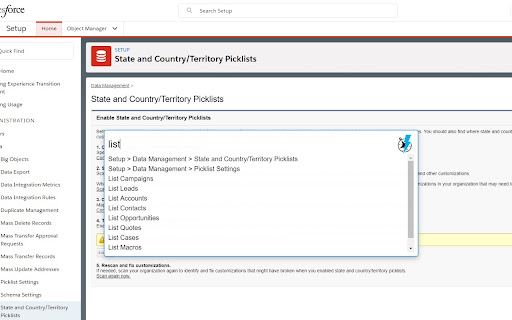
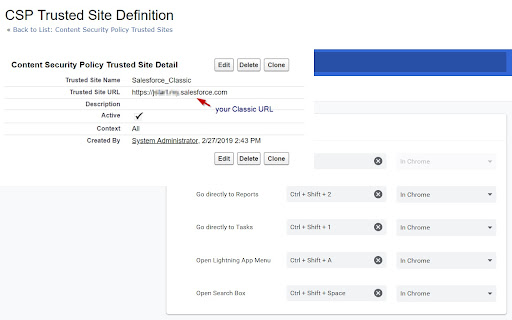
Get more done in Salesforce - list and search records, make new ones, create a task or login as on the fly! Get more done in Salesforce - list and search records, make new ones, create a task or login as on the fly! This extension helps you get to any Salesforce page quickly. Just type in what you need to do! Compatible with Lightning and Classic NEW Version 4.0+ - Near total rewrite, should perform faster and more consistently - Themes are back! - Groundwork for multilanguage support has been added - want to contribute? Translate to a new language from the GitHub link! - Still a work in progress, please add bug reports to the Issues page on the repo Open the Navigator and - [New Permission] Can now save some settings, like theme and profile setup toggle, needs Storage permission to save preferences - [New Feature] Toggle all checkboxes on the page for when subtracting from a selection is faster - [Fix] Better Classic to Lightning URL mapping - [Fix] Better loading checks so it won't error out trying to set the style of the search box - Use the account merge tool by typing "Merge Accounts " Call the Classic Account Merge from either interface using the Account you are on and the Salesforce ID in your clipboard or entered into the command box. You can use a tool like Salesforce CopyPasteGo (https://summerlin.co/copypastego) to easily grab the ID of a Salesforce record - Add tasks on the fly by typing "! " - Search all records with "? " - Go to your Home page with "Home" - Object List views with "List " - Create a new record with "New " - Go directly a Setup page by typing it's name - Access Object customizations with "Fields" (e.g. "Contact Fields") - Switch between Lightning and Classic with "Toggle Lightning" - Commands looking weird? Run "Refresh Metadata" to make sure you have what you need - Login as another user with "Login as " ** You can hold shift or control when you press enter or click your mouse to open the selected item in a new tab ** Default shortcut keys (use Command instead of Control on Mac, and/or customize your options at chrome://extensions/shortcuts) NOTES: - If you have a custom instance Domain Name, you may have to create a CSP Trusted Site Definition for your Classic domain URL in order for this extension to work - more info here https://developer.salesforce.com/docs/atlas.en-us.lightning.meta/lightning/csp_trusted_sites.htm - If you have activated the RequireHTTPOnly setting you will not be able to use this extension to navigate to custom objects (feel free to make a pull request to add proper login handling!) Contribute to this extension at https://github.com/dannysummerlin/force-navigator 6/4/2024 - Simple update to Manifest V3 to make sure things work, but everyone should look at using alternative browsers and agitate for more user control 11/25/2023 - There still should be no such thing as billionaires, but fortunately @uri-tools has made a great contribution in getting things back to working as expected even with RequireHTTPOnly turned on, thanks Uri! 10/15/23 - There should be no such thing as billionaires, it is absolute fiction any person can "earn" that much -- Created a workaround for users with RequireHTTPOnly on to allow most functions to still work, excepting custom object navigation and Login As functionality 5/3/23 - #ZooeyZephyr is a duly elected member of the Montana House of Reps, but is not allowed to be present, silencing not just her but her constituents. You cannot say that you support democracy and yet exclude a representative because you don't like what they say. To be clear what Zephyr said was not an example of that stochastic terrorism (intentionally wording public statements to create an atmosphere of violence) that many members of the national Congress commit daily, but a strongly worded, impersonal criticism of proposed legislation. Trans rights are human rights. 9/11 - #justiceforbreonnataylor (182 days and counting) - Added the ability to call the Classic Account merge tool from an Account page. Be sure to have the ID of the Account you want to merge in your clipboard; added Lightning Record Page shortcut for custom objects 8/29 - Rest in Power Chadwick Boseman. Thanks to CKloppel for pointing out missing API and click handling, now updated to v49 and new-tab clicks work again 6/19 - Happy Juneteenth! Thanks to kacrouse for Custom Metadata Lightning handling, also updating several changed URLs across the platform Maintainer(s): Danny Summerlin open to others! based on Salesforce Navigator by Daniel Nakov and Wes Weingartner Privacy Policy This extension only runs locally in communication with your instance of Salesforce. No data is collected from any user, nor is extension activity tracked or reported to a third-party. Terms of Service This extension is not intended to support the work of any individual or organization that is discriminatory or outright illegal.

Salesforce Change Set Helper
Enhances the Salesforce change set. Adds last changed date and allows sorting, searching, validation and comparison with other orgs. A Chrome extension to improve the usability of Salesforce change sets NEW! Release 3.1.4 Optimizations for large organization Release 3.1.3 - Fix Compare and allow multiple orgs to be connected. - Add the ability to validate and deploy changes directly to other orgs. - Ability to select components from different types and add them at once. - Added a new Change Set Cart where the user can see what are the items have been added without needing to leave the add screen. - Persistent cart panel with sync badge, search, virtualised list, filterable chips. - Export/Import package.xml from cart and both page toolbars. - Bulk Remove via Tooling API DELETE (no A4J reload dance). - Single-row Remove without page reload. - Hide native Import entry point. - Fix lighting page issue. Release 3.0.2 Supports Chrome extensions best practices and manifest v3 updated better loading of components for large orgs. Features include: - Includes the last modified date and user and api name for each item. - Automatically ordered by most recent modified first - Filter/Search/Order by any field. - Sets all pages to show the 1000 rows. If more than 1000 items in a page, asks if you want to continue to retrieve more. - View and Search on items in the change set. This allows you to see the whole change set and search to make removing much easier. - Compare to another org (uses OAuth2.0 -- no username or password information is seen or stored by this extension). - Shows the last modified date and user for the compared org as well. - Click the file name to see a diff of the metadata file between orgs. Note that there is a delay when loading large pages and you may need to disable other chrome extensions that alter the change set page. Release 3.0.0. Lightning compatible! Fixed issue with Validation. Added Quick Deploy. Updated compare files content to compare all files (for example, in a Aura Component). Fixed issue with constantly spinning wheel if there is an error. Added ability to change API Version. Removed extension from all pages except change sets. Release 2.2.0 Now includes Validation helper. Log into another org and validate the change set. Release 2.1.2 Fixed bug with Quick Links on VF page even when disabled Fixed bug with Sharing Criteria Rules Release 2.1.1 Fixed bugs with hanging when no content. Merged with "beta" extension -- new features such as download zip file of the change set. Release 2.02 Now can compare files between orgs. Log in to a sandbox or dev/prod org. Uses Oauth2.0 for authorization -- no user or password information is seen or stored locally. Shows the last modified date and user for the compared org. Click the name and see a diff comparison of the two. Release 1.4 Updated to add ability to keep getting 1000 more items on pages. (Salesforce will only retrieve 1000 a time.) Added in a "clear" function to clear the search filters. Clear is automatically called before items are added to change set -- this is because of a bug where the items will not be added unless they are visible. Release 1.3 Updated to support workflows, reports, email templates and many more.

Salesforce DevTools
Salesforce DevTools is a powerful Salesforce developer chrome extension for doing the below things : ・Quickly generate Apex code / SOQL, exporting query results to Excel file. ・Quickly access to new record page, list page and object setting page of any object. ・Quickly search object fields and check its usage. ・Display fields API name on Salesforce object detail page. ・Exporting Objects Definition to Excel file. ・Exporting Objects Fields Definition to Excel file. ・Exporting Objects Page Layout Definition to Excel file. ・Exporting Objects List View Definition to Excel file. ・Exporting Flow Definition to Excel file. ・Salesforce data modal (ERDs) generator. ・All Check / Select on profile edit page and field permissions edit page. ・Mass edit, mass delete, mass clone custom fields (Only Classic). ++++++++++++++++++++++++++++ Release notes ++++++++++++++++++++++++++++ 2026/01/1 ・Added features of "Export Flow Definition". -------------------------------------- 2023/04/10 ・Added features of mass edit, mass delete, mass clone custom fields on Lightning. -------------------------------------- 2022/01/30 ・Added feature of searching object fields and show its usage. -------------------------------------- 2021/04/05 ・Added feature of exporting Object definition (FULL) and fixed bugs. -------------------------------------- 2020/09/07 ・Added feature of exporting List View definition and fixed bugs. -------------------------------------- 2020/06/07 ・Fixed Lighting active bug and Japanese language document exporting bug. -------------------------------------- 2020/04/12 ・Improved feature of Query Editor. -------------------------------------- 2020/01/06 ・Added feature of exporting object page layout. -------------------------------------- 2019/08/18 ・Added feature of Multi Check on field permission edit page. -------------------------------------- 2019/05/13 ・Added features of mass edit, mass delete, mass clone custom fields -------------------------------------- 2019/03/24 ・Fixed issues. -------------------------------------- 2018/12/17 ・Reactivated feature of Debug Log Viewer. ・Added feature of searching Debug Log. ・Fixed issues. -------------------------------------- 2018/11/12 ・Improved UX of feature exporting object API reference to Excel file. ・Added Query Editor feature to all Objects. ・Added feature of exporting query result to Excel file -------------------------------------- 2018/09/25 ・Added support for cloudforce orgs. -------------------------------------- 2018/09/03 Major Release ・ Added support for Lightning! ・ Improved UX of feature Object Reference Doc generating. ・ Improved UX of feature All Check. -------------------------------------- 2018/04/17 ・Improved ERDs UX, fixed bugs. -------------------------------------- 2017/10/11 ・Improved Debug Log Viewer UX. -------------------------------------- 2017/05/29 ・Added feature of query editor and csv data exporting. -------------------------------------- 2017/04/23 ・Added feature of ERDs generator. -------------------------------------- 2017/02/06 ・Fix bugs. -------------------------------------- 2017/01/30 ・Added features of SOQL generator and Apex debug log viewer. -------------------------------------- 2016/12/20 ・Fixed export excel bugs. -------------------------------------- 2016/12/06 ・Improved UI, fixed bugs. -------------------------------------- 2016/11/25 ・Added features that allows you to enable it on custom domain. -------------------------------------- 2016/08/21 Major Release ・Added features of exporting objects definition to excel file. -------------------------------------- 2016/05/18 ・ Added support for Visualforce Page. -------------------------------------- 2016/04/04 ・ Added the features of object searching and object quick access. -------------------------------------- 2016/03/31 ・ Added support for generating Apex Code include blank fields -------------------------------------- 2016/03/28 ・ Added support for RecordType ・ Added hint for Quick Access Menu Turned Off

Salesforce Colored Favicons
Updates the standard favicon on Salesforce tabs with colored versions to help differentiate between different organizations. Supports both Classic and Lightning Experiences and includes separate icons for production, sandbox, and develop/scratch orgs. To use the extension, simply navigate to a Salesforce org and the extension will automatically select a random color for it then update the favicon with that color. Now every time you visit that org, the colored favicon will be displayed instead of the default Salesforce favicon. At this point you can also visit the options page to change the color for any org you've visited.

Record and Metadata Comparator for Salesforce
Compare Record data values and object metadata in Salesforce Compare Object Metadata and it's record values in Salesforce (now supports Lightning!) and see all differences in just four clicks! Credits: 1. sorenkrabbe for his extension "salesforce-inspector" available @ https://chrome.google.com/webstore/detail/salesforce-inspector/aodjmnfhjibkcdimpodiifdjnnncaafh I have used the code shared by him to improvise and develop this extension. I would share the code of this extension on github soon. 2. Maninder Singh for enabling the extension to work in Lightning -https://www.linkedin.com/in/mansinghinder/ This extension compares any two objects or its records (could be from same org or different orgs) and highlights all the differences found. It can show you the following Please watch the video tutorial available @ http://youtu.be/mkarbbYWveY to understand the exact functionality and its uses. 1. Open up the custom object definition or it's list view or any of it's record in salesforce. This is your source record. Click on the extension icon and then click on the "Select Source Record" button. 2. After that, open up the custom definition of the same object or it's list view or the record (could be from same org or different org). This is your target record. Click on the extension icon and then click on the "Select Target record" button. 3. The extension would create a popup and in that show you all the differences that were found. Steps to compare Record Values: 1. open any record from a standard/custom object in one org. This is your source record. Click on the extension icon and then click on the "Select Source Record" button. 2. After that, open up any other record for the same object (could be from same org or different org). This is your target record. Click on the extension icon and then click on the "Select Target record" button. 3. The extension would create a popup and in that show you all the differences that were found. Do recommend the extension with you friends and colleagues if you like it. Also, if you like the extension, please don't forget to Rate it on the Chrome Extension Webstore. Thanks again and I hope this extension saves your time and makes you more productive! For any queries: rajivashokbhatt+metadatacomparator@gmail.com
