
cenhhgabijhpobnfnmkigobcefkmhjbj


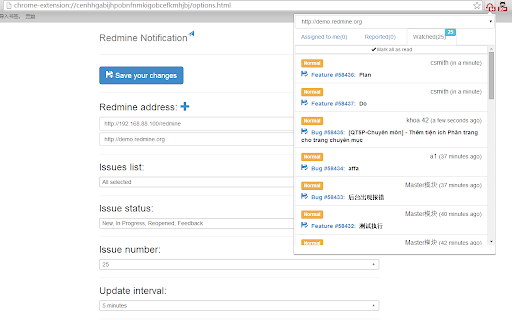
Redmine notification tools for chrome extension. * See the problem and the discuss directly through the plugin. * Real time updates and automatically prompted to the problem. * Support for multiple redmine, centralized management issues. * Support for custom issue roles (developer and tester). * issue status and issue number. * Support offline viewing problems.

JetBrains Toolbox Extension
Clone and open projects from GitHub, GitLab, Gitee, and Bitbucket in JetBrains IDEs right from your browser The extension adds buttons that allow you to clone and open projects from GitHub, GitLab, Gitee, and Bitbucket in IntelliJ-based IDEs. Note: The Toolbox App must be installed on your computer to make the extension work. Download the Toolbox App from https://www.jetbrains.com/toolbox-app. To open the projects from self-hosted GitHub, GitLab, and Bitbucket instances, make sure to enable the extension for your website by ticking “Enable on this domain” in the extension settings menu. If you encounter any problem using the extension, please create an issue request at our tracker: https://youtrack.jetbrains.com/issues/TBX Would you like to collaborate on the extension? Because you can! It's an open-source project. Here is the repository address: https://github.com/JetBrains/toolbox-browser-extension

PageSpeed Insights (MV3)
Analyze the performance of your webpages and get specific suggestions on how to optimize them. 1. This extension is experimental. 2. The UI is using the open source code, which is different from the current (deprecated) PageSpeed Insights extension. 3. If you are using ARM-based computer, this is your only choice for PageSpeed Insights for now. [ NOTE: if you find any bugs, please file an issue at https://github.com/songlibo/pagespeed-chrome-extension/issues ] Update: 2023-01-26 v0.0.2.0 Rewrite the some C++ code for WebAssembly, and migrated the extension to manifest_version:3. 2022-07-14 v0.0.1.11 Removed pnacl module as it is deprecated. Stay tuned for a new implementation of the running code. 2017-08-22 v0.0.1.8 Fix issue/29, which mark data uri for caching. Also show a button in the browser action popup to open PageSpeed Insights online. 2017-04-26 v0.0.1.7 Fix issue/6, which breaks when the extension is updated. Also add a link to the options page. 2017-04-25 v0.0.1.6 Fix localStorage issue/26, and ignore extension files issue/8. Default to use lossy compression for images (option to revert back to lossless), add option to compressing images using Guetzli (warning: use a lot of memory, and very slow). 2017-03-02 v0.0.1.5 Fix issues/22, 24. Fix language selection in options, show RTL for Arabic and Hebrew, and save/load result. 2016-02-19 Detect NaCl plugin before running PageSpeed. If NaCl is not available, the PageSpeed will not start, and give a better message to install or enable the plugin. 2015-12-25 Update the issue link on github so that you can file bugs and request features. 2015-10-01 Add the missing guide (popup when clicking the icon). 2014-02-21 Add loading progress -- the loading of PNaCl is very slow when first installed or updated. It should be fast afterward.

WebSocket Test Client
WebSocket Test Client can be used to help construct custom WebSocket requests and handle responses to directly test your WebSocket services. 1. Enter the URL of your Web Socket server. 2. Click Open. 3. Input request text, then click Send. 4. The Log shows response messages.

Markdown Preview Plus
Converts and previews markdown files (.md, .markdown) to HTML(include TOC) right inside Chrome and support live reload Automatically parses markdown files (.md) into HTML with live reload 1. Install extension from webstore (creates no new UI) 2. Check "Allow access to file URLs" in chrome://extensions listing: 3. Open local or remote .md file in Chrome. 4. See nicely formatted HTML! Note: The auto reload feature is disabled default. * Support auto reload. * Support external css file. * Customize theme for every md file. * Support github flavored markdown. * Export nicely formatted HTML. * Support render Katex, Mermaid. The extension is open source. https://github.com/volca/markdown-preview Fix a bug for the tag style * Fix a bug for load fonts of Katex * Fix a bug for "table of contents" * Compatible with Chrome 136 * Update mermaid lib * Update marked lib * Update marked lib * Fix a bug for clear custom CSS paths * Supports add custom CSS path. See #19 * Fix a bug for render mermaid. See #158
