
lanlbpjbalfkflkhegagflkgcfklnbnh
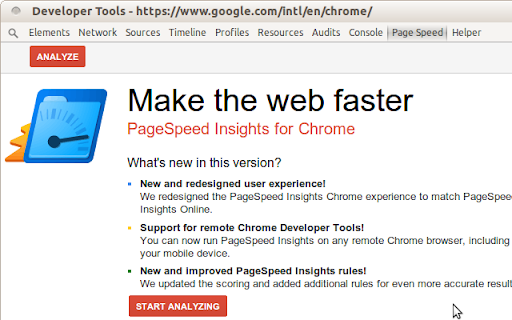
Analyze the performance of your webpages and get specific suggestions on how to optimize them. 1. This extension is experimental. 2. The UI is using the open source code, which is different from the current (deprecated) PageSpeed Insights extension. 3. If you are using ARM-based computer, this is your only choice for PageSpeed Insights for now. [ NOTE: if you find any bugs, please file an issue at https://github.com/songlibo/pagespeed-chrome-extension/issues ] Update: 2023-01-26 v0.0.2.0 Rewrite the some C++ code for WebAssembly, and migrated the extension to manifest_version:3. 2022-07-14 v0.0.1.11 Removed pnacl module as it is deprecated. Stay tuned for a new implementation of the running code. 2017-08-22 v0.0.1.8 Fix issue/29, which mark data uri for caching. Also show a button in the browser action popup to open PageSpeed Insights online. 2017-04-26 v0.0.1.7 Fix issue/6, which breaks when the extension is updated. Also add a link to the options page. 2017-04-25 v0.0.1.6 Fix localStorage issue/26, and ignore extension files issue/8. Default to use lossy compression for images (option to revert back to lossless), add option to compressing images using Guetzli (warning: use a lot of memory, and very slow). 2017-03-02 v0.0.1.5 Fix issues/22, 24. Fix language selection in options, show RTL for Arabic and Hebrew, and save/load result. 2016-02-19 Detect NaCl plugin before running PageSpeed. If NaCl is not available, the PageSpeed will not start, and give a better message to install or enable the plugin. 2015-12-25 Update the issue link on github so that you can file bugs and request features. 2015-10-01 Add the missing guide (popup when clicking the icon). 2014-02-21 Add loading progress -- the loading of PNaCl is very slow when first installed or updated. It should be fast afterward.

Checkbot: SEO, Web Speed & Security Tester 🚀
Checkbot is a powerful website testing tool that tells you how to improve the SEO, page speed and security of your website. Checkbot crawls 100s of pages at the same time checking for 50+ common website problems based on web best practices recommended by Google and Mozilla. These checks include: 📊 SEO TESTS: Broken link checker, missing or long page titles/descriptions/headings, duplicate page content, HTML/CSS/JavaScript validator, canonical URLs, image ALT tags, robots.txt, URL naming, mobile friendly pages, deprecated web features, 404 pages, meta tags, temporary/meta redirects, thin pages & sitemap setup. 🚀 PAGE SPEED TESTS: Minification, network compression, resource caching, render blocking or duplicate CSS/JavaScript, excessive inlining of CSS/JavaScript, redirecting URLs & redirect chains. 🔒 WEB SECURITY TESTS: Security headers, HTTPS and mixed content checker, HSTS with preloading, content sniffing, iframe restrictions & password forms security. See https://www.checkbot.io/guide/ for the 50+ web best practices Checkbot will test for you to help make your site faster, more secure and rank higher in search results. 🏆 HubSpot, Best Chrome Extensions 2021 - "Checkbot combines technical SEO with modern security to help you analyze both how safe and how optimized a website is for search engines" https://blog.hubspot.com/marketing/best-chrome-extensions 🏆 Einstein Marketer, "11 Must-Have Google Chrome Extensions (for Marketers, Entrepreneurs and Businesses)...If you own a website, this Chrome extension is going to help you supercharge your load speed, rank higher in Google and improve the security" https://www.einsteinmarketer.com/chrome-extensions-marketers/ 🏆 Product Hunt, #3 Product of the Day award https://www.producthunt.com/posts/checkbot-for-chrome The free version lets you check unlimited small websites as often as you want but you need to upgrade to run website audits with these features: - Advanced crawl settings to exclude pages by URL pattern, type, folder and subdomain See https://www.checkbot.io/#pricing for more. Follow Checkbot for updates: Visit https://www.checkbot.io/faq/ for support, answers to frequently asked questions and to give feedback. Checkbot will ask for the "Read and change all your data..." permission for the sole purpose of crawling and testing the websites you ask Checkbot to check. This is currently the most restrictive permission we can ask for that allows this and Google has also reviewed this extension to check it follows best practices on requesting permissions. Your regular browsing will be unaffected: Checkbot does not observe or modify anything outside of the Checkbot tab. If you still have concerns, you can opt to create a new Chrome user profile to install Checkbot inside of to isolate it from your regular browsing.

Open SEO Stats(Formerly: PageRank Status)
Shows the web rank and SEO stats for current webpage, quick access to index pages, link stats, security info and more A really SEO extension for Google Chrome to easily access web rank and SEO stats of current web page, get information on indexed pages, cached pages, link statistics, socials, Whois, Geo IP location and more. Formerly: PageRank Stauts. THANKS: Open SEO Stats supports over 30 languages and now the top SEO extension for Chrome! PLEASE: Send your suggestion to oss[at]openadmintools.com, or help us to translate this plugin to your language: http://www.chromefans.org/chrome-plugins/translate-chrome-pagerank.htm FEATURES LIST -------------------- ● PAGES INDEXED Shows the number of pages indexed from most search engines ● CACHE STATS Shows the cached versions from Archive and Google ● SITE INFO Shows the site information: XML Sitemap | robots.txt | GEO IP infom | DNS Lookup | Site Security ● Page Info Shows the page tag stats: Title | Meta Keywords | H1 | H2 | Bold | ALT Text ● Link Stats External links | Internal links | nofollow links

Redirect Path
The HTTP Header & Redirect Checker for SEO Redirect Path flags up 301, 302, 404 and 500 HTTP Status Codes as well as client side redirects like Meta and Javascript redirects, bringing potential issues that may not otherwise be seen to your attention immediately. As well as flagging up redirects and errors, the plugin also displays other HTTP Headers (such as server types and caching headers) and the server IP Address at the click of a button. All the magic happens on your computer, so it doesn’t “phone home” to anyone (except when auto-updating itself) and is instantaneous. The redirect path logo is from the "Iconic" icon set, which can be found here: http://somerandomdude.com/work/iconic/ Please note, by using this extension you agree to our End User Licence Agreement: https://www.ayima.com/browser-extensions-eula 4.0: Fixed runtime bugs and potential security flaws, plus added support for Ayima AI 3.0: Updated the extension to support Googles Manifest V3 roll out, no other major changes 2.0.0.6: Major rewrite - a lot of logic has been changed under the hood allowing us to display Meta and Javascript redirects for the first time.

FeHelper - JSON格式化、编解码、二维码、开发者工具箱
FeHelper is a powerful developer tool designed for front-end developers. It integrates various practical tools to help developers improve work efficiency. However, FeHelper strictly adheres to the principle of single function activation. By default, FeHelper only provides the JSON auto-formatting function, and all other functions are disabled by default. If users need them, they can go to the plugin configuration page to install and enable them. The following are the main functions of FeHelper: ## JSON Tools: - JSON beautifier: Automatically detects and formats JSON data, supports manual formatting, decoding of messy codes, sorting, BigInt processing, editing, downloading, and skin customization, greatly facilitating developers' processing of JSON data. - JSON comparison tool: Supports automatic key-value comparison of two JSON contents, highlights differences, and helps developers quickly identify data changes. ## QR Code Tool: - QR code generator: Supports custom color and icon QR code generation, suitable for a variety of application scenarios. - QR code decoder: Supports multiple modes of QR code decoding, including decoding after pasting a screenshot, which is convenient and fast. ## Encoding tool: - String encoding and decoding: Supports multi-format information encoding and decoding, such as Unicode, UTF-8, URL, Base64, MD5, etc., to meet different encoding requirements. Code beautification tool: Supports code beautification for multiple languages, including Javascript, CSS, HTML, XML, and SQL, helping developers maintain clean and tidy code. Code compression tool: Provides simple code compression functionality, supports HTML, Javascript, and CSS code compression, and optimizes web page loading speed. ## Developer Tools: - AI assistant: A super intelligent dialogue tool powered by AI, supporting code writing, code modification, scheme design, and other tasks to improve development efficiency. - Simple Postman: An interface debugging tool that supports GET/POST/HEAD request methods, automatically formats JSON content, and simplifies the API testing process. - Websocket tool: supports packet capture testing for Websocket interfaces, including connection testing for ws services, message sending testing, result analysis, and more. ## Other tools: - Time (stamp) conversion: mutual conversion between localized time and time stamp, supporting second/millisecond, world time zone switching, clock display in various time zones, etc. - Random password generation: Generate passwords by randomly combining various characters, supporting specified length and character type to ensure password security. - My sticky notes: A sticky notes tool that supports creating directories to categorize and manage notes. Notes can be exported/imported with one click for convenient information management. - Markdown conversion: Markdown editing/preview tool, supports direct conversion of HTML fragments to Markdown, and supports downloading content in PDF format. - Webpage screenshot tool: It can take screenshots of any webpage, supporting both visible area screenshots and full-page scrolling screenshots. The final result can be previewed before being saved. - Page color picker tool: You can directly collect color values for any element on the webpage. Move the cursor to the location where you want to pick the color, and click OK.
