
hbdkkfheckcdppiaiabobmennhijkknn
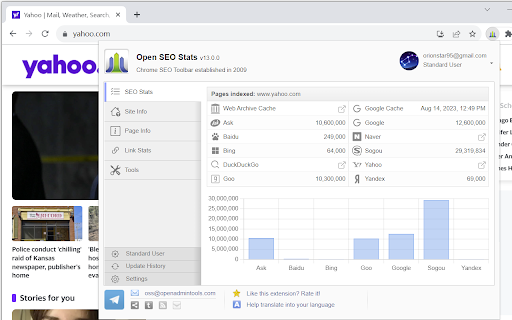


Shows the web rank and SEO stats for current webpage, quick access to index pages, link stats, security info and more A really SEO extension for Google Chrome to easily access web rank and SEO stats of current web page, get information on indexed pages, cached pages, link statistics, socials, Whois, Geo IP location and more. Formerly: PageRank Stauts. THANKS: Open SEO Stats supports over 30 languages and now the top SEO extension for Chrome! PLEASE: Send your suggestion to oss[at]openadmintools.com, or help us to translate this plugin to your language: http://www.chromefans.org/chrome-plugins/translate-chrome-pagerank.htm FEATURES LIST -------------------- ● PAGES INDEXED Shows the number of pages indexed from most search engines ● CACHE STATS Shows the cached versions from Archive and Google ● SITE INFO Shows the site information: XML Sitemap | robots.txt | GEO IP infom | DNS Lookup | Site Security ● Page Info Shows the page tag stats: Title | Meta Keywords | H1 | H2 | Bold | ALT Text ● Link Stats External links | Internal links | nofollow links

LRT Power*Trust – PageRank Replacement
The LRT Power*Trust metric helps you evaluate the quality and trustworthiness of a domain or page you are currently visiting. Ever since Google announced that they would not update PageRank anymore, SEOs and webmasters from all around the world have been looking for the best replacement. LinkResearchTools developed the perfect alternative for Google’s toolbar PageRank: the LRT Power*Trust Extension. LRT Power*Trust (previously known as CEMPER Power*Trust) is a unique metric that measures the overall quality of a page or domain. LinkResearchTools launched this metric shortly after the first Google Penguin update in 2012. With the LRT Power*Trust extension you can: • see the Power and Trust of a domain • see the Power and Trust of a page • discover great places to build links to • see the NoFollow links on the pages you browse (we highlight them for you) • understand if a link is worth keeping • see which links must go in your disavow file • quickly reply to your clients on the most important SEO questions There are a bunch of SEO applications and toolbars out there that still have the classic Google Toolbar PageRank as the main metric to indicate the quality of a page or domain. Google's Toolbar PageRank was never a reliable metric, since Google only updated the data when they felt like it. Usually, the updates were done quarterly. But since April 2016, Google officially removed the Toolbar PageRank. Update 1.3.0 We removed the sign in requirements. Now anyone can use the extension and see the LRT Power*Trust value for both Domain and Page while browsing the web. Update 1.3.3 We removed the "Terms and Conditions" install step and included all the information in our official Privacy Policy: http://www.linkresearchtools.com/browser-extensions-privacy-policy/ Update 1.3.4 Bugfixes and Try LinkResearchTools button Update 1.4.0 Improved layout, added option to show metrics for rel-canonical target of the URL, added page and domain backlink count metrics

SerpWorx
SerpWorx SEO extension. Free trial version, no cc req, only $29.95 p/m. Instant SEO metrics in your search results & on any site. With the SerpWorx SEO tool you can instantly view the SEO metrics of all ranking sites for any keyword without ever leaving the Google results page or the website you're on. This is the absolute fastest way to check over 30 SEO metrics in just a click. This is a free 3-day trial version with no CC required to try it. SerpWorx is $29.95 p/m as per our pricing page here: https://www.serpworx.com/pricing/ Step 1: Search for any keyword you want in Google. Step 2: You'll now see all of the SEO metrics for each site in a beautiful toolbar that sits underneath every site in the search results. Step 3: Compare each sites SEO metrics with results from Majestic SEO, Moz, aHref's and SEMrush and more. See exactly why sites are ranking where they are and completely revolutionise your SEO workflow. It simply doesn't get any better than this! SerpWorx also works on any website you visit too! What's included in the SerpWorx toolbar: Majestic SEO metrics: 1. Trust Flow & Citation Flow 2. Topical Trust Flow categories 3. Total inbound link counts for root and page URL Moz Metrics: 1. Domain & Page Authority 2. Moz Trust 3. Mox Rank 4. Spam Score 5. Total inbound link counts for root and page URL aHrefs Metrics. 1. Total inbound link count for root & page URL fetched from live index 2. aHrefs URL Rating 3. aHrefs Domain Rating 4. aHrefs keyword anchor text density Note: aHrefs account required SEMrush Metrics: 1. Total keyword visibility with search volume and positions 2. Monthly traffic Onsite SEO Metrics 1. Total heading tag count & heading tag text 2. External Outbound link count 3. Page word count 4. Keyword density of actual search phrase on page 5. Google +1's for page 6. Facebook Shares 7. Domain first indexed (age) as per Wayback Machine 8. Site hosting location 9. Site build with technology 10.Google page speed results 11.Broken link checking & count 12.Mobile friendly check 13.Indexed pages Having all of these metrics provided straight under each site in the search results completely streamlines your workflow and provides you with a concise SEO analysis of each site. Become a 'SerpWorx Insider' today and start checking SEO the easy way.

SEO Minion
SEO Minion helps you in your daily SEO tasks such as On-Page SEO analysis, Broken Link Checking, SERP Preview and more The tool helps you with the following tasks - (1) Analyze On-Page SEO - analyze the HTML of any webpage and view useful information that will help you optimize the On-Page SEO as well as alert you to any issues. (2) Highlight All Links - quickly see all the links (internal & external) for any webpage (3) Check Broken Links - check every link on a webpage and get a report of any links with issues (5) SERP Preview - preview your website on a real Google search result and update this in real time (6) Google search location simulator - view non-personalized google search results for one keyword on two different location/language combination. (8) HTML v/s DOM - analyze the differences between the HTML source code and the rendered DOM to check if your JS library is causing any SEO related issue (9) Analyze Structured Data - analyze the structured data on the webpage We add features based on user feedback. If you'd like us to add any new features, please email us at akash@seominion.com. You can view the change-log for every version update at https://seominion.com/news

NoFollow
Outline nofollow links, detect nofollow and noindex meta tags on webpages. Features website filtering and custom CSS outline styles. :: Features ★ supports NOFOLLOW, UGC, and SPONSORED attribute values ★ supports search engine specific robot meta tags ★ disable or enable extension for defined websites v6.0.0 - switched to extension manifest V3 - added export and import - added keyboard shortcuts - removed "Remember minimised state" setting - now it always remembers minimised state across browser restarts - misc code improvements v5.3.3 - fixed visual issues in extension options for high pixel density screens v5.3.2 - trying a fix for errors on Mac OS v5.3.0 - ignore certain errors in logger - added CSP for better security v5.2.2 - fixed issue where extension would not mark links with image nested more than one level deep v5.2.0 - support for UGC and SPONSORED attribute values (there is no way to visually distinguish it from NOFOLLOW value at this time) - replaced facebook and twitter share links on options page v5.1.0 - improved the way injected script communicates with background script - fix: improved error logging v5.0.0 - new: added outline for links without nofollow attribute ("DoFollow" links) - new: added outline for external links - new: added "D" button next to each style input so you can easily restore default style value - new: inject content scripts to already opened browser tabs on extension start, this should improve user experience on extension install and update - change: updated minimum requirements to Chrome v39 - change: updated default outline styles (this will be noticed only by new users) - change: merged content scripts into one script, should use less resources now - change: made sure that extension doesn't try to load itself into pages from web store to avoid "no permission" errors - change: improved error logging - change: removed Google+ icon and updated Facebook and Twitter icons ===> Full changelog on the website
