
dagohlmlhagincbfilmkadjgmdnkjinl
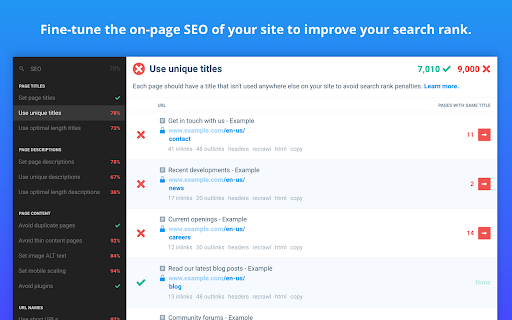

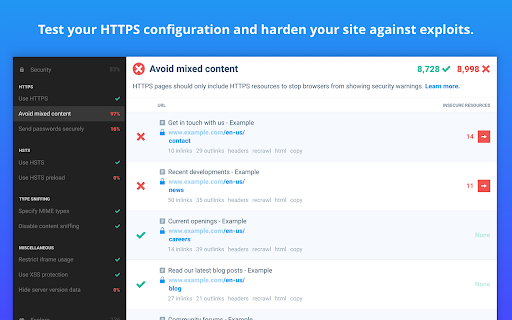


Checkbot is a powerful website testing tool that tells you how to improve the SEO, page speed and security of your website. Checkbot crawls 100s of pages at the same time checking for 50+ common website problems based on web best practices recommended by Google and Mozilla. These checks include: 📊 SEO TESTS: Broken link checker, missing or long page titles/descriptions/headings, duplicate page content, HTML/CSS/JavaScript validator, canonical URLs, image ALT tags, robots.txt, URL naming, mobile friendly pages, deprecated web features, 404 pages, meta tags, temporary/meta redirects, thin pages & sitemap setup. 🚀 PAGE SPEED TESTS: Minification, network compression, resource caching, render blocking or duplicate CSS/JavaScript, excessive inlining of CSS/JavaScript, redirecting URLs & redirect chains. 🔒 WEB SECURITY TESTS: Security headers, HTTPS and mixed content checker, HSTS with preloading, content sniffing, iframe restrictions & password forms security. See https://www.checkbot.io/guide/ for the 50+ web best practices Checkbot will test for you to help make your site faster, more secure and rank higher in search results. 🏆 HubSpot, Best Chrome Extensions 2021 - "Checkbot combines technical SEO with modern security to help you analyze both how safe and how optimized a website is for search engines" https://blog.hubspot.com/marketing/best-chrome-extensions 🏆 Einstein Marketer, "11 Must-Have Google Chrome Extensions (for Marketers, Entrepreneurs and Businesses)...If you own a website, this Chrome extension is going to help you supercharge your load speed, rank higher in Google and improve the security" https://www.einsteinmarketer.com/chrome-extensions-marketers/ 🏆 Product Hunt, #3 Product of the Day award https://www.producthunt.com/posts/checkbot-for-chrome The free version lets you check unlimited small websites as often as you want but you need to upgrade to run website audits with these features: - Advanced crawl settings to exclude pages by URL pattern, type, folder and subdomain See https://www.checkbot.io/#pricing for more. Follow Checkbot for updates: Visit https://www.checkbot.io/faq/ for support, answers to frequently asked questions and to give feedback. Checkbot will ask for the "Read and change all your data..." permission for the sole purpose of crawling and testing the websites you ask Checkbot to check. This is currently the most restrictive permission we can ask for that allows this and Google has also reviewed this extension to check it follows best practices on requesting permissions. Your regular browsing will be unaffected: Checkbot does not observe or modify anything outside of the Checkbot tab. If you still have concerns, you can opt to create a new Chrome user profile to install Checkbot inside of to isolate it from your regular browsing.

Essential SEO Toolkit (SEO Analysis Tool) from Opace
The Essential SEO Toolkit from Opace is a collection of useful SEO tools, which when clicked opens the tool using the current URL. This is v4 (see new features listed below). The Essential SEO Toolkit from Opace is a free of charge Chrome extension, which offers a collection of useful SEO tools, which when clicked opens the tool using the current URL. The SEO tools and resources included are ones which we believe Web Developers, SEO professionals and Marketers may find useful. The toolkit consists of a range of tools, any of which when clicked, the tool opens will open a new tab and pass the current URL to the tool for quick and easy viewing of data for the given website. Install the SEO Toolkit, by following these easy steps: 1) Click the “Add to Chrome” button 2) On the next screen, click the “Add Extension” button 3) A message will then be displayed saying “The Essential SEO Toolkit has successfully been added to Chrome” 4) That’s it, the extension is now available and ready to use! The tools included are split into five groups and cover various areas of SEO and social media. These tools can be accessed by clicking the radio button next to the tool name: General intelligence tools with a traffic emphasis, but also other features too: a) Alexa – analyse your own / competitors’ traffic with a full suite of SEO tools b) SERanking – an SEO suite with 35+ internal tools to analyse traffic & other SEO areas c) SEMRush – a powerful intelligence suite for SEO, PPC, social media & video research A range of tools designed to provide opportunities to increase website speed/performance: a) Pingdom Tools – monitor the speed, performance & availability of a website b) GT Metrix – analyse a page’s speed performance, see scores with PageSpeed & YSlow c) Google PageSpeed Insights – PageSpeed score & suggestions direct from Google Audit tools which will often identify many areas of possible improvements for websites: a) WooRank – review your website & identify keywords with the WooRank SEO checker b) Nibbler (Silktide) – testing tool for accessibility, SEO, social media & other compliance c) SEOptimer – a tool which analyses & grades a website, showing areas of improvement d) SiteChecker – 100+ parameters audit report, includes metadata, images, links, etc. Analyse backlinks for your own and competitor websites with this range of tools: a) Majestic – a suite of link intelligence tools for SEO and digital marketing b) Ahrefs – SEO toolset includes backlinks, competitor analysis, keyword research, etc. c) Moz Link Explorer – a set of link analysis and competitor research tools from Moz Tools which provide fast insights into the amounts of social shares of a URL: a) Social Shares Count Checker – track the social media shares for a URL in seconds b) Count Checker – shows # of shares, likes & comments for many social media sites 1. A Facelift - Firstly, the tool has a fresh facelift and a more modern UX: 2. Settings panel - We now have a cog symbol in the top right hand corner which will load a settings panel. Here you can add your own categories and tools which will be saved and shown when ever you use the Essential SEO Toolkit. PLEASE NOTE – these settings will only save for you locally and will not impact other users of the Google Chrome extension. 3. Add Your Own Tool - If you are the vendor of an online tool which you feel will be useful, you can make suggestions for your own tool to be added to our extension by clicking the 'Add Your Own Tool' button. 4. Essential new tools - We’ve added the following new categories and SEO tools: Check various user-experience related aspects of your website or web page: a) Google Mobile-Friendly Test – a tool which will reports on whether your URL passes Google’s mobile-friendly test b) Responsinator – a related tool, which shows how your URL will actually appear on different devices and screen resolutions so you can quickly check how a user will see your page or post c) Think With Google Test – this reports on a range of aspects of your URL in particular relating to page speed metrics and load times Tools to assess various factors related to technical SEO (on-site SEO) including your content and markup: a) Copyscape Duplicate Content Checker – a tool to check whether you URL contains any content duplicated from elsewhere on Web b Google Structured Data Testing Tool – evaluate your code to check for opportunities to add structured data and rich snippets c) Siteliner Crawler – assess the internal content of your site for duplicate content, broken links and more d) XML Sitemap Generator – automatically generate an XML sitemap for your domain Reasons to download the tool Here are some of the main reasons to download the Essential SEO toolkit: • Convenience – find all your favourite tools in one convenient browser extension • Free – the tool is totally free of charge • New tools – learn about new tools in the toolkit and additional ones as they are added • Quick installation – the installing process is just a few clicks and takes 2-3 minutes • Quick removal – if you decide to no longer use the toolkit, remove it in two minutes • Reduced bookmarking – free up some bookmarks, by storing favourite sites here • Save time – the tools included will save you a lot of time on day to day analysis tasks Why is the tool supplied for free? There is no actual direct cost to Opace of making this tool available, so we are happy to release it free of charge as many organisations do with open source software. As a business, we do benefit from the tool as we use this ourselves every day at work! Do you ever upgrade/modify the tool? We do plan to upgrade the tool from time to time. When we do we will make the new version available here and update this page with additional information. Can I suggest additional tools to be added to the toolkit? Absolutely, yes. If you have any additional tools, which you feel would be good to add please email us at info@opace.co.uk or https://opace.agency/get-in-touch and we will certainly consider them for a future version of the toolkit. For any new tools to be added though, they would need to add extra value over and above our existing tools. What browsers is the toolkit available on? Currently the toolkit is only available for Google Chrome (as this is the browser Opace work with), but we may add the toolkit to other browsers in the future. Watch this space! Are all of the tools totally free to use? Many of the tools are totally free to use. Some of the tools have a restriction on use and require an upgrade to remove restrictions. A few tools are subscription only, but usually have a free trial period to test the product in day to day use. Disclaimer Please note: Opace Ltd are not affiliated with any of these tools. Some may require account creation in order to access the data and others may require you to copy your URL into their search bar.

Website SEO Checker
Get free on-page SEO report by 100+ parameters with the best website SEO checker ☑️ Overview – quickly check essential SEO data: URL structure, metadata, indexation, and canonical settings. ☑️ Content – analyze headings, keyword density, text length, and text-to-code ratio for better structure. ☑️ Links – identify external, internal, and subdomain links, plus dofollow/nofollow status and anchor text. ☑️ Hreflangs – instantly verify hreflang setup and language targeting for international SEO. ☑️ Images – detect missing alt/title tags, broken images, and check sizes with on-page highlighting. ☑️ Structured Data – instantly identify and validate Schema.org markup for better SEO performance. ☑️ PageSpeed – measure mobile and desktop performance with actionable optimization insights. ☑️ GSC+GA4 Insights – assess search performance & indexing plus user behavior and conversion metrics. ☑️ Issues & Monitoring – detect SEO issues, track technical changes, and monitor page updates over time. Deep dive into Sitechecker Chrome Extension’s capabilities to unlock the full potential of your SEO workflow. 1️⃣ Get a quick technical overview of any page to ensure it meets SEO best practices. • Inspect URL structure, status code, and page size. • Review meta title, description, and H1 heading. • Analyze indexation settings, including robots meta tags, X-Robots-Tag directives, and robots.txt rules. • Validate canonical tag settings to prevent duplicate content issues. 2️⃣ Analyze content structure to improve keyword relevance and readability. • Review heading hierarchy (H1–H6) and highlight them on the page. • Copy the entire heading structure in one click for easy documentation. • Measure text length in words and characters. • Calculate text-to-code ratio to optimize content efficiency. • Get keyword density insights for single, two, and three-word phrases. 3️⃣ Audit all links on a page to improve internal linking and track external references. • Detect external, internal, and subdomain links. • Check dofollow/nofollow status and analyze HTTP response codes. • Review anchor text usage and link destinations. • Search for specific links and highlight them directly on the page. • Copy all detected links in one click for easy analysis and outreach. 4️⃣ Ensure proper hreflang implementation for international SEO. • Detect missing or incorrect hreflang attributes. • Validate language targeting and regional settings. • Check backward links to confirm proper hreflang setup. 5️⃣ Optimize images to improve SEO and user experience. • Identify missing alt and title attributes. • Detect broken images and oversized files. • Highlight image details directly on the page for easy fixes. 6️⃣ Validate structured data for better search visibility. • Detect Schema.org markup and review structured data implementation. • Identify missing or incorrect structured data elements. • Ensure key rich snippet attributes are correctly applied. 7️⃣ Measure page speed and get actionable insights for optimization. • Check page loading speed for desktop and mobile. • Identify slow-loading elements affecting performance. • Get recommendations to improve Core Web Vitals. 8️⃣ Unlock real-time GSC + GA4 insights to track performance, user behavior, and conversions. • View clicks, impressions, CTR, and average position over 7/30/60/90 days. • Analyze top search queries and how they drive traffic. • Inspect URL crawling, indexing status, and mobile usability issues. • Measure user behavior with engagement metrics like bounce rate and average session duration. • Track conversions with key events and key event rate. • Break down performance by traffic source (Google Organic, Direct, Social, Bing, etc.). 9️⃣ Monitor SEO issues and track page changes over time. • Detect technical errors, broken links, and missing metadata. • Track content updates and structural modifications. • Get alerts for critical SEO changes.

SEO Checker Tool - Get Free SEO Audit Analysis
Analyze your on-page SEO in one click, get customized suggestions and improve your rankings. Use our SEO Checker Tool, it's free! [🔍 Analyze On-Page SEO] Get personalized suggestions and improve your rankings. Use the SEO Checker Tool – it's free! [❓ Is your page optimized for search engines?] Analyze any web page FOR FREE with our SEO extension for Google Chrome! Generate a complete SEO audit in just one click and discover your SEO score. 🛠️ SEO Checker is your essential SEO toolbox, always at hand to optimize your web page quickly and easily. Generate an SEO report to monitor content, loading time, duplicate titles, and other on-page SEO factors. 1️⃣ Go to the URL of the page you want to analyze. 2️⃣ Click on the extension icon. 3️⃣ ✨ That's it! Within seconds, SEO Checker will generate a complete page analysis, packed with suggestions and tips for optimization. Follow the instructions and fix all the issues affecting your ranking on major search engines like Google, Bing, Yahoo!, DuckDuckGo, Ecosia, and many more. [🚀 Why should you use SEO Checker?] 🔹 SEO Checker is the "Made in Italy" SEO tool by SEO Tester Online, used by millions of users worldwide. 🔹 It automatically and accurately monitors all the factors affecting your page's ranking. 📊 Analyze your competitors Scan your competitors' pages and discover their SEO strengths and weaknesses. 📈 Get more traffic Climb the SERP rankings by optimizing your page and increasing the number of visitors to your website. ⚠️ Detect errors Your website might not be fully optimized for every crucial SEO factor. Quickly find the issues that are hurting your ranking on Google and other search engines. 💡 Receive personalized suggestions For each issue found, SEO Checker will provide step-by-step recommendations to improve your SEO score. 🏷️ Title, description, heading tags (H1, H2, etc.) 🔗 URL optimization, HTTP/HTTPS status codes 🔑 Used keywords, content, alt text in images, and meta description 📊 Structured data ⚡ Loading speed on mobile and desktop devices 🤖 Robots.txt and sitemap 📣 Open Graph, Twitter Card, social plugins, and Facebook share count ✨ And much more! [📩 Want to give us feedback?] Help us improve our extension! Send us your suggestions at 📧 info@seotesteronline.com ⭐ Do you like the SEO Checker Tool? Leave us a review! Your support is important!

WP Hive | A Better WordPress Plugin Repo
The WP Hive Chrome Extension is another revolutionary step for WordPress users, right from Chrome itself. Have you ever wondered how much impact a plugin has on your WordPress website? WP Hive’s Plugin testing tool automatically tests a plugin and gives you better insights. Easily discover new plugins or the popular ones with relevant filters. Even compare plugins like you do for phones. Get useful metrics such as impact on memory usage & pagespeed, PHP errors, warning or notices, Javascript issues, PHP 7.4 compatibility, latest WordPress 5.5 version compatibility, database footprint, activation error, resource errors - right from your WordPress.org page. WP Hive automatically tests all WordPress plugins to get useful metrics and shows them inside the WordPress.org plugin pages. You can also compare a plugin with another plugin from WP Hive and get a detailed insight of the plugin. The extension also offers an option to redirect to WP Hive plugin page for a particular plugin. Sure, WordPress repository is great, but WP Hive makes it even better with better insights & adding more value to users. The privacy policy can be found here: wphive.com/privacy-policy/
