
icagkiolfkmndbggheneeamfbnobcdma


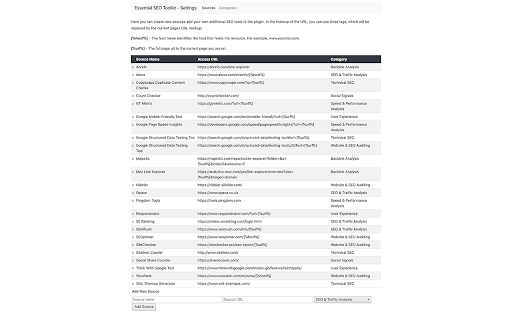

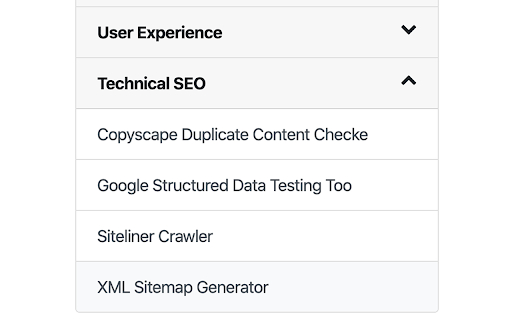
The Essential SEO Toolkit from Opace is a collection of useful SEO tools, which when clicked opens the tool using the current URL. This is v4 (see new features listed below). The Essential SEO Toolkit from Opace is a free of charge Chrome extension, which offers a collection of useful SEO tools, which when clicked opens the tool using the current URL. The SEO tools and resources included are ones which we believe Web Developers, SEO professionals and Marketers may find useful. The toolkit consists of a range of tools, any of which when clicked, the tool opens will open a new tab and pass the current URL to the tool for quick and easy viewing of data for the given website. Install the SEO Toolkit, by following these easy steps: 1) Click the “Add to Chrome” button 2) On the next screen, click the “Add Extension” button 3) A message will then be displayed saying “The Essential SEO Toolkit has successfully been added to Chrome” 4) That’s it, the extension is now available and ready to use! The tools included are split into five groups and cover various areas of SEO and social media. These tools can be accessed by clicking the radio button next to the tool name: General intelligence tools with a traffic emphasis, but also other features too: a) Alexa – analyse your own / competitors’ traffic with a full suite of SEO tools b) SERanking – an SEO suite with 35+ internal tools to analyse traffic & other SEO areas c) SEMRush – a powerful intelligence suite for SEO, PPC, social media & video research A range of tools designed to provide opportunities to increase website speed/performance: a) Pingdom Tools – monitor the speed, performance & availability of a website b) GT Metrix – analyse a page’s speed performance, see scores with PageSpeed & YSlow c) Google PageSpeed Insights – PageSpeed score & suggestions direct from Google Audit tools which will often identify many areas of possible improvements for websites: a) WooRank – review your website & identify keywords with the WooRank SEO checker b) Nibbler (Silktide) – testing tool for accessibility, SEO, social media & other compliance c) SEOptimer – a tool which analyses & grades a website, showing areas of improvement d) SiteChecker – 100+ parameters audit report, includes metadata, images, links, etc. Analyse backlinks for your own and competitor websites with this range of tools: a) Majestic – a suite of link intelligence tools for SEO and digital marketing b) Ahrefs – SEO toolset includes backlinks, competitor analysis, keyword research, etc. c) Moz Link Explorer – a set of link analysis and competitor research tools from Moz Tools which provide fast insights into the amounts of social shares of a URL: a) Social Shares Count Checker – track the social media shares for a URL in seconds b) Count Checker – shows # of shares, likes & comments for many social media sites 1. A Facelift - Firstly, the tool has a fresh facelift and a more modern UX: 2. Settings panel - We now have a cog symbol in the top right hand corner which will load a settings panel. Here you can add your own categories and tools which will be saved and shown when ever you use the Essential SEO Toolkit. PLEASE NOTE – these settings will only save for you locally and will not impact other users of the Google Chrome extension. 3. Add Your Own Tool - If you are the vendor of an online tool which you feel will be useful, you can make suggestions for your own tool to be added to our extension by clicking the 'Add Your Own Tool' button. 4. Essential new tools - We’ve added the following new categories and SEO tools: Check various user-experience related aspects of your website or web page: a) Google Mobile-Friendly Test – a tool which will reports on whether your URL passes Google’s mobile-friendly test b) Responsinator – a related tool, which shows how your URL will actually appear on different devices and screen resolutions so you can quickly check how a user will see your page or post c) Think With Google Test – this reports on a range of aspects of your URL in particular relating to page speed metrics and load times Tools to assess various factors related to technical SEO (on-site SEO) including your content and markup: a) Copyscape Duplicate Content Checker – a tool to check whether you URL contains any content duplicated from elsewhere on Web b Google Structured Data Testing Tool – evaluate your code to check for opportunities to add structured data and rich snippets c) Siteliner Crawler – assess the internal content of your site for duplicate content, broken links and more d) XML Sitemap Generator – automatically generate an XML sitemap for your domain Reasons to download the tool Here are some of the main reasons to download the Essential SEO toolkit: • Convenience – find all your favourite tools in one convenient browser extension • Free – the tool is totally free of charge • New tools – learn about new tools in the toolkit and additional ones as they are added • Quick installation – the installing process is just a few clicks and takes 2-3 minutes • Quick removal – if you decide to no longer use the toolkit, remove it in two minutes • Reduced bookmarking – free up some bookmarks, by storing favourite sites here • Save time – the tools included will save you a lot of time on day to day analysis tasks Why is the tool supplied for free? There is no actual direct cost to Opace of making this tool available, so we are happy to release it free of charge as many organisations do with open source software. As a business, we do benefit from the tool as we use this ourselves every day at work! Do you ever upgrade/modify the tool? We do plan to upgrade the tool from time to time. When we do we will make the new version available here and update this page with additional information. Can I suggest additional tools to be added to the toolkit? Absolutely, yes. If you have any additional tools, which you feel would be good to add please email us at info@opace.co.uk or https://opace.agency/get-in-touch and we will certainly consider them for a future version of the toolkit. For any new tools to be added though, they would need to add extra value over and above our existing tools. What browsers is the toolkit available on? Currently the toolkit is only available for Google Chrome (as this is the browser Opace work with), but we may add the toolkit to other browsers in the future. Watch this space! Are all of the tools totally free to use? Many of the tools are totally free to use. Some of the tools have a restriction on use and require an upgrade to remove restrictions. A few tools are subscription only, but usually have a free trial period to test the product in day to day use. Disclaimer Please note: Opace Ltd are not affiliated with any of these tools. Some may require account creation in order to access the data and others may require you to copy your URL into their search bar.

Link Research SEO Toolbar
Enjoy looking at the most advanced SEO metrics while you search the Web. You can use the Link Research SEO Toolbar to customize your searches in Google, Bing and Yandex. You can also enable it as a page toolbar, so you look at advanced SEO metrics for every page. Here’s what you can do with the Link Research SEO Toolbar: • See the Power and Trust of a domain or page • Discover great places to get links from • See how successful a page is on social media • Understand user engagement • See the strongest pages by Keyword Ranking • Spot drastic changes in the number of links • See how many backlinks a page has. All this is possible by looking at a set of powerful SEO metrics: • LRT Power*Trust for domains • LRT Power*Trust for pages • Buzz - social media signals • Impact - long-term user engagement metrics • Keyword Ranking • Link Velocity Trends • Number of Backlinks Why LRT Power*Trust? Because LRT Power*Trust is a precise, reliable and stable metric built by LinkResearchTools shortly after the first Google Penguin update in 2012, as a result of many years of research and calculations. Forget about Google’s Toolbar PageRank. Google stopped updating it many years ago and completely removed it from their toolbar in April 2016. You can think of LRT Power*Trust as a replacement for Google’s toolbar PageRank, but it’s so much more. LRT Power*Trust is the metric to look at when you want to assess the quality and trustworthiness of a page, domain or top domain. Why Keyword Ranking? The Link Research SEO Toolbar’s “Keyword Ranking” metric allows you to take a quick look at your competitors’ keyword rankings. By evaluating the keywords your competitors rank for, you will easily come up with new ideas for your content optimization. Why Buzz? Buzz is Impactana’s aggregate of social media signals, divided into shares and likes. By using the Link Research SEO toolbar to sort the search results by Buzz, you can quickly find out what sort of content is “HOT” on social media. You can use Google’s time filter to see only the pages indexed in the past year, month or week. Why Impact? The Impact metric helps you discover strong content that people linked to a lot and engaged with by commenting or downloading it. This metric measures user engagement for any content, not only for the one that goes viral on social media. A good article about construction will not get shared on social media, but it may get many links or comments if it’s great. Why link velocity trends? A website needs to have a steady link growth. Search engines can interpret unnatural link growth as a negative signal, which can lead to a loss in the rankings. Google uses link growth trends to detect any algorithm manipulation attempts. If your backlink profile grows too fast, you’re out. If you’re too slow, you won’t ever get on the first page. Why backlinks? Google confirmed links to be a top ranking factor. That's a very strong reason to look at links whenever you analyse the strength of a page or domain. Update 0.0.3 - Now with option to follow REL-Canonicals for Metrics of pages (requires fetch) - Loading animation Update 0.0.4 NEW: SEO Toolbar for every page with all the important metrics - three different toolbar styles mini, bulky and skyscraper - drag&drop the toolbar around where you need it - open backlink checker right from the toolbar (requires LRT account) NEW: Fetch results from SERP to resolve redirects and show real SEO metrics SERP overlay - Backlink count shown for every SERP result - Sorting by backlink count in the SERPs Update 0.0.5 - Domain exclusion feature: you can now choose to disable the Link Research SEO Toolbar for certain domains. Update 0.0.9 - Minor layout fixes and improvements. - Added knowledge graph hint. Update 0.1.2 - Fixed issues with Google reCAPTCHA Update 0.1.3 - Fixed issues with Google SERP overlay

SEO Review Tools for Chrome!
This extension will help you to analyze an URL using SEO Review Tools SEO Review Tools for Chrome is a free extension which allows you to quickly check the URL your visiting with one of my 68 free SEO Tools. And in addition I’ve added my 6 favorite Google Tools. An overview of all the tools you can access using this Chrome extension: - AI Brand Visibility Tool - ChatGPT Visibility Tool - Perplexity Visibility Tool - Backlink Checker - Fresh Backlink checker - Broken link checker - Rank Checker - Domain rank tracker - Link Building Tool - Bulk Domain Rating checker - SEO Competitor Research - Full SEO Scan - Website Authority Checker - Domain Authority & Page Authority Checker - Paid Search Competitor Checker ★ SEO Content Tools - AI Content Optimization tool - Content coverage checker - SEO Content Editor - AI Writer - Content Re-writer - Content Brief Generator - Headline Generator - Content Outline Generator - Keyword Cluster Tool - FAQ Schema Generator - Keyword Research Tool - Keyword Difficulty Checker - SEO Content Score Checker - Keyword Sourcer [NEW] - eBay Keyword Tool - Featured Snippet Tool - Trending topics - Free Keyword Search Volume Checker - Keyword Density Checker - SEO Keyword suggestion Tool - Duplicate content checker - Readability Checker - Keyword Extractor - Bulk Web page Word Count checker - Bulk Title tag checker - Title Tag generator [NEW] - Bulk meta description checker - Meta Description Generator [NEW] - HTML Headings Checker - Website SEO Checker - Page Experience Checker - Core Web Vitals Test - PWA Testing Tool - Website Security Checker - Google PageSpeed checker - AMP Checker / Testing tool - Internal Link Analyzer - SEO Redirect checker - Canonical URL / Location Checker - Paid Search Competitor Checker - Domain Age Checker - Email Finder - Website Accessibility Checker [NEW] - Social page authority checker - Bulk Pinterest Pins checker - Facebook Comments box count checker - Bulk Facebook share count checker

META SEO inspector
Meta SEO Inspector helps web developers and curious users explore what’s hidden behind any web page. Instantly check a site’s HTML… Meta SEO Inspector helps web developers and curious users explore what’s hidden behind any web page. Instantly check a site’s HTML for SEO issues, verify metadata, and ensure compliance with Google’s Webmaster Guidelines. Features 🌟 NEW! – Can be opened on an always-open sidebar. ⭐ One-click insights – Instantly view all metadata and structured data (including full JSON-LD). ⭐ Smart alerts – Get notified when tags are missing, too short, or too long. ⭐ Actionable advice – Learn what’s wrong and how to fix it to improve your Core Web Vitals and search visibility. ⭐ Analyze competitors – Compare your site’s structure and content with others. ⭐ Easy exporting – Copy meta values, print reports, or export data in seconds. ⭐ Multilingual interface – Available in many languages. ⭐ Free and regularly updated – Continuously improved with community feedback. Perfect for developers, marketers, or anyone curious about what makes a web page tick.

SEO Extension [Metrics, Backlinks, On-Page]
Speed up your SEO routine with SEO extension by Mangools. See the important metrics & website insights on a click. CHECK THE DOMAIN AUTHORITY AND POPULARITY The most popular SEO metrics by Moz, Majestic and popularity charts give you a great overview of any website. Metrics included: - Domain Authority - Page Authority - Citation Flow - Trust Flow - Alexa Rank - Referring IPs - Facebook shares - Followers on social profiles See what the currently visited website already ranks for without visiting any keyword tool: - See the list of keywords with positions in search results - Get the exact search volume for each keyword - See the estimated visits of the currently visited website - Check PPC metrics - Evaluate the keywords with Keyword Difficulty by Mangools rated as (one of) the most accurate metrics on the market Get the list of your competitor's backlinks directly in your browser. The “Backlinks” tab includes the backlinks with the most critical metrics: - The Link Strength developed by Mangools - Source URL - Citation Flow - Trust Flow - HREF - Anchor text - DoFollow/NoFollow tags Click on the "Expand" button to proceed to LinkMiner if you want to further backlink analysis. ON-PAGE SEO ANALYSIS What's the appearance of the website in Google SERP? Are there any on-page errors? Find out with: - Google SERP snippet preview tool - Meta tags, Headings and Structured data checker - Keyword usage analysis - Outbound links analysis (broken link checker) - Page Speed checker - Social previews Identify what long tail keywords are used on the website, what's their density and where are they used. - 1/2/3 word terms - tags usage - title tag and the meta description usage - keyword count - keyword density. If you want to analyze the keywords, just click on the magnifier to see the keyword difficulty and other metrics in KWFinder. You can also copy and import all the keywords. This is super-useful to find any broken links on the website. They are a great opportunity for broken link building or if you look at your own website, you'll be able to fix any errors thanks to the following information: Track the organic positions of your website or competitors: - Start tracking the keywords the currently visited website already ranks for (we'll show you their top organic keywords) - The Dominance Index and Estimated Visits inform you about the overall organic traffic share - Spot the biggest ranking changes with the Top Rankers and Top Outrankers We've included quick context menu integrations so you can access all the popular features of the Mangools SEO tools package at any time. Advanced features that are available directly in SERP to boost the SEO analysis are great huh? And that's exactly what's included in the search results: - SERP positions - Shortcuts to Mangools SEO tools for further analysis You can use this extension with the 10-day FREE trial account. No strings attached, no credit card required. If you are already subscribed to Mangools SEO tools, you'll see the data from the tools in the extension ;)
