
bkdokaekjhpdpijbmonddjijineidbcj
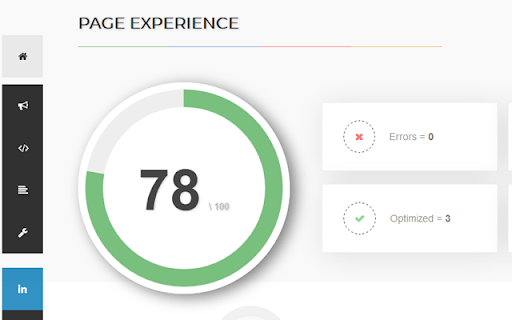
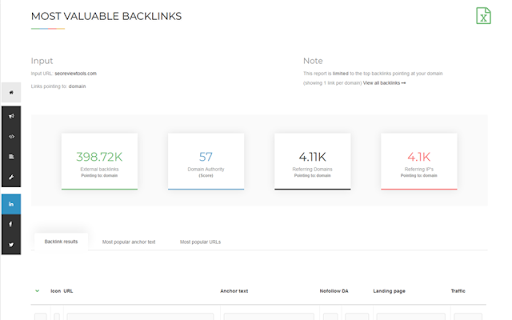


This extension will help you to analyze an URL using SEO Review Tools SEO Review Tools for Chrome is a free extension which allows you to quickly check the URL your visiting with one of my 68 free SEO Tools. And in addition I’ve added my 6 favorite Google Tools. An overview of all the tools you can access using this Chrome extension: - AI Brand Visibility Tool - ChatGPT Visibility Tool - Perplexity Visibility Tool - Backlink Checker - Fresh Backlink checker - Broken link checker - Rank Checker - Domain rank tracker - Link Building Tool - Bulk Domain Rating checker - SEO Competitor Research - Full SEO Scan - Website Authority Checker - Domain Authority & Page Authority Checker - Paid Search Competitor Checker ★ SEO Content Tools - AI Content Optimization tool - Content coverage checker - SEO Content Editor - AI Writer - Content Re-writer - Content Brief Generator - Headline Generator - Content Outline Generator - Keyword Cluster Tool - FAQ Schema Generator - Keyword Research Tool - Keyword Difficulty Checker - SEO Content Score Checker - Keyword Sourcer [NEW] - eBay Keyword Tool - Featured Snippet Tool - Trending topics - Free Keyword Search Volume Checker - Keyword Density Checker - SEO Keyword suggestion Tool - Duplicate content checker - Readability Checker - Keyword Extractor - Bulk Web page Word Count checker - Bulk Title tag checker - Title Tag generator [NEW] - Bulk meta description checker - Meta Description Generator [NEW] - HTML Headings Checker - Website SEO Checker - Page Experience Checker - Core Web Vitals Test - PWA Testing Tool - Website Security Checker - Google PageSpeed checker - AMP Checker / Testing tool - Internal Link Analyzer - SEO Redirect checker - Canonical URL / Location Checker - Paid Search Competitor Checker - Domain Age Checker - Email Finder - Website Accessibility Checker [NEW] - Social page authority checker - Bulk Pinterest Pins checker - Facebook Comments box count checker - Bulk Facebook share count checker

Majestic Backlink Analyzer
Majestic backlink analysis straight into your browser. Over 60,000 installations. Get instant link counts and see who is linking to the page you are browsing without having to go to a separate link analysis tool. FREE backlink count data with much more detail for Majestic.com account holders. This backlink checker from Majestic gives you a really fast way to see the strength of any page based on its backlink information. Because Majestic crawls the whole web, it does not have to rely on a third party for the data. You can immediately see the Trust Flow, Citation Flow and Visibility Flow for any web page directly on the URL bar and you can see summary information about the number of domains and URLs linking to this page. Topical Trust Flow is now integrated into the tool. This now shows you the topic (or category) of each backlink. Information provided free includes: Link Profile charts, link counts at the URL, subdomain and root level and three Flow Metric scores from 0-100 for pages you visit (speed limits apply). Majestic subscribers can very easily link their account to the extension and can then see more detail about links to the page your browser is on. including: *Backlink Detail*: A list of the 10 strongest backlinks to the page (with a link to more), including the URL, anchor text, Citation Flow, Trust Flow, Visibility Flow and the dates first and last seen. The primary Topical Trust Flow is also embedded. *Anchor Text Detail*: A list of the 10 strongest anchor texts (with a link to more) used in links to the URL, including the link counts and domain counts linking with this text and the relative Citation Flow and Trust Flow associated with these links. The primary Topical Trust Flow is also embedded. *Tools*: You can easily delve deeper into URLs by using many of Majestic's backlink analysis tools directly from the extension. *Add to Bucket*: If you are interested in reviewing the URL later, you can press the "Add to Bucket" button to add the URL straight into your Majestic account for later backlink analysis. Who wrote this Analyzer and How? Majestic is one of the UK's fastest growing tech companies, ranked 18th in 2014 in the Deloitte fast 50 list. Unlike many tools that rely on scraping third party data, Majestic is one of the largest web crawlers on the planet, collecting data directly from the web. It even has its own search engine. This independence has made Majestic's Trust Flow metric one of the most reliable and consistent ways to evaluate pages on the internet at scale the score, which is a log score between 0 and 100, gives a valuable insight. More recently, Majestic has launched and integrated Topical Trust Flow into into the Chrome extension, giving more precise analysis of a URL's power and influence. Majestic does not track your crawling behavior at all in this plugin and it will not slow down your browsing. Until you click on the extension, it remains idle and passes no data at all. At that point it simply looks up the data we have already indexed regarding the URL you are currently visiting. Majestic's full privacy policy is described at https://majestic.com/company/privacy-policy

Free Link Checker by LRT
Free link checker to verify all links on a page. Finds broken, unverified, no-follow, follow, internal, external links. Analyze all links on a page in seconds - advanced and fast export of link data. This unique and free Link Checker allows you to check all links on a page and see broken links and unverified links in categories no-follow links vs. follow links, internal links vs. external links. An on-page link code browser lets you see the exact source code of any link on mouse over for quick spotting of issues. Highlighting no-follows and links from own projects are supported as well as other power-user features. Features * Live Links, Broken Links and Unverified Links * No-Follow Links vs. Follow Links * Own Network Links vs. External Links * Source Code Browser on Mouse Over * LRT Power*Trust for every link * Live Filter Link Detail Table Benefits * Built for professional SEO power-users * Replaces all other link checker extensions * "My domains" highlighting * Blazzing fast link data export feature * Ongoing development by LRT Screenshot #1 1. Count the total links the page 2. Count the number of live links 3. Count the number of unverified links 4. Count the number of live links broken links 5. Different link scope for internal, links, within same root domain and external links 6. Count the number of Follow vs No-Follow links for every link scope. Click on those numbers to traverse through code details 7. Go to fancy review and export function (see below) Screenshot #2 8. Full dynamic link detail table and export to Excel and CSV action 9. Show links by network status 10. Show links by link scope 11. Show links by Follow vs. No-Follow 12. Filter links by keyword Screenshot #3 13. Mouse over any link to see details 14. LRT Power*Trust to measure strength and trust of the target page where the link points to - if this is very low, this could be a problematic or new page 15. Full HTML Source Code to review and possibly spot spammy things 16. Blue Marker for own domains (configured in extension settings) 20180917 V0.1.2 - Initial release 20180918 V0.1.3 - Improved Export function and text labels 20190912 V0.1.5 - Added support for UGC and SPONSORED link rel attribute 20190917 V0.1.6 - Resolved issues with source code preview caused by "data-html" attribute.

Essential SEO Toolkit (SEO Analysis Tool) from Opace
The Essential SEO Toolkit from Opace is a collection of useful SEO tools, which when clicked opens the tool using the current URL. This is v4 (see new features listed below). The Essential SEO Toolkit from Opace is a free of charge Chrome extension, which offers a collection of useful SEO tools, which when clicked opens the tool using the current URL. The SEO tools and resources included are ones which we believe Web Developers, SEO professionals and Marketers may find useful. The toolkit consists of a range of tools, any of which when clicked, the tool opens will open a new tab and pass the current URL to the tool for quick and easy viewing of data for the given website. Install the SEO Toolkit, by following these easy steps: 1) Click the “Add to Chrome” button 2) On the next screen, click the “Add Extension” button 3) A message will then be displayed saying “The Essential SEO Toolkit has successfully been added to Chrome” 4) That’s it, the extension is now available and ready to use! The tools included are split into five groups and cover various areas of SEO and social media. These tools can be accessed by clicking the radio button next to the tool name: General intelligence tools with a traffic emphasis, but also other features too: a) Alexa – analyse your own / competitors’ traffic with a full suite of SEO tools b) SERanking – an SEO suite with 35+ internal tools to analyse traffic & other SEO areas c) SEMRush – a powerful intelligence suite for SEO, PPC, social media & video research A range of tools designed to provide opportunities to increase website speed/performance: a) Pingdom Tools – monitor the speed, performance & availability of a website b) GT Metrix – analyse a page’s speed performance, see scores with PageSpeed & YSlow c) Google PageSpeed Insights – PageSpeed score & suggestions direct from Google Audit tools which will often identify many areas of possible improvements for websites: a) WooRank – review your website & identify keywords with the WooRank SEO checker b) Nibbler (Silktide) – testing tool for accessibility, SEO, social media & other compliance c) SEOptimer – a tool which analyses & grades a website, showing areas of improvement d) SiteChecker – 100+ parameters audit report, includes metadata, images, links, etc. Analyse backlinks for your own and competitor websites with this range of tools: a) Majestic – a suite of link intelligence tools for SEO and digital marketing b) Ahrefs – SEO toolset includes backlinks, competitor analysis, keyword research, etc. c) Moz Link Explorer – a set of link analysis and competitor research tools from Moz Tools which provide fast insights into the amounts of social shares of a URL: a) Social Shares Count Checker – track the social media shares for a URL in seconds b) Count Checker – shows # of shares, likes & comments for many social media sites 1. A Facelift - Firstly, the tool has a fresh facelift and a more modern UX: 2. Settings panel - We now have a cog symbol in the top right hand corner which will load a settings panel. Here you can add your own categories and tools which will be saved and shown when ever you use the Essential SEO Toolkit. PLEASE NOTE – these settings will only save for you locally and will not impact other users of the Google Chrome extension. 3. Add Your Own Tool - If you are the vendor of an online tool which you feel will be useful, you can make suggestions for your own tool to be added to our extension by clicking the 'Add Your Own Tool' button. 4. Essential new tools - We’ve added the following new categories and SEO tools: Check various user-experience related aspects of your website or web page: a) Google Mobile-Friendly Test – a tool which will reports on whether your URL passes Google’s mobile-friendly test b) Responsinator – a related tool, which shows how your URL will actually appear on different devices and screen resolutions so you can quickly check how a user will see your page or post c) Think With Google Test – this reports on a range of aspects of your URL in particular relating to page speed metrics and load times Tools to assess various factors related to technical SEO (on-site SEO) including your content and markup: a) Copyscape Duplicate Content Checker – a tool to check whether you URL contains any content duplicated from elsewhere on Web b Google Structured Data Testing Tool – evaluate your code to check for opportunities to add structured data and rich snippets c) Siteliner Crawler – assess the internal content of your site for duplicate content, broken links and more d) XML Sitemap Generator – automatically generate an XML sitemap for your domain Reasons to download the tool Here are some of the main reasons to download the Essential SEO toolkit: • Convenience – find all your favourite tools in one convenient browser extension • Free – the tool is totally free of charge • New tools – learn about new tools in the toolkit and additional ones as they are added • Quick installation – the installing process is just a few clicks and takes 2-3 minutes • Quick removal – if you decide to no longer use the toolkit, remove it in two minutes • Reduced bookmarking – free up some bookmarks, by storing favourite sites here • Save time – the tools included will save you a lot of time on day to day analysis tasks Why is the tool supplied for free? There is no actual direct cost to Opace of making this tool available, so we are happy to release it free of charge as many organisations do with open source software. As a business, we do benefit from the tool as we use this ourselves every day at work! Do you ever upgrade/modify the tool? We do plan to upgrade the tool from time to time. When we do we will make the new version available here and update this page with additional information. Can I suggest additional tools to be added to the toolkit? Absolutely, yes. If you have any additional tools, which you feel would be good to add please email us at info@opace.co.uk or https://opace.agency/get-in-touch and we will certainly consider them for a future version of the toolkit. For any new tools to be added though, they would need to add extra value over and above our existing tools. What browsers is the toolkit available on? Currently the toolkit is only available for Google Chrome (as this is the browser Opace work with), but we may add the toolkit to other browsers in the future. Watch this space! Are all of the tools totally free to use? Many of the tools are totally free to use. Some of the tools have a restriction on use and require an upgrade to remove restrictions. A few tools are subscription only, but usually have a free trial period to test the product in day to day use. Disclaimer Please note: Opace Ltd are not affiliated with any of these tools. Some may require account creation in order to access the data and others may require you to copy your URL into their search bar.

Detailed SEO Extension
Get SEO insights at the click of a button to any website you're currently on. Built by full-time SEO's for daily analysis. Get SEO-related insights at the click of a button to any website you're currently on. Pull back their title tag, meta description, meta robots tag and much more. Save hours of time looking through the source code of this page with our SEO analysis extension.
