
pfjdepjjfjjahkjfpkcgfmfhmnakjfba
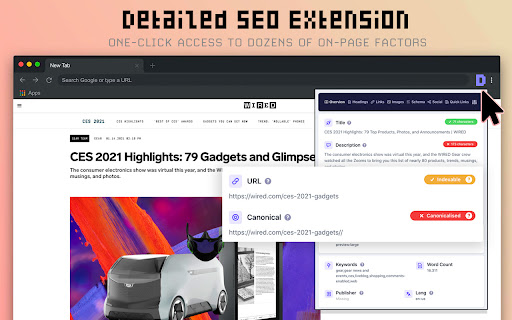


Get SEO insights at the click of a button to any website you're currently on. Built by full-time SEO's for daily analysis. Get SEO-related insights at the click of a button to any website you're currently on. Pull back their title tag, meta description, meta robots tag and much more. Save hours of time looking through the source code of this page with our SEO analysis extension.

GMB Everywhere - GBP Audit for Local SEO
Find GMB categories, GMB Audits, Review audit, and Post audit. Spy, audit, and crush your GMB competitor with this Local SEO tool. Your personal Google Business Profile tool that works on the browser. You will now be able to see Google My Business categories, do basic audits, do Review audits, do Post audits, check location ranking and many related GMB audits directly on Google itself. Now you can turbo charge your Google Business listing, GMB spy on your competitor, get google business analytics and win on Local SEO. 🚀 How to use it? - Install the extension from this page. - Go to Google, and you will see the GMB categories and audit buttons shown on every business page and search result page by default. It also works on Google, Local finder and Google Search result pages. 🚀 About us? GMB Everywhere is a extension that lets you view Google My Business categories on maps. We let you spy on your Google Business competitor and rank better on Local SEO. 🚀 Our features? Design and value to the customer is the number one parameter we aim for when we get our extension in public. Local SEO ranking can make or break your GMB listing. At present extension features includes. ⭐GMB Categories: The categories you assign to your Google listing is one of the top parameter when it comes to Google map business ranking. With our extension you can see the categories directly on Maps and Local Finder. The pages it shows up include: - Google Business Page - Google Search Result Page - Google Business Page with bottom selector. - Local Finder Page - Local Finder Search Result Page These categories automatically updates as you move from one page to another on these GMB resources above. ⭐Highlighting categories: Among the categories that you assign to your business, it is the primary category that is the primary mover. It makes the difference between being on the 3 pack or in the bottom. Our extension marks the primary category with a '⭐'. This way you can ideally differentiate between what is shown as the main category on google and what is the primary category. Unlike commonly believed, the default category shown is not always the primary category. ⭐Basic GMB Audit: This will allow you to do a basic audit on the business. This will give you a ton of details about the business. This includes: - Business claimed status. - Location information. - Place ID - CID - Business Profile Id - Knowledge Panel Link - GMB Review Request Link - GMB Review Display Link - Post Link - Other businesses at the same address - Other businesses using the same website - Many website auditing shortcuts. ⭐Teleport: You local ranking is very much dependent on the location from which your customer is searching. With our Teleport feature, you can now simulate a search from a particular location. The features include: - Adding a term and select and location and find the rank at the particular location. - Get the competition you have at that particular location. - You can draw and calculate the distance of your business from that particular location directly. ⭐GMB Review Audit: Quantity and quality of reviews are a very important parameter in GMB ranking. With this business review analysis, you would get vital information about the health of the GMB reviews. With this feature, you can find the following information about reviews: - Graphical representation of reviews with time. - Calculating rating of the reviews. - Get analysis of content of their reviews. - Get analysis of quality of their reviews. - Get valuable information about the strategy you would need to follow to be effective. ⭐GMB Post Audit: This feature will let you analyze the posts of a business on GMB. This uses the latest public data. This will give you a very accurate sense of the health of the posting frequency and other GMB Post parameters. With this feature, you can find the following information about posts: - Graphical representation of their post strategy. - Post frequency analysis. - Post content analysis. - Get valuable information about strategy you would need to follow to be effective. ⭐Category Finder: This feature will allow you to find the most relevant category and services for your business. This includes: - Find related category by providing a category. - Find search traffic associated with that category. - Find services associated with a category. - Shortcut to compare seasonal change in category search with external tool. ⭐ Local Scan: This is our most powerful feature for side-by-side competitor analysis. Local Scan allows you to compare multiple businesses in the search results with a single click, giving you a practical roadmap to outrank them. The insights include: - Category Analysis: Compare your categories against competitors to spot what you are missing. - Service Analysis: Discover service gaps and opportunities your competitors are leveraging. - Review Comparison: See exactly where you stand against the competition in terms of review quantity and rating. - Location & Proximity: Understand how location advantages are affecting the rankings in that specific area. ⭐Other features: - Transparent description about how we calculate data. - Show all the result in Maps Search, Google and Google Local Finder. 🚀 Some things to note: ⭐ We are not related to Keyword Everywhere, Keyword Surfer or PlePer. This extension can be used in addition to these extensions on Google. ⭐ We are also not related to GatherUp Google Review Link Generator or UberSuggest. They are just external links given in the audit result. ⭐ This is an independent extension that works on Maps and other Google resources. 🚀 Contact us: In you have any questions, you can contact us using the chat option on the bottom right of www.gmbeverywhere.com.

MST SERP Counter - SEO Free SERP Checker Tool
SERP Counter is a free checker tool that allow you to fastly check google rank. Using the MST SERP Counter Google Chrome extension, you can examine the live numerical search results to see where you currently stand in the rankings.

Schema Builder for Structured Data
Easily build validated json-ld structured data markup for any webpage. Based on schema.org specification Generating structured data markup for your webpages doesn't have to be hard! No more having to learn each Schema type, which elements are required vs. recommended or worrying about errors and issues. Schema.dev's Schema Builder makes it as simple as point and click to generate the perfect JSON-LD structured data for dozens of Google supported Schema types! and all for FREE! ============================================= Be sure to view the initial training video for fastest time to value. https://videos.seoclarity.net/video/kazj73n005plxgv61 ============================================= Simply enable the plugin, choose the schema markup you'd like to add and then populate the form using the point and click capabilities or manual input. Already have schema markup on your webpages? The built-in Schema testing tool helps validate your schema markup and shows errors and warnings. Key Features - Updated March 2nd, 2025 ================================== + NEW! Support for Vehicle Listing Markup + Support for 20+ Schema types - including ALL Google supported markups + Automatic detection of existing structured data + Point-and-click ease to populate schema fields + Intuitive UI that guides you through required, recommended and optional elements for each schema + Structured Data Testing capabilities built in for any schema markup generated + Intuitive UI to guide through required, recommended and optional elements NOTE: The plugin is in actively development - Join the forums at https://support.schema.dev for feedback, bugs and tips.

Domain Age Checker | Site Age Checker
Domain age checker is a whois tool / extension developed by toolpyramid.com for checking any domain age Domain age refers to the time difference between the site is registered and the current time. AgeUncle domain age checker is a chrome extension that helps you get domain age of any website available in one click. Our Free ToolPyramid Domain Age Checker / Site Age Checker Tool will allow you to quickly find out the age of any website or domain, including your top competitors . 🎉 🎉🎉🎉🎉🎉🎉🎉🎉🎉🎉🎉🎉🎉🎉🎉🎉 Upgrades. 📈📈📈Now Over 1250 + domains tld and ccld supported increasing from 350 tld . 📈📈📈 Each and every domain on the internet supported. Features ⭐️ Free To Use Chrome Extension ⭐️ No need to copy and paste ⭐️ Support http and https both . ⭐️ Works with www and any subdomain also. ⭐️ Works even when site is site is working. ⭐️ Easy to use only one click required ⭐️ No need to navigate from your existing page. ⭐️ Lightening fast response from our hosted servers. ⭐️ Over 1250 + domains tld ans ccld supported ⭐️ Secondary level domains also supported. ⭐️ Always keep your competitors and research at ease. ⭐️ Premium Support to all our users. ⭐️ Request features with only one click. ⭐️ No requirement to remove url slug . ⭐️ Get Tools advise absolutely free . Domain age checker is a whois tool / extension developed by toolpyramid.com for digital marketers to enhance their seo research , competitor analysis . This tool help you check any domain's age or website's age . Domain age checker helps you save time . You can check domain age in just one click , with the help of this extension you need not to copy the domain and paste them in other tools . For Checking Multiple Domains at once you can visit link . Also you can request feature from the link in the extension itself
