
klohjdodjjeocpbpadmkcndjoadijgjg
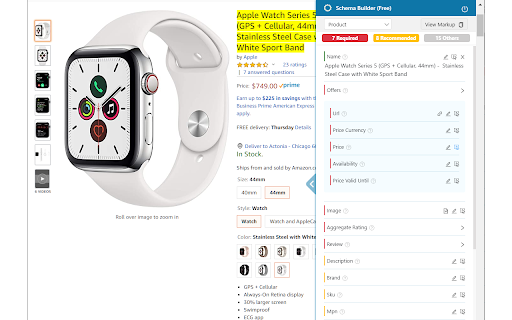
Easily build validated json-ld structured data markup for any webpage. Based on schema.org specification Generating structured data markup for your webpages doesn't have to be hard! No more having to learn each Schema type, which elements are required vs. recommended or worrying about errors and issues. Schema.dev's Schema Builder makes it as simple as point and click to generate the perfect JSON-LD structured data for dozens of Google supported Schema types! and all for FREE! ============================================= Be sure to view the initial training video for fastest time to value. https://videos.seoclarity.net/video/kazj73n005plxgv61 ============================================= Simply enable the plugin, choose the schema markup you'd like to add and then populate the form using the point and click capabilities or manual input. Already have schema markup on your webpages? The built-in Schema testing tool helps validate your schema markup and shows errors and warnings. Key Features - Updated March 2nd, 2025 ================================== + NEW! Support for Vehicle Listing Markup + Support for 20+ Schema types - including ALL Google supported markups + Automatic detection of existing structured data + Point-and-click ease to populate schema fields + Intuitive UI that guides you through required, recommended and optional elements for each schema + Structured Data Testing capabilities built in for any schema markup generated + Intuitive UI to guide through required, recommended and optional elements NOTE: The plugin is in actively development - Join the forums at https://support.schema.dev for feedback, bugs and tips.

Google Search Console Enhanced Analytics
Google Search Console Enhanced Analytics is a simple, time-saving extension that enhances your analysis. Google Search Console Enhanced Analytics let’s you easily select and compare dates, generate percentage changes or generate search volumes. It enhances your analysis! Features - Select a custom standard period (either in the UI or in the extension) - Do a quick comparison - Do a custom comparison - Generate percentage changes - Generate search volumes - See exact metrics above the chart - Export all generated data to Excel Privacy Your privacy is extremely important to me. This extension does not store any data. Does this extension need Google Search Console property access? No. The only thing this extension does to calculate data is use the info inside your browser. You do not need to give access to your Google Search Console property and I don’t store / send any data to a server. How do you save my DataForSEO credentials? To make sure you don’t need to login every time you open my extension, I give you an option to save your data. Save data, don’t remember me > Your credentials are saved in the session storage of your browser and are kept there during your browsers session. Save data, remember me > Your credentials are saved in the local storage of your browser and are kept there until you delete your data inside the extension or remove the extension.

Detailed SEO Extension
Get SEO insights at the click of a button to any website you're currently on. Built by full-time SEO's for daily analysis. Get SEO-related insights at the click of a button to any website you're currently on. Pull back their title tag, meta description, meta robots tag and much more. Save hours of time looking through the source code of this page with our SEO analysis extension.

Fast Schema Markup Checker - By Vryse SEO
Analyze and check on-page schemas and structured data of a webpage. Ideal for developers and SEOs Fast Schema Analyzer is a versatile Chrome extension designed to streamline the process of analyzing and validating schema markups directly within your browser. This tool is essential for anyone who needs to ensure that their web pages are properly optimized with structured data, meeting the necessary standards for Google’s rich results. ⭐️ Key Features 1. Schema Markup Checker: Instantly analyze any web page to determine whether it includes schema markup. This feature is the cornerstone of Fast Schema Analyzer, allowing users to quickly check if a URL has schema. 2. Validate Schemas: The extension goes beyond basic checking by validating the schemas found on the page. It ensures that the structured data is correctly implemented according to Google’s guidelines, making it a robust json-ld validator. 3. Copy JSON Code: Easily copy the JSON-LD structured data code from the page. This feature allows developers and SEOs to reuse or modify existing schema markup effortlessly. 4. Dropdown Accordion: The extension features a user-friendly interface with collapsible sections that allow users to expand and review each schema type found on the page. This makes the schema checking process more organized and efficient. 5. Rich Result Checker: Understand the potential impact of your schema on Google’s search results by checking which types of schema might trigger rich results, enhancing your site’s visibility. ❓ How It Works 1. Simple Interface: Just click the extension icon while browsing any webpage, and Fast Schema Analyzer will automatically scan the page for structured data. 2. Automatic Detection: The extension instantly checks if a URL has schema and presents the findings in a structured, easy-to-understand format. 3. Schema Validation: It validates the schema markup directly in your browser, making sure it adheres to Google’s standards, helping you avoid common errors that could affect your SEO performance. 4. Comprehensive Analysis: The extension supports all common schema types, including Article, Product, Event, FAQPage, and more, ensuring a wide application across different content types. 🤝 Benefits 1. Quick Schema Checking: No need for complex tools; simply open the extension to check structured data on any webpage in real-time. 2. Improved SEO: Ensure your pages are eligible for Google’s rich results by using the built-in rich result checker, which verifies the correct implementation of structured data. 3. Developer-Friendly: The ability to copy JSON-LD data directly from the extension makes it a practical tool for developers looking to implement or tweak structured data on their sites. 💡Frequently Asked Questions Q: What types of schema markups does Fast Schema Analyzer support? A: The extension supports a wide range of schema types, including but not limited to Product, Event, Article, and FAQPage schemas. Q: Can Fast Schema Analyzer check structured data on competitor sites? A: Yes, simply navigate to any URL, and the extension will check if the URL has schema and validate the structured data if present. Q: How does the extension validate schemas? A: Fast Schema Analyzer acts as a json-ld validator, ensuring that the structured data on the page conforms to Google’s guidelines, reducing the risk of errors.

SEO Schema Visualizer
Visualize JSON-LD schema markup at the click of a button SEO Schema Visualizer turns structured data into something you can actually read. With one click, it finds JSON-LD schema markup on the page and converts it into an interactive visual graph, so you can quickly understand how your entities are connected. Built for SEOs, marketers, site owners, and developers who want faster schema checks without digging through raw code. What you can do with SEO Schema Visualizer: ★ Instantly visualize JSON-LD as an interactive graph See schema structure and relationships clearly, even on complex pages. ★ Get automatic schema badge alerts The extension icon shows a badge when valid JSON-LD is detected on a page. ★ Use powerful graph controls Adjust depth, spacing, node size, label size, and force settings for easier reading. ★ Interact with the graph Drag nodes, zoom/pan, pause the simulation, and inspect details on hover. ★ Filter by schema type Quickly narrow the graph by @type and optionally show only connected nodes. ★ Open in a larger tab view Launch the visualization in a dedicated tab for more space and better analysis. ★ View raw JSON-LD in a clean reader tab Open all detected JSON-LD blocks in a separate page. ★ Work with each JSON-LD block in the reader Prettify or minify, copy JSON, copy as , collapse/expand, and export as .json or .html. ★ Paste your own JSON-LD manually Use manual input mode to visualize JSON-LD even if it’s not on the page yet. ★ Export graph assets Download high-resolution PNG or SVG for reporting, presentations, or design edits. See summary counts Quick at-a-glance totals for @type, @id, unique @id, and total nodes. Q: Does this work on any website? A: It works on pages where the extension can access content and where schema markup exists. Q: What if no JSON-LD is found? A: You’ll see a no-JSON-LD message, and you can still use manual JSON-LD input. Q: Can I use this for client reporting? A: Yes. Export PNG/SVG visuals and JSON-LD block files for audits and presentations. Q: Do I need to be technical to use it? A: No. It’s designed to make schema structure understandable, even if you don’t write JSON-LD by hand.
