
lddhiobdanelpbaghblpeohcjomclocl
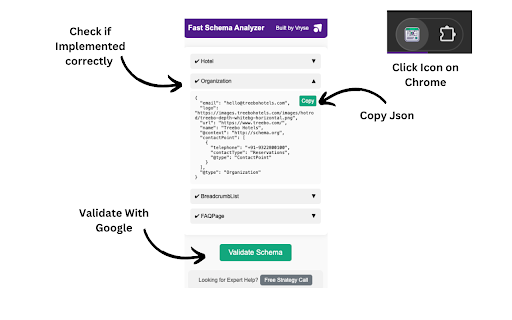
Analyze and check on-page schemas and structured data of a webpage. Ideal for developers and SEOs Fast Schema Analyzer is a versatile Chrome extension designed to streamline the process of analyzing and validating schema markups directly within your browser. This tool is essential for anyone who needs to ensure that their web pages are properly optimized with structured data, meeting the necessary standards for Google’s rich results. ⭐️ Key Features 1. Schema Markup Checker: Instantly analyze any web page to determine whether it includes schema markup. This feature is the cornerstone of Fast Schema Analyzer, allowing users to quickly check if a URL has schema. 2. Validate Schemas: The extension goes beyond basic checking by validating the schemas found on the page. It ensures that the structured data is correctly implemented according to Google’s guidelines, making it a robust json-ld validator. 3. Copy JSON Code: Easily copy the JSON-LD structured data code from the page. This feature allows developers and SEOs to reuse or modify existing schema markup effortlessly. 4. Dropdown Accordion: The extension features a user-friendly interface with collapsible sections that allow users to expand and review each schema type found on the page. This makes the schema checking process more organized and efficient. 5. Rich Result Checker: Understand the potential impact of your schema on Google’s search results by checking which types of schema might trigger rich results, enhancing your site’s visibility. ❓ How It Works 1. Simple Interface: Just click the extension icon while browsing any webpage, and Fast Schema Analyzer will automatically scan the page for structured data. 2. Automatic Detection: The extension instantly checks if a URL has schema and presents the findings in a structured, easy-to-understand format. 3. Schema Validation: It validates the schema markup directly in your browser, making sure it adheres to Google’s standards, helping you avoid common errors that could affect your SEO performance. 4. Comprehensive Analysis: The extension supports all common schema types, including Article, Product, Event, FAQPage, and more, ensuring a wide application across different content types. 🤝 Benefits 1. Quick Schema Checking: No need for complex tools; simply open the extension to check structured data on any webpage in real-time. 2. Improved SEO: Ensure your pages are eligible for Google’s rich results by using the built-in rich result checker, which verifies the correct implementation of structured data. 3. Developer-Friendly: The ability to copy JSON-LD data directly from the extension makes it a practical tool for developers looking to implement or tweak structured data on their sites. 💡Frequently Asked Questions Q: What types of schema markups does Fast Schema Analyzer support? A: The extension supports a wide range of schema types, including but not limited to Product, Event, Article, and FAQPage schemas. Q: Can Fast Schema Analyzer check structured data on competitor sites? A: Yes, simply navigate to any URL, and the extension will check if the URL has schema and validate the structured data if present. Q: How does the extension validate schemas? A: Fast Schema Analyzer acts as a json-ld validator, ensuring that the structured data on the page conforms to Google’s guidelines, reducing the risk of errors.

SEOMarkup Structured Data Schema Inspector
View and analyze JSON-LD structured data on any webpage. Built for SEO professionals, web developers, and data analysts. Inspect, copy, and validate every piece of JSON-LD structured data on any page — in one click. SEOMarkup Inspector parses every block, flattens @graph arrays into individual schemas, and gives you an organized tree view with full-text search. No more squinting at View Source. ━━━━━━━━━━━━━━━━━━━━━━━━━ WHAT YOU GET ━━━━━━━━━━━━━━━━━━━━━━━━━ • One-click inspection of all JSON-LD on the active page • Expandable tree view with full-text search and match cycling • Per-schema actions: copy as JSON, copy as tag, download as .json • Click a schema type to jump straight to its Schema.org documentation • Inline error banner when JSON-LD is malformed — see exactly which block broke and why • Microdata and RDFa detection so you know when other structured-data formats are present • One-click validation via Google Rich Results Test and validator.schema.org (pre-filled with the current URL) • Works on any website — no setup, no account, no signup ━━━━━━━━━━━━━━━━━━━━━━━━━ WHO IT'S FOR ━━━━━━━━━━━━━━━━━━━━━━━━━ • SEO professionals — audit a client site in seconds. See every Product, Article, Organization, FAQ, BreadcrumbList, and more without leaving the page. • Web developers — debug your structured data before it ships. Catch malformed JSON-LD before Search Console does. • Content auditors and competitive researchers — see what schema your competitors use, copy it as a starting template, and validate before deploying. • Zero configuration — install and click • Tiny footprint — under 50KB total • Fast — opens instantly, no external requests • Private by design — see the privacy section below No data leaves your browser. We use the activeTab permission only, which means SEOMarkup Inspector can read structured data on the page you're currently looking at — and only when you click the icon. We do not collect, store, transmit, or sell any data. There is no analytics, no telemetry, no remote code, no third-party requests.

Ahrefs SEO Toolbar
Save hours with a complete toolkit in one SEO extension. Insights for on-page, keyword research, and link analysis on any webpage. Ahrefs toolbar is free and gives you detailed SEO insights without leaving your browser. 🌍 Global SEO research (No VPN needed) Switch regions, Google domains, languages, and get new keyword ideas directly in search results. 📃 On-page SEO data in 1 click Check titles, meta descriptions, headers, and technical SEO factors like canonical tags and indexation directives in one click. 🔗 Link analysis made easy Highlight links on the page, trace redirects, filter outgoing links, spot broken links, and export all the data to CSV. 🛠 Detailed SEO research tools Save URLs from open tabs or a SERP, switch user agents to see pages like Googlebot, read HTTP headers, and get performance data for page speed insights. ✨ Paid Ahrefs users unlock Ahrefs metrics: See domain and page-level metrics like keyword counts, traffic estimates, referring domains, and more - directly on every site or result. 📌 Note: Ahrefs subscription is required for access to Ahrefs metrics. The core tools of this SEO extension remain completely free.

Schema Markup Extractor
Extracts, validates, and recommends schema.org structured data for SEO asily extract and validate structured data from web pages with Schema Markup Extractor. Whether you're an SEO professional, a web developer, or simply curious about the schema markup on a website, this tool will simplify the process of detecting JSON-LD and Microdata schema types, while also identifying any errors or warnings. Detect Schema Types Instantly: Quickly identify all schema types present on any webpage, including WebPage, FAQPage, Product, BreadcrumbList, and more. Error & Warning Validation: Automatically checks for missing or incomplete properties and flags any errors or warnings in the schema. Detailed Summary: Provides a clear overview of the detected schema types, the number of items in each type, and any issues present, making it easy to troubleshoot and optimize. User-Friendly Interface: Simple, organized layout that displays schema information in an easily digestible format. Use Cases: For SEO Professionals: Ensure your website’s structured data is implemented correctly, which can enhance your site’s visibility in search engines by providing rich snippets. For Web Developers: Validate schema markup and catch potential issues during development to ensure schema accuracy and prevent errors from going unnoticed. For Digital Marketers: Understand how schema markup is used across different pages of a website, aiding in content optimization and SEO strategy. Why You Need It: With the growing importance of structured data in enhancing search engine results and delivering rich snippets, it's crucial to ensure your schema markup is accurate and free of errors. Schema Markup Extractor saves you time by detecting and validating schema markup in just a few clicks, helping you deliver optimized content to search engines and users alike.

Website SEO Checker
Get free on-page SEO report by 100+ parameters with the best website SEO checker ☑️ Overview – quickly check essential SEO data: URL structure, metadata, indexation, and canonical settings. ☑️ Content – analyze headings, keyword density, text length, and text-to-code ratio for better structure. ☑️ Links – identify external, internal, and subdomain links, plus dofollow/nofollow status and anchor text. ☑️ Hreflangs – instantly verify hreflang setup and language targeting for international SEO. ☑️ Images – detect missing alt/title tags, broken images, and check sizes with on-page highlighting. ☑️ Structured Data – instantly identify and validate Schema.org markup for better SEO performance. ☑️ PageSpeed – measure mobile and desktop performance with actionable optimization insights. ☑️ GSC+GA4 Insights – assess search performance & indexing plus user behavior and conversion metrics. ☑️ Issues & Monitoring – detect SEO issues, track technical changes, and monitor page updates over time. Deep dive into Sitechecker Chrome Extension’s capabilities to unlock the full potential of your SEO workflow. 1️⃣ Get a quick technical overview of any page to ensure it meets SEO best practices. • Inspect URL structure, status code, and page size. • Review meta title, description, and H1 heading. • Analyze indexation settings, including robots meta tags, X-Robots-Tag directives, and robots.txt rules. • Validate canonical tag settings to prevent duplicate content issues. 2️⃣ Analyze content structure to improve keyword relevance and readability. • Review heading hierarchy (H1–H6) and highlight them on the page. • Copy the entire heading structure in one click for easy documentation. • Measure text length in words and characters. • Calculate text-to-code ratio to optimize content efficiency. • Get keyword density insights for single, two, and three-word phrases. 3️⃣ Audit all links on a page to improve internal linking and track external references. • Detect external, internal, and subdomain links. • Check dofollow/nofollow status and analyze HTTP response codes. • Review anchor text usage and link destinations. • Search for specific links and highlight them directly on the page. • Copy all detected links in one click for easy analysis and outreach. 4️⃣ Ensure proper hreflang implementation for international SEO. • Detect missing or incorrect hreflang attributes. • Validate language targeting and regional settings. • Check backward links to confirm proper hreflang setup. 5️⃣ Optimize images to improve SEO and user experience. • Identify missing alt and title attributes. • Detect broken images and oversized files. • Highlight image details directly on the page for easy fixes. 6️⃣ Validate structured data for better search visibility. • Detect Schema.org markup and review structured data implementation. • Identify missing or incorrect structured data elements. • Ensure key rich snippet attributes are correctly applied. 7️⃣ Measure page speed and get actionable insights for optimization. • Check page loading speed for desktop and mobile. • Identify slow-loading elements affecting performance. • Get recommendations to improve Core Web Vitals. 8️⃣ Unlock real-time GSC + GA4 insights to track performance, user behavior, and conversions. • View clicks, impressions, CTR, and average position over 7/30/60/90 days. • Analyze top search queries and how they drive traffic. • Inspect URL crawling, indexing status, and mobile usability issues. • Measure user behavior with engagement metrics like bounce rate and average session duration. • Track conversions with key events and key event rate. • Break down performance by traffic source (Google Organic, Direct, Social, Bing, etc.). 9️⃣ Monitor SEO issues and track page changes over time. • Detect technical errors, broken links, and missing metadata. • Track content updates and structural modifications. • Get alerts for critical SEO changes.
