
fkpkhpigkldfnnimijaaldpafcibaepk

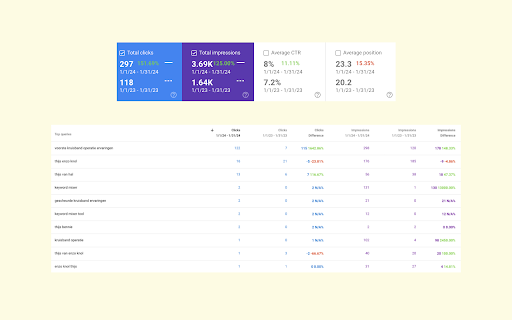


Google Search Console Enhanced Analytics is a simple, time-saving extension that enhances your analysis. Google Search Console Enhanced Analytics let’s you easily select and compare dates, generate percentage changes or generate search volumes. It enhances your analysis! Features - Select a custom standard period (either in the UI or in the extension) - Do a quick comparison - Do a custom comparison - Generate percentage changes - Generate search volumes - See exact metrics above the chart - Export all generated data to Excel Privacy Your privacy is extremely important to me. This extension does not store any data. Does this extension need Google Search Console property access? No. The only thing this extension does to calculate data is use the info inside your browser. You do not need to give access to your Google Search Console property and I don’t store / send any data to a server. How do you save my DataForSEO credentials? To make sure you don’t need to login every time you open my extension, I give you an option to save your data. Save data, don’t remember me > Your credentials are saved in the session storage of your browser and are kept there during your browsers session. Save data, remember me > Your credentials are saved in the local storage of your browser and are kept there until you delete your data inside the extension or remove the extension.

Detailed SEO Extension
Get SEO insights at the click of a button to any website you're currently on. Built by full-time SEO's for daily analysis. Get SEO-related insights at the click of a button to any website you're currently on. Pull back their title tag, meta description, meta robots tag and much more. Save hours of time looking through the source code of this page with our SEO analysis extension.

Open Earth Engine extension
An unoffical extension to enhance Google Earth Engine, and Open Earth Engine experience. This extension enhances the Google Earth Engine code editor with powerful new features: Features: - LLM integration for AI-assisted coding - Night mode for a better visual experience - OEEL (Open Earth Engine Library) cache for faster access - Quick access: Click the extension icon to open the code editor (or the OEEL documentation if the editor is already open) - Function signature insertion: Easily insert function signatures from the documentation using arrow buttons - Drag-and-drop image upload using manifests - Automatic export support - Shortcut improvements (e.g., Use ⌘+S (Cmd+S) to save on macOS) - Run all tasks with a single button - Plotly support in both the code editor and EE Apps (including event handling) - Open scripts in a new tab by double-clicking them - Customizable font settings (including size) for the code editor - Built-in terminal for debugging - Quick JSON copy by double-clicking the JSON button - Crash detection: A red console header appears when a crash occurs - Python interface support - External documentation link for easy reference - Real-time code sharing for collaboration

No Google Search Translation
No Google Search Translation is a extension to untranslate Google Search results. To help address content and perspective gaps when a user searches in their local language, sometimes Google may translate the title link and snippet of a search result (including YouTube videos titles) for results that aren't in the language of the search query. There is no easy way to just disable this feature, so this extension is here to help until Google provide a way to disable it. It also redirects away from Google Translate proxy pages, taking you directly to the original URLs.

Simple Analytics Extension
An extension to block your own visits from Simple Analytics. This extension is for Simple Analytics customers, and non-customers, who want to block their own visits on websites that use Simple Analytics. That way your own visits don't show up in the dashboard. Because it's an extension, we don't need to record IP addresses, which is more accurate and keeps working when you travel or when your IP changes. How it works: click the extension icon on a website where you want to block your visits. You'll be asked to allow access to that one site. You only need to do this once per website. The extension only has access to sites you explicitly choose, never to all sites. It works for the regular Simple Analytics script, custom domains, and for proxy installations. On the options page you'll find every website being blocked. You can turn individual websites or scripts on and off, or remove them completely. This extension does not connect to any servers. The source code is publicly available at https://github.com/simpleanalytics/extension. Enjoy, and if you have any feedback, go to our website and let us know!
