
kdibhchppeokcmdamhekocbnkjkodoii
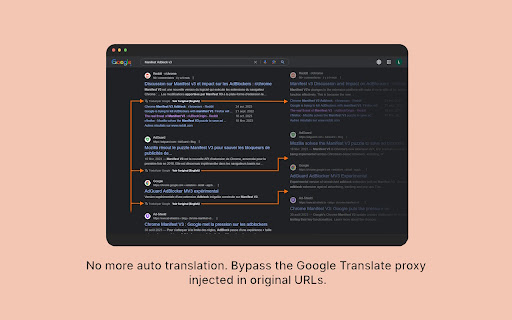

No Google Search Translation is a extension to untranslate Google Search results. To help address content and perspective gaps when a user searches in their local language, sometimes Google may translate the title link and snippet of a search result (including YouTube videos titles) for results that aren't in the language of the search query. There is no easy way to just disable this feature, so this extension is here to help until Google provide a way to disable it. It also redirects away from Google Translate proxy pages, taking you directly to the original URLs.

YouTube Row Fixer
A browser extension for customizing the videos per row and to fix big thumbnail issue ✨ Features 🔧 Customizable Layout Options > Set videos per row to suit your preference. > Control posts per row for a tailored feed. > Adjust shorts per row for optimal browsing. 💖 Able to hide shorts. 🙈 Hide Channel Profile 📝 Full Video Titles 📐Automatically adjust the number of videos per row based on screen size. 🌗 Light & Dark Theme Support

Bye Bye, Google AI: Turn off Google AI Overviews, Discussions and Ads
Filter Google search results to hide AI overviews, ads, discussions or videos. You choose. Don't like the new Google AI overviews appearing in your search results? Perhaps you don't like the discussions section or the shopping blocks or even the sponsored links? This extension lets you hide them. It simply uses CSS to set those areas of the page to be hidden (display="none"). AI overviews are hidden by default but the options menu lets you choose what else you might want to hide: Videos, Discussion blocks, shopping blocks, "readers also ask" and sponsored blocks are also available to hide. Note that, if Google changes its CSS, we'll have to update the extension to keep pace. You can also search the Google web results tab from your address bar by hitting w + space and then entering your query. Version 2.0: Eliminates new mid-page (after the first result) AI Overviews Version 1.8: Fixes bug where AI overviews that appeared in the middle of the page were not being blocked. Version 1.5: Adds support for Danish, Portuguese and Dutch. Fixes bug where blocking video sometimes blocked other blocks on People pages. Version 1.4: Adds support for 16 languages including English, French, German, Spanish, Korean, Japanese, Mandarin (Trad + Simplified), Arabic, Hebrew, Urdu, Hindi, Thai, Greek, Italian, Polish and Russian.

YouTube Anti Translate
A small extension to disable YouTube video titles/audio/descriptions autotranslation. YouTube title translation is helpful for beginners, but once you know the language well enough to understand original titles, it quickly becomes frustrating. Even worse, there's no proper way to disable this — unless you change your YouTube country, which messes up your recommendations and trends. This extension fixes the problem. Over 100,000 users trust it to restore YouTube the way it was meant to be. ✨ Restores original video titles instead of auto-translated ones 📝 Restores original video descriptions and chapters 💬 Restores original subtitles (untranslates captions) 🖼️ Restores original video thumbnails 🎨 Restores original channel branding, headers, and channel names 🔇 Disables automatic audio translations (dubbing) 📱 Supports YouTube Shorts — restores both audio and titles 📱 Also works on mobile (m.youtube.com) — untranslates both titles, descriptions, and audio (beta) 🔔 Fixes translations in notifications 🌐 Works everywhere — homepage, embedded videos, youtube-nocookie.com, and more ⚙️ Works automatically — no configuration or API keys needed 🎯 Advanced settings — whitelist specific channels to keep translations if needed 🧼 Lightweight and safe — clean code, no tracking, open source Chrome for Android doesn't support extensions, but you have two options: 1️⃣ Firefox for Android (Recommended): • Install Firefox • Visit FireFox page of this extension: https://addons.mozilla.org/firefox/addon/youtube-anti-translate-mv3/ • Install this extension • Open YouTube and enjoy! 2️⃣ Kiwi Browser: • Install Kiwi Browser • Open Kiwi and go to this page (Chrome Web Store) • Install this extension • Open YouTube and enjoy! 💖 This is a completely free, open‑source project maintained by volunteers. If the extension has helped you, please consider supporting the original creator at https://www.patreon.com/zpix1 or the maintainers at https://github.com/zpix1/yt-anti-translate. Firefox version: https://addons.mozilla.org/ru/firefox/addon/youtube-anti-translate-mv3/ GitHub page: https://github.com/zpix1/yt-anti-translate No more awkward or misleading title translations — get YouTube back the way it was meant to be. ____

Turn Off AI Overview (& Other Google Features)
Control your Google Search experience: Toggle AI Overview, hide elements (ads, featured snippets, etc.), and filter domains. July 2025 Update: Made sure it works with recent changes of AI Overviews. Customizable Search Experience for Google—Hide AI Overviews, Ads, & More. "Turn Off AI Overview" gives you full control over your Google Search results. With a single click, hide AI-generated overviews, remove sponsored ads, and filter out distracting features like autocomplete, 'People Also Ask,' discussions, and featured snippets. Customize your search experience by excluding specific websites or limiting results to trusted sources. Easily tailor your Google search environment for a cleaner, more focused experience—all without storing or accessing data outside your browser. 𝐅𝐞𝐚𝐭𝐮𝐫𝐞𝐬 • Hide AI-generated overviews with one click • Remove sponsored ads, 'People Also Ask,' discussions, and featured snippets • Exclude results from specific websites (e.g., Reddit, Pinterest) • Limit search results to only your trusted websites • Customize Google Search without affecting data privacy 𝐏𝐫𝐢𝐯𝐚𝐜𝐲: This extension operates locally on your browser. No data is stored, shared, or accessed outside of your browsing environment.
