
cfklmhljnpiobjgmnllgjioekopgpboo
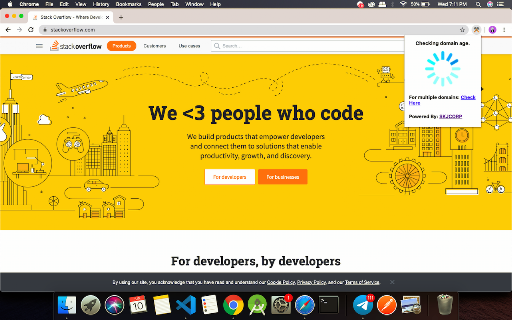
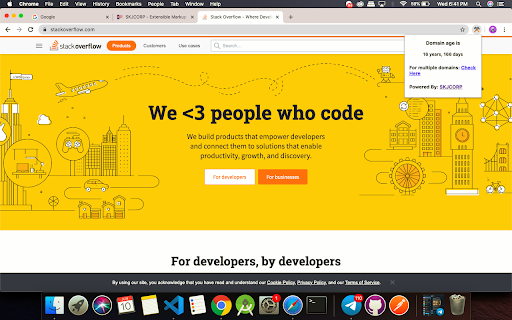
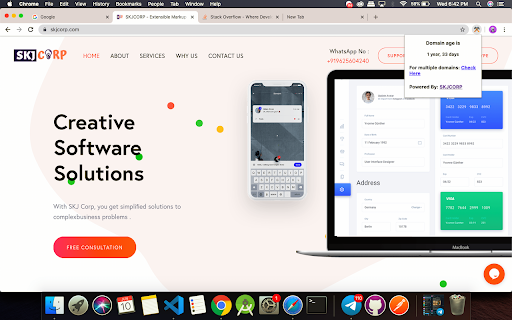
Domain age checker is a whois tool / extension developed by toolpyramid.com for checking any domain age Domain age refers to the time difference between the site is registered and the current time. AgeUncle domain age checker is a chrome extension that helps you get domain age of any website available in one click. Our Free ToolPyramid Domain Age Checker / Site Age Checker Tool will allow you to quickly find out the age of any website or domain, including your top competitors . 🎉 🎉🎉🎉🎉🎉🎉🎉🎉🎉🎉🎉🎉🎉🎉🎉🎉 Upgrades. 📈📈📈Now Over 1250 + domains tld and ccld supported increasing from 350 tld . 📈📈📈 Each and every domain on the internet supported. Features ⭐️ Free To Use Chrome Extension ⭐️ No need to copy and paste ⭐️ Support http and https both . ⭐️ Works with www and any subdomain also. ⭐️ Works even when site is site is working. ⭐️ Easy to use only one click required ⭐️ No need to navigate from your existing page. ⭐️ Lightening fast response from our hosted servers. ⭐️ Over 1250 + domains tld ans ccld supported ⭐️ Secondary level domains also supported. ⭐️ Always keep your competitors and research at ease. ⭐️ Premium Support to all our users. ⭐️ Request features with only one click. ⭐️ No requirement to remove url slug . ⭐️ Get Tools advise absolutely free . Domain age checker is a whois tool / extension developed by toolpyramid.com for digital marketers to enhance their seo research , competitor analysis . This tool help you check any domain's age or website's age . Domain age checker helps you save time . You can check domain age in just one click , with the help of this extension you need not to copy the domain and paste them in other tools . For Checking Multiple Domains at once you can visit link . Also you can request feature from the link in the extension itself

Detailed SEO Extension
Get SEO insights at the click of a button to any website you're currently on. Built by full-time SEO's for daily analysis. Get SEO-related insights at the click of a button to any website you're currently on. Pull back their title tag, meta description, meta robots tag and much more. Save hours of time looking through the source code of this page with our SEO analysis extension.

Keyword Surfer
Keyword Surfer allows you to generate keyword ideas and see search volumes directly in Google search results. Keyword Surfer generates fresh keyword ideas and search volumes, right from your Google search results. Each time you search in Google, you'll uncover valuable insights on search volume, CPC, keyword suggestions, related terms, visibility metrics, and on-page data. Download the extension and add it to any Chromium-based search engine. Once added, make sure to grant the extension any required access and you’re good to go. Then, start by Googling a term—Keyword Surfer will appear on the side panel of your Google results page, however, you may be required to scroll down the page to see it. With Keyword Surfer, you can also store keywords for quick access, without having to google them separately every time. Plus, you can conveniently export collections as a .csv file whenever you need to. Streamline your whole content creation research process without ever leaving Google results page. NEW! Keyword Surfer can now be used in ChatGPT to humanize the written content. It also shows you how likely your content is to be detected as human-like. Check more in our [Keyword Surfer in ChatGPT article](https://docs.surferseo.com/en/articles/9956100-keyword-surfer-in-chatgpt). Looking for our Google Docs extension for effortless writing with SEO optimization in mind? [You can find it here!](https://chromewebstore.google.com/detail/surfer-for-google-docs/faapilcgnafanfcdhlkjijhoimmlhmjn) ______________________________ Data for the extension are provided by Surfer: surferseo.com. Surfer transforms SEO into a clear, predictable path for business growth by offering smart solutions that boost organic traffic. We pave the way for simpler, smarter SEO for agencies, teams, and marketers. Our toolkit empowers these groups to automate content management tasks and increase traffic without breaking the bank. Crafted by a dedicated team of engineers, marketers, and SEO specialists, our platform is designed to simplify the SEO content creation process, making it efficient and user-friendly. Thanks to our reliance on reverse-engineering algorithms, users have come to trust our advice. Our Content Score sets the industry standard, removing uncertainty from on-page SEO. Count on our tool for relevant, data-supported recommendations. We make SEO straightforward.

Ubersuggest - SEO and Keyword Discovery
Keyword search volume, CPC and insights for all keywords you search. Works with Google, YouTube and Amazon. SEO tool by Neil Patel. Ubersuggest is a FREE chrome extension and a powerful SEO tool that shows you keywords monthly search volume, CPC & competition data. The Ubersuggest extension will not only provide you with insightful data related to a specific keyword query on Google™ but also on sites like YouTube™, Amazon™ & more. Yes! When you go to YouTube or Amazon and perform a search, you will see data on suggested keywords. Once you install the Ubersuggest keyword research tool, all you have to do is go to Google, YouTube, or Amazon and perform a search. That is where you will see data around the keywords and search terms. And if you want more details on any given keyword you searched for, just click “view all” next to the search bar and you will get access to even more keywords and SEO insights. The value in all the data that is available for a single search query is that it allows you to get more granular with your search queries in order to find keywords and phrases that you can rank for. • Ubersuggest SEO extension also has graphs and trends! These graphs break down the total monthly search volume that displays monthly mobile searches and desktop searches for a particular keyword. • When you perform a search on Google, there are now traffic estimations under each URL. And if you are more of a visual person, in the right-hand sidebar you can also see the traffic estimation for any result in the top 10. • BackLink data: Above the organic results, you will see a speech bubble that breaks the average authority of the sites that are ranking (domain score) and the average number of referring domains the top 10 results have (backlinks). You can use this data to improve your link building strategy. • You can customize your location and language. • You will also have: Trend chart, Related keywords, ""people also search for"", Trending keywords & long-tail keywords. While visiting any website you can click on the icon ""U"" on your browser tab (under extension spot) and you will be able to see the following metrics: ★ Domain metrics – you’ll see a quick overview of each domain. From the number of organic keywords a site ranks for, to their estimated organic traffic, domain score, and even number of backlinks. ★ Historical traffic – you will see an organic traffic chart of the last 6 months to any given site. ★ Top pages by country – want to know the most popular pages on your competitor’s site? This table will show you just that. ★ Top keywords by country – you will also view the most popular keywords that drive traffic to that site. Use Ubersuggest to improve page rankings and to get ideas on how to climb the SERPs from searches valuable to your business. The complete list of metrics, data, and features available with Ubersuggest is: • Different keyword ideas • Content ideas • Google keywords • Amazon keywords • YouTube keywords • Top ranking pages • Keyword analysis and details • Site audits • Backlink profiles • Search volume • CPC • Highly-targeted keyword suggestions • The average number of backlinks • Domain score • Pinterest shares • Facebook shares • A comprehensive chart that breaks down • Percentage of SEO clicks your search term gets • Different age groups that search for your term If you have any questions, comments or suggestions, contact us at: support@ubersuggest.com --------------------------------------------- Website: https://ubersuggest.com/ Data for the extension provided by Ubersuggest: https://neilpatel.com/ubersuggest/ Frequently asked questions: ★ Do you ever upgrade/modify the extension? Yes, we do! In fact, at this very moment, we’re working on features that are probably going to be added in 10 months from now. We have a goal of making Ubersuggest the best SEO and Marketing extension out there, and we take this mission very seriously. ★ Can I suggest additional features to be added to the extension? We’d love that! Please feel free to reach out to support@ubersuggest.com with the subject line “Chrome extension”. We listen to our users attentively to make sure we’re adding features that will truly impact your workflow by saving you hours of work and giving you the data you need. ★ What browsers is the extension available on? At the moment, our extension is only available for Google Chrome. But we do have plans to incorporate other browsers too. ★ Are all of the features totally free to use? In our Chrome extension, you will get access to all of the features for free with plenty of daily data limits. You can upgrade to access even more data if you so desire but it's not required to use the app.

Alphagate X
Alphagate integrated with X, enhancing the overall user experience with advanced features and superior functionality. This tools helps X/Photon/BullX users have integrated Alphagate on their surfing experience. It displays Alphagate data on such as account history, followers/followings and social links to assist users by providing safety and insights.
