
fgponpodhbmadfljofbimhhlengambbn
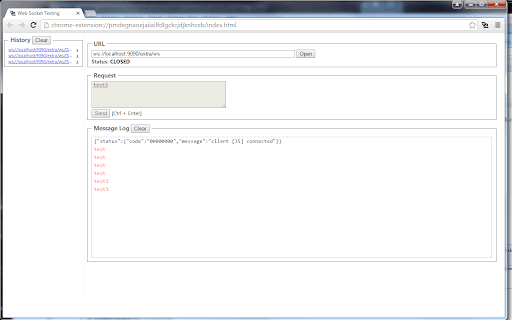
WebSocket Test Client can be used to help construct custom WebSocket requests and handle responses to directly test your WebSocket services. 1. Enter the URL of your Web Socket server. 2. Click Open. 3. Input request text, then click Send. 4. The Log shows response messages.

CORS Unblock
No more CORS error by appending 'Access-Control-Allow-Origin: *' header to local and remote web requests when enabled This extension bypasses the "XMLHttpRequest" and "fetch" rejections by altering the "Access-Control-Allow-Origin" and "Access-Control-Allow-Methods" headers for every request that the browser receives. You can activate the extension by pressing the action button. Also, use the right-click context menu over the action button to modify which headers the extension manipulates. You can also ask the extension not to overwrite these headers when the server returns values for them. The default values for the headers: Additional Features: 1. It can remove the following CSP-related headers: "Content-Security-Policy", "Content-Security-Policy-Report-Only", "X-WebKit-CSP" and "X-Content-Security-Policy". 2. It can overwrite the returned 4xx status code from the server. Use this feature when a server does not support a method, but you want to pretend it does. 4. It can permit cross-origin frame embedding (by removing the "X-Frame-Options" header) to simplify remote page embedding during local development. 5. It can include or exclude the "referer" and "origin" headers when a server is sensitive to them to work appropriately. 6. The extension optionally uses the "chrome.debugger" to overwrite 4xx status codes (in case a server does not support a method, you can use this feature to pretend the server accepts a response or supports an unsupported method). 7. The extension also optionally fixes CORS policies of redirected URLs. -- It is important to note that this extension fixes preflight requests to permit access to any custom header (when enabled). Links: 1. For reporting bugs, please use the link https://github.com/balvin-perrie/Access-Control-Allow-Origin---Unblock.

Allow CORS: Access-Control-Allow-Origin
Easily add (Access-Control-Allow-Origin: *) rule to the response header. Allow CORS: Access-Control-Allow-Origin lets you easily perform cross-domain Ajax requests in web applications. Simply activate the add-on and perform the request. CORS or Cross-Origin Resource Sharing is blocked in modern browsers by default (in JavaScript APIs). Installing this add-on will allow you to unblock this feature. Please note that, when the add-on is added to your browser, it is inactive by default (toolbar icon is grey C letter). If you want to activate the add-on, please open the toolbar popup and press the toggle button on the left side. The icon will turn to an orange C letter. If you have a feature request or found a bug to report, please fill out the bug report form on the add-on's homepage (https://mybrowseraddon.com/access-control-allow-origin.html).

Redux DevTools
Redux DevTools for debugging application's state changes. The extension provides power-ups for your Redux development workflow. Apart from Redux, it can be used with any other architectures which handle the state. This is an open source project. See the official repository for more details: https://github.com/reduxjs/redux-devtools

Moesif Origin/CORS Changer & API Logger
Allow cross-domain requests by override Origin and CORS headers. Log/capture XmlHttpRequest API calls for debugging and analytics. This plugin allows you to send cross-domain requests directly from browser without receiving Cross Origin Errors. You can override the Request Origin header with this plugin and also have Access-Control-Allow-Origin set to *. Update: We removed email list signup and added ability to log and capture API calls. Migrated from Chrome Manifest V2 to V3, due to the new V3 "storage" api, your old settings may need to be reentered. You can override: Request Headers: Origin Response Headers: Access-Control-Allow-Origin, Access-Control-Allow-Methods, Access-Control-Allow-Headers, Access-Control-Allow-Credentials, Access-Control-Expose-Headers Guide on CORS: https://www.moesif.com/blog/technical/cors/Authoritative-Guide-to-CORS-Cross-Origin-Resource-Sharing-for-REST-APIs/ You can capture any Ajax, XmlHttpRequest, or fetch API requests made by any page, and send to your Moesif account for analytics and debugging. DISCLAIMER: This tool circumvents CORS security rules baked into every browser and is intended for testing your own website during development. Some production websites like Google Docs or Facebook may complain if they detect something that isn't expected. You can use the whitelist feature to only turn on for some domains. To avoid security issues, it is recommend to turn off after debugging. About Moesif API Monetization and Observability: Moesif (https://www.moesif.com) enables API teams at UPS, You.com, Deloitte, and others to deeply understand customer API usage and ship better API products with user-centric API analytics and monetization, which enables you to: - Understand customer API usage with user behavior analytics. - Debug issues quickly with high-cardinality API logs and metrics. - Get alerted of problems that impact customers. - Track API KPIs with custom dashboards. - Meter API usage and set up billing meters with integrations with Stripe, Chargebee, and custom billing platforms. By using this extension, you agree to Moesif's terms of use (https://www.moesif.com/terms) and privacy policy (https://www.moesif.com/pravicy).
