
digfbfaphojjndkpccljibejjbppifbc
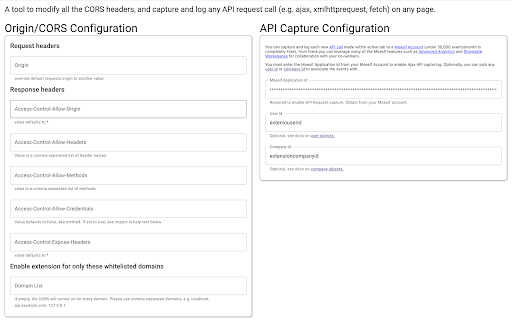
Allow cross-domain requests by override Origin and CORS headers. Log/capture XmlHttpRequest API calls for debugging and analytics. This plugin allows you to send cross-domain requests directly from browser without receiving Cross Origin Errors. You can override the Request Origin header with this plugin and also have Access-Control-Allow-Origin set to *. Update: We removed email list signup and added ability to log and capture API calls. Migrated from Chrome Manifest V2 to V3, due to the new V3 "storage" api, your old settings may need to be reentered. You can override: Request Headers: Origin Response Headers: Access-Control-Allow-Origin, Access-Control-Allow-Methods, Access-Control-Allow-Headers, Access-Control-Allow-Credentials, Access-Control-Expose-Headers Guide on CORS: https://www.moesif.com/blog/technical/cors/Authoritative-Guide-to-CORS-Cross-Origin-Resource-Sharing-for-REST-APIs/ You can capture any Ajax, XmlHttpRequest, or fetch API requests made by any page, and send to your Moesif account for analytics and debugging. DISCLAIMER: This tool circumvents CORS security rules baked into every browser and is intended for testing your own website during development. Some production websites like Google Docs or Facebook may complain if they detect something that isn't expected. You can use the whitelist feature to only turn on for some domains. To avoid security issues, it is recommend to turn off after debugging. About Moesif API Monetization and Observability: Moesif (https://www.moesif.com) enables API teams at UPS, You.com, Deloitte, and others to deeply understand customer API usage and ship better API products with user-centric API analytics and monetization, which enables you to: - Understand customer API usage with user behavior analytics. - Debug issues quickly with high-cardinality API logs and metrics. - Get alerted of problems that impact customers. - Track API KPIs with custom dashboards. - Meter API usage and set up billing meters with integrations with Stripe, Chargebee, and custom billing platforms. By using this extension, you agree to Moesif's terms of use (https://www.moesif.com/terms) and privacy policy (https://www.moesif.com/pravicy).

JSON Formatter
The original JSON Formatter, now with optional dark mode 🌚 Auto-formats JSON when you load it in a browser tab. - Fast, even on very long JSON pages - Dark mode - Syntax highlighting - Collapsible trees, with indent guides - Clickable URLs - Negligible performance impact on non-JSON pages (less than 1 millisecond) - Works on any valid JSON page – URL doesn't matter - Buttons for toggling between raw and parsed JSON - FIXED: Exports the parsed JSON to window.json so you can explore it in Dev Tools Note: this extension might clash with other browser extensions that modify the DOM before it runs. If it doesn't seem to be working, try disabling other extensions. If it clashes with an extension you need, open an issue and I'll try to find a solution. PRIVACY No tracking, no advertising, and nothing else nefarious.

Apollo Client Devtools
GraphQL debugging tools for Apollo Client. Apollo Client Devtools is a Chrome extension for the open-source GraphQL client, Apollo Client. This extension has 4 main features: 1. A built-in version of the Apollo Studio Explorer that allows you to make queries against your GraphQL server using your app's network interface directly (no configuration necessary). 2. A query watcher that shows you which queries are being watched by the current page, when those queries are loading, and what variables those queries are using. 3. A mutation inspector that displays the mutations made to your Apollo Client application data. 4. A cache inspector that displays your Apollo Client cache data. You can explore the cache through a tree-like interface, and search for specific field keys and values. Code for this extension can be found at: https://github.com/apollographql/apollo-client-devtools

Redux DevTools
Redux DevTools for debugging application's state changes. The extension provides power-ups for your Redux development workflow. Apart from Redux, it can be used with any other architectures which handle the state. This is an open source project. See the official repository for more details: https://github.com/reduxjs/redux-devtools

Vue.js devtools (beta)
DevTools browser extension for Vue.js Chrome DevTools extension for debugging Vue.js applications. Thank you for trying the Vue.js devtools Beta! If you have any issue, please report them on the GitHub repository. This is the beta channel with a brand-new re-implementation, built with Vue 3. Note the beta channel may cause conflict with the stable version of Vue devtools. If the Vue icon is lit but the Vue tab doesn't show up in devtools, please temporarily disable the stable version and re-open the page.
