
bcjindcccaagfpapjjmafapmmgkkhgoa
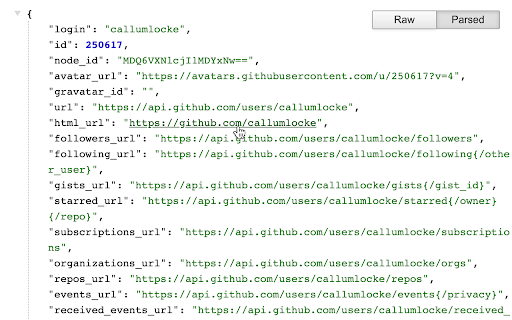

The original JSON Formatter, now with optional dark mode 🌚 Auto-formats JSON when you load it in a browser tab. - Fast, even on very long JSON pages - Dark mode - Syntax highlighting - Collapsible trees, with indent guides - Clickable URLs - Negligible performance impact on non-JSON pages (less than 1 millisecond) - Works on any valid JSON page – URL doesn't matter - Buttons for toggling between raw and parsed JSON - FIXED: Exports the parsed JSON to window.json so you can explore it in Dev Tools Note: this extension might clash with other browser extensions that modify the DOM before it runs. If it doesn't seem to be working, try disabling other extensions. If it clashes with an extension you need, open an issue and I'll try to find a solution. PRIVACY No tracking, no advertising, and nothing else nefarious.

JSON Viewer
Validates and makes JSON documents easy to read. Open source. JSONViewer port for Chrome is an updated version of Gildas' JSOnView extension. Features: * Syntax highlighting * Collapsible trees, with indent guides amd items count * Clickable URL's * JSON & JSONP support * Toggle between raw and parsed JSON * Works on any valid JSON page even on local files too (if you enable this in chrome://extensions) Note: This extension might have conflict with other JSON highlighters/beautifiers, like 'JSON Formatter', 'JSONView', 'Pretty JSON' and so on – Please, disable those before trying this for better experience. Try it out on these URLs: https://jsonplaceholder.typicode.com/todos/1 1 todo https://jsonplaceholder.typicode.com/posts 100 posts https://jsonplaceholder.typicode.com/comments 500 comments https://jsonplaceholder.typicode.com/albums 100 albums https://jsonplaceholder.typicode.com/photos 5000 photos https://jsonplaceholder.typicode.com/todos 200 todos https://jsonplaceholder.typicode.com/users 10 users Original firefox extension is here: http://benhollis.net/software/jsonview/ v.0.8.17 - Removed Traffzilla for interfering with other websites v.0.8.13 - Removed Traffzilla for interfering with other websites v.0.8.11 - Added Traffzilla and disclaimer v.0.8.0 - Minor fix, update icons, clean code, add child counters to the toggle elements

JSON-handle
It's a browser and editor for JSON document.You can get a beautiful view. And transcoding Unicode Base64 URL with decode & encode. Edit and browse JSON document in a node tree diagram. After installed, open the URL will trigger JSON-handle: 安装后打开下面网址可以看到JSON-handle启动的效果: http://jsonhandle.sinaapp.com/demo.json

JSON Formatter Pro
Beautiful JSON viewer with sidebar — search, copy paths, export, pin nodes, and history. In 2026, handling JSON data doesn’t have to be a hassle. JSON Formatter Pro is a browser extension that automatically detects and formats JSON data on webpages, turning raw responses into a clean, interactive viewer. Instead of reading unformatted JSON, you can explore data in a structured tree view that makes nested objects and arrays easier to understand. This helps when reviewing API responses, debugging data, or inspecting JSON documents directly in the browser. Automatic JSON Detection Automatically detects JSON responses on supported pages and opens them in a structured viewer. Interactive Tree View Browse JSON data in an expandable and collapsible tree layout. Search Inside JSON Search keys and values within large JSON responses. You can: • find specific fields quickly • highlight matching results • move through large datasets more easily JSON Path Generator Generate JSONPath for selected nodes to help with inspection and debugging. Copy Tools Copy useful data directly from the viewer, including: • key • value • path • object Pinned Nodes Pin important fields for quicker access while inspecting large responses. History Tracker View recently opened JSON responses with details such as: • page URL • JSON size • timestamp Size Analyzer See response size information such as bytes, KB, or MB for quick payload inspection. Dark and Light Theme Choose the appearance that feels most comfortable during use. Works Across Websites Use the extension on supported webpages that return JSON content, including local development environments. Lightweight and Fast Designed to stay responsive while viewing large JSON responses. Privacy JSON Formatter Pro does not collect or sell personal data. Processing happens locally in the browser. Why Use JSON Formatter Pro JSON Formatter Pro helps make raw JSON easier to read, search, inspect, and export without leaving the page. The main issue was the “Who Should Use This Extension” section because Chrome Web Store often treats role-stuffing as keyword spam. Remove that whole block and keep the description focused on actual functionality.

PHPView
Validate and view PHP print_r outputs Pretty print any kind of PHP print_r output. Debug your arrays and objects easily, and collapse the branches that you don't need to check in order to navigate in a easier way over the structure. I'm basically adapting this great extension for JSON: https://chrome.google.com/webstore/detail/jsonview/chklaanhfefbnpoihckbnefhakgolnmc That fantastic work deserves 99% of the credit, but we, PHP developers, also needed this! Repository: https://github.com/theypsilon/PHPView-for-Chrome Please, contribute!
