
lfhmikememgdcahcdlaciloancbhjino
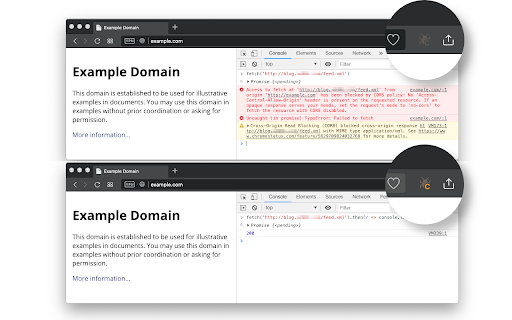

No more CORS error by appending 'Access-Control-Allow-Origin: *' header to local and remote web requests when enabled This extension bypasses the "XMLHttpRequest" and "fetch" rejections by altering the "Access-Control-Allow-Origin" and "Access-Control-Allow-Methods" headers for every request that the browser receives. You can activate the extension by pressing the action button. Also, use the right-click context menu over the action button to modify which headers the extension manipulates. You can also ask the extension not to overwrite these headers when the server returns values for them. The default values for the headers: Additional Features: 1. It can remove the following CSP-related headers: "Content-Security-Policy", "Content-Security-Policy-Report-Only", "X-WebKit-CSP" and "X-Content-Security-Policy". 2. It can overwrite the returned 4xx status code from the server. Use this feature when a server does not support a method, but you want to pretend it does. 4. It can permit cross-origin frame embedding (by removing the "X-Frame-Options" header) to simplify remote page embedding during local development. 5. It can include or exclude the "referer" and "origin" headers when a server is sensitive to them to work appropriately. 6. The extension optionally uses the "chrome.debugger" to overwrite 4xx status codes (in case a server does not support a method, you can use this feature to pretend the server accepts a response or supports an unsupported method). 7. The extension also optionally fixes CORS policies of redirected URLs. -- It is important to note that this extension fixes preflight requests to permit access to any custom header (when enabled). Links: 1. For reporting bugs, please use the link https://github.com/balvin-perrie/Access-Control-Allow-Origin---Unblock.

CSP Unblock
No more Content-Security-Policy limitations. This extension removes all CSP-related headers during website testing. This extension removes the following CSP-related response headers to remove limitations caused by CSP. 1. "content-security-policy" header 2. "content-security-policy-report-only" header 3. "x-webkit-csp" and "x-webkit-csp-report-only" headers 4. "x-content-security-policy" and "x-content-security-policy-report-only" headers 5. reporting APIs ("report-to" and "reporting-endpoints") Use Cases: 1. This extension can temporarily remove the limitations of CSP so that the developer can test inline and remote scripts. Also, you can load different cross-origin resources without any limitation. 2. Allow a website to load a remote worker script 3. Allow a website to play remote media Notes: 1. Disable the extension when you are browsing the internet. By removing CSP, the website's protection reduces significantly which might harm you. 2. The extension removes specified CSP-related headers from the top-frame and all sub-frame elements Definitions: "content-security-policy" header: The HTTP Content-Security-Policy response header allows website administrators to control resources the user agent is allowed to load for a given page. With a few exceptions, policies mostly involve specifying server origins and script endpoints. This helps guard against cross-site scripting attacks (Cross-site_scripting). "content-security-policy-report-only" header: The HTTP Content-Security-Policy-Report-Only response header allows web developers to experiment with policies by monitoring (but not enforcing) their effects. These violation reports consist of JSON documents sent via an HTTP POST request to the specified URI.

Requestly: Intercept & Modify HTTP Requests
Intercept & modify HTTP(S) traffic: redirect URLs, modify headers, inject scripts, mock REST & GraphQL APIs, and more. 🚀 Best Chrome extension to supercharge Web Development & QA. Trusted by 300,000+ developers. 👉 Requestly works directly in Chrome with beautiful, modern UI and team collaboration features. Popular features – Modify HTTP Headers, Override API Responses, API Mocking, Redirect URLs, Insert Scripts & HTTP Interceptor. 🌟 Top Use Cases → Mock API Responses to build frontend when backend isn't ready → Modify HTTP Request & Response Headers → Test local JavaScript changes directly on production sites → Use HTTP Redirect Rule to load scripts from local or staging environments on production sites → Modify and Mock API Request payload, Response body, & Status Code → Override GraphQL Requests 📌 https://requestly.com/blog/what-is-requestly Requestly (now a part of BrowserStack) doesn't set up a proxy in your browser, and hence, developers don't face VPN issues or lags while using it. Requestly leverages Chrome Extension APIs under the hood to intercept & modify requests. 👉 Redirect URLs, Change Host, Modify Query Params (Map Remote or Map Local) → Use dev/staging APIs in production sites & test local changes without code changes → Debug remote Javascript by loading locally running JS in production sites → Switch Hosts (e.g. abc.com/* to xyz.com/*) using Replace Rule → Debug Ad Tracking Pixels, Debug A/B Test Campaigns, etc → Remote Debugging with Requestly on Production sites → Swap Adobe Launch (Adobe DTM) scripts in production with staging script 📌 Demo Video – https://www.youtube.com/watch?v=85GVaOWTnlE 👉 Insert Scripts to any Webpage → UserScripts are simple JavaScript/CSS code that can change the layout of a page, add or remove new functionality and content, or automate actions. → Use File Server to upload long scripts and Inject them using Script Rule → Inject your JS tags on potential customers' sites and test your features → The sales/product team can use this to demo the product directly on the prospect's website (10x engaging demo) 📌 Demo – https://www.youtube.com/watch?v=4dvucRjLwGY 👉 Requestly supports the following imports → All HTTP header profiles from ModHeader → JSON configuration for Redirects & Scripts from Resource Override → XML configuration from Charles Proxy (Map local isn't supported in chrome extension yet due to technical limitations in browser) 👉 Additional Features → Enable/Disable rules with a single click → Export and import the rules and maintain a backup for your rules → Easy collaboration with others. Share Rules with other Users in one click 📌 Demo – https://www.youtube.com/watch?v=BM7kTFy-vdc

Anti-CORS, anti-CSP
Enable cross origin requests blocked by CORS or CSP. Disable CORS and CSP in selected hostnames, preserve security of other websites The extension enables cross origin requests with fetch() or XMLHttpRequest (XHR) objects that are blocked by CORS policy or violate the document’s Content Security Policy. It is an easiest way to solve CORS errors during development. Internally the extension bypasses Cross-Origin Resource Sharing (CORS) and Content Security Policy (CSP) by setting permissive Access-Control-Allow-Origin, Access-Control-Allow-Methods, Access-Control-Allow-Headers, Access-Control-Allow-Credentials and Content-Security-Policy response headers. User guide: Click the extension icon in the tab with the URL on which you want to enable cross-origin requests. CORS policy gets disabled in all the tabs with the same hostname. The tabs with web pages from other hosts are not affected. Any fetch() or XHR requests will succeed unless they are blocked by CSP. To disable CSP the pages have to be reloaded. Typical use case: You develop an enterprise web application whose functionality depends on already existing web services. The production environment has the same hostname as the web services, but the development environment is set up in your office and has a different hostname. The web services do not support the cross-origin requests. Thus, in the development environment HTTP requests to the essential web services are prevented by the CORS mechanism in the browser. You can imagine a solution based on a reverse proxy and the environment-dependent URLs for the REST services, or you can opt for the effortless solution not to do anything more than installing a browser extension. Not only CORS, but also CSP prevents cross-origin requests. A strict CSP is an increasingly common security requirement. As with CORS, you could set up different policies for the development and production environment, but it is easier to use an extension instead of configuring environment-specific application settings. How this extension is better than other extensions: - The extension is domain-specific. Cross-origin requests gets enabled, i.e. CORS and CSP get disabled, not globally in all browser tabs, but only in the tabs with the hostnames that you have selected by clicking on the extension icon. Thus, the extension does not compromise the security of all websites opened in your browser. - The extensions is open source and, thus, is safe. - The extension relaxes both CORS and CSP. - Cross origin requests with cookies are supported. The extension sets not an asterisk but the exact origin in the Access-Control-Allow-Origin header. - The extension does not disrupt function of any popular websites such as Youtube.com or Google Docs - The extension does not have any settings and does not need to be configured. - Besides the icon, the extension does not have any user interface. How to test a CORS extension There are two criteria: - Cross origin requests become possible. You can test all possible requests, i.e. GET, POST, PUT, DELETE, PATCH with or without credentials, on https://crossoriginrequests.onrender.com - Function of other websites, e.g. youtube.com or docs.google.com, should not be disrupted even when the extension is activated in their tabs. The source code of the anti-CORS extension is explained in https://marian-caikovski.medium.com/how-to-bypass-cors-and-csp-policies-and-enable-cross-origin-requests-in-a-browser-47fe269500fb The plain source code can be extracted from the extension or downloaded from https://github.com/marianc000/antiCors

Apollo Client Devtools
GraphQL debugging tools for Apollo Client. Apollo Client Devtools is a Chrome extension for the open-source GraphQL client, Apollo Client. This extension has 4 main features: 1. A built-in version of the Apollo Studio Explorer that allows you to make queries against your GraphQL server using your app's network interface directly (no configuration necessary). 2. A query watcher that shows you which queries are being watched by the current page, when those queries are loading, and what variables those queries are using. 3. A mutation inspector that displays the mutations made to your Apollo Client application data. 4. A cache inspector that displays your Apollo Client cache data. You can explore the cache through a tree-like interface, and search for specific field keys and values. Code for this extension can be found at: https://github.com/apollographql/apollo-client-devtools
