
lkbelpgpclajeekijigjffllhigbhobd
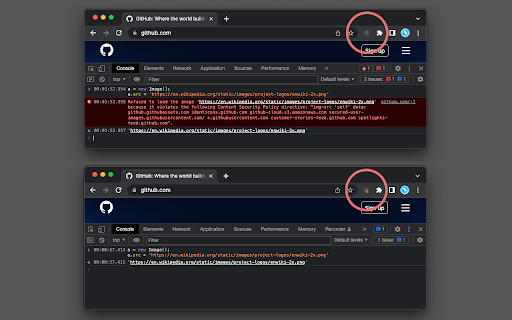
No more Content-Security-Policy limitations. This extension removes all CSP-related headers during website testing. This extension removes the following CSP-related response headers to remove limitations caused by CSP. 1. "content-security-policy" header 2. "content-security-policy-report-only" header 3. "x-webkit-csp" and "x-webkit-csp-report-only" headers 4. "x-content-security-policy" and "x-content-security-policy-report-only" headers 5. reporting APIs ("report-to" and "reporting-endpoints") Use Cases: 1. This extension can temporarily remove the limitations of CSP so that the developer can test inline and remote scripts. Also, you can load different cross-origin resources without any limitation. 2. Allow a website to load a remote worker script 3. Allow a website to play remote media Notes: 1. Disable the extension when you are browsing the internet. By removing CSP, the website's protection reduces significantly which might harm you. 2. The extension removes specified CSP-related headers from the top-frame and all sub-frame elements Definitions: "content-security-policy" header: The HTTP Content-Security-Policy response header allows website administrators to control resources the user agent is allowed to load for a given page. With a few exceptions, policies mostly involve specifying server origins and script endpoints. This helps guard against cross-site scripting attacks (Cross-site_scripting). "content-security-policy-report-only" header: The HTTP Content-Security-Policy-Report-Only response header allows web developers to experiment with policies by monitoring (but not enforcing) their effects. These violation reports consist of JSON documents sent via an HTTP POST request to the specified URI.

Disable Content-Security-Policy
Disable Content-Security-Policy for web application testing. When the icon is colored, CSP headers are disabled. Use at your own risk. This disables the Content-Security-Policy header for a tab. Use this when testing what resources a new third-party tag includes onto the page. Click the extension icon to disable Content-Security-Policy header for the tab. Click the extension icon again to re-enable Content-Security-Policy header. Use this only as a last resort. Disabling Content-Security-Policy means disabling features designed to protect you from cross-site scripting. Prefer to use report-uri which instructs the browser to send CSP violations to a URI. That allows you keep Content-Security-Policy enabled in your browser but still know what got blocked. https://report-uri.com is a free tool that gives you a web interface to inspect CSP violations on your site.

CORS Unblock
No more CORS error by appending 'Access-Control-Allow-Origin: *' header to local and remote web requests when enabled This extension bypasses the "XMLHttpRequest" and "fetch" rejections by altering the "Access-Control-Allow-Origin" and "Access-Control-Allow-Methods" headers for every request that the browser receives. You can activate the extension by pressing the action button. Also, use the right-click context menu over the action button to modify which headers the extension manipulates. You can also ask the extension not to overwrite these headers when the server returns values for them. The default values for the headers: Additional Features: 1. It can remove the following CSP-related headers: "Content-Security-Policy", "Content-Security-Policy-Report-Only", "X-WebKit-CSP" and "X-Content-Security-Policy". 2. It can overwrite the returned 4xx status code from the server. Use this feature when a server does not support a method, but you want to pretend it does. 4. It can permit cross-origin frame embedding (by removing the "X-Frame-Options" header) to simplify remote page embedding during local development. 5. It can include or exclude the "referer" and "origin" headers when a server is sensitive to them to work appropriately. 6. The extension optionally uses the "chrome.debugger" to overwrite 4xx status codes (in case a server does not support a method, you can use this feature to pretend the server accepts a response or supports an unsupported method). 7. The extension also optionally fixes CORS policies of redirected URLs. -- It is important to note that this extension fixes preflight requests to permit access to any custom header (when enabled). Links: 1. For reporting bugs, please use the link https://github.com/balvin-perrie/Access-Control-Allow-Origin---Unblock.

CORS Unblocker
Temporarily bypass CORS restrictions to streamline development and testing workflows. CORS Unblocker: Effortless Cross-Origin Development and Testing Simplify API Testing and Web Development Take control of your development workflow with CORS Unblocker, the ultimate tool for bypassing Cross-Origin Resource Sharing (CORS) restrictions. Designed with developers and testers in mind, this extension streamlines the process of working with local and cross-origin APIs. Key Features Instant CORS Bypass Enable or disable CORS restrictions with a single click, removing barriers to seamless API and web application testing. No server-side changes required! Temporary and Secure CORS unblock settings are temporary and automatically reset when the browser closes, ensuring your browsing remains secure. Developer-Focused Design Tailored specifically for developers and testers, this tool simplifies debugging and accelerates workflows for local development and API integrations. Built-In Security Warning Receive clear, built-in warnings about potential security implications when disabling CORS, empowering you to make informed choices. Minimalist, User-Friendly Interface Enjoy a sleek, intuitive UI that makes toggling the CORS unblocker quick and hassle-free. Safe for Development Environments Perfect for debugging and testing without affecting live or production systems, keeping your projects secure. Plug-and-Play Functionality No setup required—just install, enable, and start using immediately. Universal Compatibility Works across all websites and API endpoints, offering a comprehensive solution for cross-origin issues. Why Choose CORS Unblocker? Whether you're a seasoned developer or just starting, CORS Unblocker is an essential tool for enhancing your productivity. Debug, test, and develop faster while keeping your projects secure and efficient. Download now and revolutionize your cross-origin development!

Disable-CSP
A browser extension to disable http header Content-Security-Policy and html meta Content-Security-Policy A browser extension to disable http header Content-Security-Policy and html meta Content-Security-Policy In the process of website development and testing, we inevitably need to inject cross-domain resources into some websites, but Content-Security-Policy prevents this. So you can use this extension to disable Content-Security-Policy so that you have a better development experience
