
febilkbfcbhebfnokafefeacimjdckgl
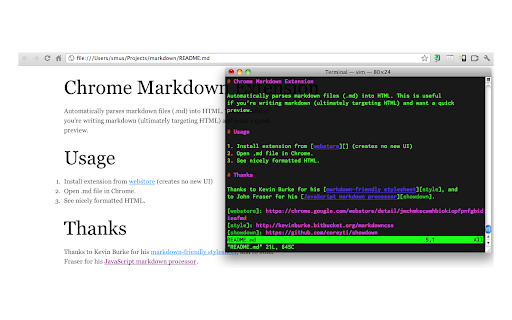
Converts and previews markdown files (.md, .markdown) to HTML(include TOC) right inside Chrome and support live reload Automatically parses markdown files (.md) into HTML with live reload 1. Install extension from webstore (creates no new UI) 2. Check "Allow access to file URLs" in chrome://extensions listing: 3. Open local or remote .md file in Chrome. 4. See nicely formatted HTML! Note: The auto reload feature is disabled default. * Support auto reload. * Support external css file. * Customize theme for every md file. * Support github flavored markdown. * Export nicely formatted HTML. * Support render Katex, Mermaid. The extension is open source. https://github.com/volca/markdown-preview * Fix a bug for load fonts of Katex * Fix a bug for "table of contents" * Compatible with Chrome 136 * Update mermaid lib * Update marked lib * Update marked lib * Fix a bug for clear custom CSS paths * Supports add custom CSS path. See #19 * Fix a bug for render mermaid. See #158

Talend API Tester - Free Edition
Visually interact with REST, SOAP and HTTP APIs. Welcome to Talend API Tester - Free Edition, formerly known as Restlet Client. Talend API Tester makes it easy to invoke, discover and test HTTP and REST APIs. 1. Send requests and inspect responses Talend API Tester - Free Edition handles all HTTP requests, no matter how complex. Requests can be made dynamic by inserting variables. Security and authentication are fully supported, as well as hypermedia and HTML forms. You can visualize, prettify and inspect HTTP responses. Whether you want to check that your API is behaving as specified, or you need to confirm how well third-party APIs are responding, Talend API Tester lets you perform many sorts of API response tests. Use assertions to validate values of headers, parts of the body or response time among others. Environments variables can also be created to increase the reusability of your tests. - Interact with REST or simple HTTP APIs through a visual and easy-to-use UI - View and search your call history. Edit and re-send requests from history. - Save and organize your requests into projects and services. - Build dynamic requests with custom variables, security and authentication. - Visualise and inspect responses of different format (JSON, XML, HTML, images...) using different views (raw, pretty, preview) - Validate responses with assertions (status, headers, XML and JSON body, response time...) - Easily import your Postman Collections, Swagger / OAS / OpenAPI and HAR (HTTP Archive). Why does Talend API Tester require "Read and change all your data on the websites you visit" and "Communicate with cooperating websites" permissions? Chrome extensions which need access to internet resources must have the resources declared in their manifest which can be a list of URLs or URL mask. For example, http://*/* allow access to any URL. Allowing access to any URL is a primary function of Talend API Tester. The URL mask with wildcards is interpreted by Chrome Web Store as Talend API Tester can read and change all your data on the websites you visit, without meaning that the app is doing something wrong.

FeHelper - JSON格式化、编解码、二维码、开发者工具箱
FeHelper is a powerful developer tool designed for front-end developers. It integrates various practical tools to help developers improve work efficiency. However, FeHelper strictly adheres to the principle of single function activation. By default, FeHelper only provides the JSON auto-formatting function, and all other functions are disabled by default. If users need them, they can go to the plugin configuration page to install and enable them. The following are the main functions of FeHelper: ## JSON Tools: - JSON beautifier: Automatically detects and formats JSON data, supports manual formatting, decoding of messy codes, sorting, BigInt processing, editing, downloading, and skin customization, greatly facilitating developers' processing of JSON data. - JSON comparison tool: Supports automatic key-value comparison of two JSON contents, highlights differences, and helps developers quickly identify data changes. ## QR Code Tool: - QR code generator: Supports custom color and icon QR code generation, suitable for a variety of application scenarios. - QR code decoder: Supports multiple modes of QR code decoding, including decoding after pasting a screenshot, which is convenient and fast. ## Encoding tool: - String encoding and decoding: Supports multi-format information encoding and decoding, such as Unicode, UTF-8, URL, Base64, MD5, etc., to meet different encoding requirements. Code beautification tool: Supports code beautification for multiple languages, including Javascript, CSS, HTML, XML, and SQL, helping developers maintain clean and tidy code. Code compression tool: Provides simple code compression functionality, supports HTML, Javascript, and CSS code compression, and optimizes web page loading speed. ## Developer Tools: - AI assistant: A super intelligent dialogue tool powered by AI, supporting code writing, code modification, scheme design, and other tasks to improve development efficiency. - Simple Postman: An interface debugging tool that supports GET/POST/HEAD request methods, automatically formats JSON content, and simplifies the API testing process. - Websocket tool: supports packet capture testing for Websocket interfaces, including connection testing for ws services, message sending testing, result analysis, and more. ## Other tools: - Time (stamp) conversion: mutual conversion between localized time and time stamp, supporting second/millisecond, world time zone switching, clock display in various time zones, etc. - Random password generation: Generate passwords by randomly combining various characters, supporting specified length and character type to ensure password security. - My sticky notes: A sticky notes tool that supports creating directories to categorize and manage notes. Notes can be exported/imported with one click for convenient information management. - Markdown conversion: Markdown editing/preview tool, supports direct conversion of HTML fragments to Markdown, and supports downloading content in PDF format. - Webpage screenshot tool: It can take screenshots of any webpage, supporting both visible area screenshots and full-page scrolling screenshots. The final result can be previewed before being saved. - Page color picker tool: You can directly collect color values for any element on the webpage. Move the cursor to the location where you want to pick the color, and click OK.

Asciidoctor.js Live Preview
Render AsciiDoc (.ad, .adoc, .asc, .asciidoc) as HTML inside your browser! The extension can be configured via an options page. To open the options page, right-click the extension icon and choose Options on the menu. You can also go to chrome://extensions and click the Options link. The options page let you add custom attributes or change the theme of the AsciiDoc HTML output. • Migrate to manigest v3 -- `include` won't work anymore! • Migrate documentation to Antora: https://docs.asciidoctor.org/browser-extension/ • Reorganize use-cases to separate page, try-it-yourself to a quickstart page, diagrams try-it-yourself to a diagrams quickstart page (#652) (#654) • Fix MathJax equation numbering (#412) • Upgrade Asciidoctor.js from 2.2.0 to 2.2.1(based on Asciidoctor 2.0.12) • Upgrade Asciidoctor Kroki from 0.8.2 to 0.12.0 (add excalidraw, bpmn and bytefield as a supported diagrams) • Global configuration using `kroki-default-format` and `kroki-default-options` attributes • Upgrade bulma from 0.8.2 to 0.9.1 • Do not add the toc2 class if the document has no section - thanks @mnrvwl • Stop auto reload when the extension has been disabled - thanks @mnrvwl • Remove the deprecated options_page - thanks @mnrvwl • Upgrade Asciidoctor.js from 2.1.1 to 2.2.0 • Upgrade Asciidoctor Kroki from 0.7.0 to 0.8.1 • Support sidebar toc • Compatibility with Firefox, use the same codebase again! • Remove chartist sourcemap reference • Upgrade Asciidoctor.js from 2.0.3 to 2.1.1 • Show errors thrown by the background script on the page (thanks @doub) • Catch exceptions thrown by the initial XMLHttpRequest • Use the `Cache-Control` header to make sure that we fetch the latest version available • Upgrade Asciidoctor Kroki from 0.4.0 to 0.7.0 with new diagrams: `packetdiag`, `rackdiag`, `vega` and `vegalite` • Upgrade chartist from 0.11.0 to 0.11.4 • Upgrade bulma from 0.7.5 to 0.8.2 • Move the fetch and convert functions in the background script (as the latest version of Chrome 80+ blocks `XMLHttpRequest` sent by the content script) • Upgrade to MathJax 3.0.1 • Fix inter-document cross references by using `.adoc` as `outfilesuffix` (thanks @jmini) • Disable the diagram extension by default (can be enabled in options page) • The Kroki server URL can now be configured in the options page (for instance, you can point to a local instance) • Set built-in attributes docfile, docname and docfilesuffix (thanks @utopalex & @ehmkah) • Use Kroki extension to render diagrams (support BlockDiag, SeqDiag, ActDiag, NwDiag, C4, Ditaa, Erd, GraphViz, Mermaid, Nomnoml, PlantUML, SvgBob and UMLet diagrams!) • Load additional languages for highlight.js (using :highlightjs-languages: attribute) • Upgrade to Asciidoctor.js 2.0.3 • The default safe mode is now safe (was secure)

Sourcegraph
Connect Sourcegraph to GitHub. Open repos, compare revisions and search code directly from Chrome's Omnibox for faster development. Make it work on your code host • GitHub: No action required. Your extension works here by default. • GitHub Enterprise: click the extension icon and update the "Sourcegraph URL" Make it work for private code To use the browser extension with your private repositories, you must set up a private Sourcegraph instance and connect it to the extension.
