
bfnnokhpnncpkdmbokanobigaccjkpob

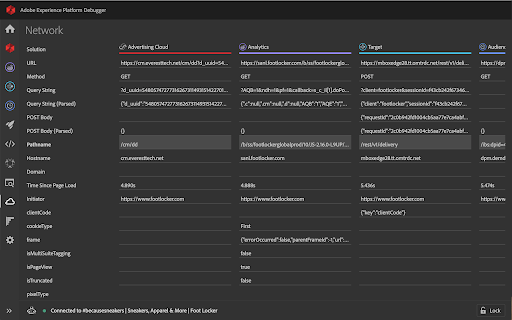

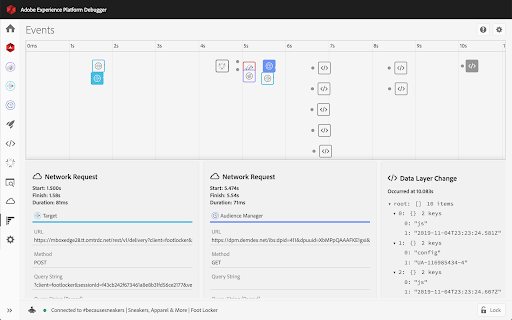

Debug Adobe Experience Platform and Adobe Experience Cloud products using the Adobe Experience Platform Debugger The new Adobe Experience Platform Debugger helps to debug Adobe Experience Platform and Adobe Experience Cloud products. The new Debugger includes everything you love in the previous debugger plus these new features: Fresh-yet-familiar design Enjoy a debugging experience that feels more intuitive and natural. More space to debug The new navigation bar auto-collapses when Debugger get too small to ensure you have enough space to debug. See your data layer in action See data layer changes on a timeline alongside every Adobe network call to more easily debug your data. Understand your data layer Toggle the diff viewer to see how your data layer evolves across the event timeline. Freely Flip through tabs Click the Lock icon to stay connected to the current tab in focus without losing the context of the page you’re debugging. Implementation health at your fingertips See in-context implementation health checks powered by Adobe Experience Platform Auditor so ensure your Adobe implementations are healthy. More flexible Launch and DTM testing Inject Launch embed codes, or replace or block both DTM and Launch embed codes. Easy on the eyes Go to settings to toggle between dark- and light-mode.

Adobe Experience Cloud Visual Editing Helper
The Visual Editing Helper extension allows users to load their website into Adobe Target or Adobe Journey Optimizer. The Visual Editing Helper Chrome extension allows Adobe Experience Cloud users to load their website into Adobe Target or Adobe Journey Optimizer and to use a visual WYSIWYG editor to personalize it. The extension solves site-loading issues for which customers now rely on the Target Enhanced Experience Composer or third-party extensions to be able to author their websites. Benefits of using the Visual Editing Helper extension: - All iframe busting headers, such as X-Frame-Options and Content-Security-Policy, are implicitly removed from the website to enable authoring. - Extension sets SameSite attribute to the value "None" for the website's session cookies in order to be able to login using the visual editor. - Customers new to Target or to Journey Optimizer can use the extension to experiment even if their IT developers have not yet implemented Target or Journey Optimizer on their websites.

AEM Navigator
Useful for AEM developers for easy navigation.Useful for Touch UI. AEM Navigator is meant for AEM developers to ease them to navigate through various consoles easily and way faster. Read the complete blog here https://howtoaem.blogspot.com/2019/10/aem-navigator-chrome-extension-aem_24.html 1. Open page in- Edit Mode Disabled Mode Open Page Properties directly and edit them Open page in CRXDE directly 2. Most used consoles CRXDE Package Manager Welcome Page 3. Assets and Sites Open DAM Open Sites Open Templates

MiaProva
MiaProva facilitates organizational scale and visibility into optimization programs. This extension is for Adobe Target end users. MiaProva's Chrome Extension 2.2.0.2 Update Updated the colors of the icon to make it easier to see when the extension is on or off and improved the loading/unloading of the Chrome Extension MiaProva's Chrome Extension 2.1.0.2 Update: We've added support to copy and download the Adobe Target server calls (mbox calls) as well as the WebSDK network calls. This will be helpful as organizatations enhance their WebSDK use or migrate from at.js to the WebSDK. MiaProva's Chrome Extension 2.1.0.1 Update: Added support for sites that have site injectors and don't provide a URL to Adobe Target. MiaProva's Chrome Extension 2.1.0.0 Update: New Branding and Design. MiaProva's Chrome Extension 2.0.1.0 Update: Added additional support for older at.js versions and made some CSS tweaks. MiaProva's Chrome Extension 2.0.0.0 Update: - Support for Adobe's WebSDK and Adobe Target - New Network Panel exposing Adobe Target Server calls along with any WebSDK requests and search functionality - Highlighting of tested content areas when the VEC was used - Visibility into Response Tokens with each modification from an Adobe Target Activity - A feed into the MiaProva Blog - Updates to Profile retrieval based on the Adobe ECID and Client ID (when WebSDK is detected) Below is a small list of features by each MiaProva Chrome Extension tab. We also have more information available here: https://www.miaprova.com/blog/adobe-target-chrome-extension-brought-to-you-by-miaprova/. ACTIVITIES tab: Here, Adobe Target users can easily see what activities and experiences they are members of as they traverse their digital properties. They can also see what other activities are mapped to their Adobe Target ID, which is very helpful for understanding cross-test participation. Target users will also see the data communicated to Adobe Target and a response from Adobe with the order of activities and offers execution for QA purposes. MiaProva also makes the offer code available for easy consumption. The premium feature on the Activities tab is that MiaProva customers can access reporting for any live Adobe Target Activity managed within MiaProva. MiaProva users can also upload test screenshots to those tests within this tab. PROFILE tab: This tab gives Adobe Target users a window into what Profile Attributes and values are associated with their Adobe Target ID. This feature creates an incredible opportunity for Adobe Target users to become more familiar with what Profiles are and how to use them for their personalization efforts. You can view all of your attributes within this tab, add additional attributes (helpful for many reasons!), and edit any of your current non-user—profile attributes. ID tab: Users can quickly see and copy any visitor ID values used in their optimization efforts. We purposely put the mbox3rdPartyId or 1st party ID in the first spot to highlight this underutilized component, which allows Adobe Target users to coordinate tests across devices and use all the rich data available in internal databases. IDEAS tab: Premium Feature—MiaProva's Chrome Extension is directly linked to end-user MiaProva accounts. Users can add test ideas in the context of their site and research. MiaProva will communicate ideas submitted here to its Idea Board for voting and prioritization. Subscribers to new ideas will receive an email letting them know. REPORTS tab: Premium Feature - MiaProva customers can access their test results via MiaProva's Adobe I/O integration. MiaProva also provides lift and statistical confidence calculations and makes them available here. Thank you for checking out the MiaProva Chrome Extension. We would love any feedback, thoughts, or ideas you may have. Please contact us at support@miaprova.com, and we will respond immediately.

Digital Data Viewer (DDV)
View, filter and save Adobe Analytics and Adobe Experience Manager (XDM / Alloy) data from developer tools. Digital Data Viewer (DDV) captures requests made to Adobe Experience analytics platforms (AppMeasurement + XDM) and presents the information from your digitalData data layer delivered to Adobe for page view and link click event tracking in devtools panel. - Compact view tied to each tab, for focused evaluation of data dedicated to analytics analysis. - Incorporates Tag Management System info (Adobe Launch and Tealium) including build, property, report suite into each request. - The filter mechanism allows for simple string search, as well as regexp, and filters out request so only those that include the matching value are displayed - Export all request as: CSV, TEXT, HTML, JSON -- allowing for the capture of an entire "flow" for further analysis offline. - Forward events to your endpoint to assist with Adobe Event Forwarding local development.
