
jakfkigacoblojbffhjananlifkombok

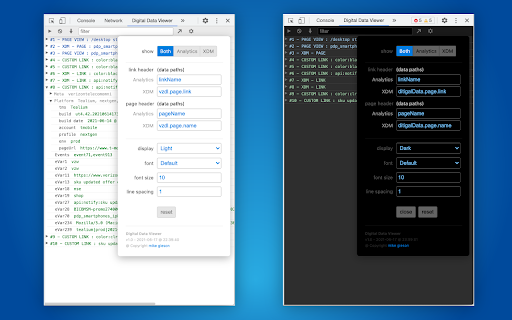
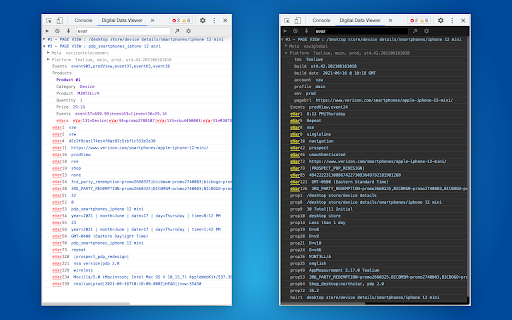
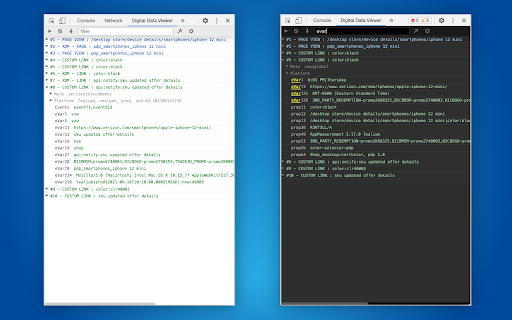
View, filter and save Adobe Analytics and Adobe Experience Manager (XDM / Alloy) data from developer tools. Digital Data Viewer (DDV) captures requests made to Adobe Experience analytics platforms (AppMeasurement + XDM) and presents the information from your digitalData data layer delivered to Adobe for page view and link click event tracking in devtools panel. - Compact view tied to each tab, for focused evaluation of data dedicated to analytics analysis. - Incorporates Tag Management System info (Adobe Launch and Tealium) including build, property, report suite into each request. - The filter mechanism allows for simple string search, as well as regexp, and filters out request so only those that include the matching value are displayed - Export all request as: CSV, TEXT, HTML, JSON -- allowing for the capture of an entire "flow" for further analysis offline. - Forward events to your endpoint to assist with Adobe Event Forwarding local development.

Contentsquare - CS Live
Contentsquare’s CS Live extension will allow you to display Contentsquare’s unique UX metrics directly on your website. For every zone on each page, you can seamlessly see metrics like click recurrence, hesitation time or engagement rate.

Omnibug
Omnibug is a browser extension to decode and display outgoing digital marketing tool requests. Omnibug is a Chrome extension built to ease developing with, debugging, and providing quality assurance to today's analytics, UX/CRO tools, and many other marketing technologies. These tags include the Google Marketing Cloud (including Google Analytics, Google Tag Manager, Doubleclick, and Google Ads), the Adobe Experience Cloud (including Adobe Analytics, Adobe Launch, Adobe Target, Web SDK), Tealium iQ, and many more! Events sent to these MarTech platforms are captured and decoded into a human-readable format, which can be filtered and/or exported. You can view all of our release notes at https://omnibug.io/help/changelog/ and a list of providers we support at https://omnibug.io/help/supported-tags/

Adobe Experience Cloud Visual Editing Helper
The Visual Editing Helper extension allows users to load their website into Adobe Target or Adobe Journey Optimizer. The Visual Editing Helper Chrome extension allows Adobe Experience Cloud users to load their website into Adobe Target or Adobe Journey Optimizer and to use a visual WYSIWYG editor to personalize it. The extension solves site-loading issues for which customers now rely on the Target Enhanced Experience Composer or third-party extensions to be able to author their websites. Benefits of using the Visual Editing Helper extension: - All iframe busting headers, such as X-Frame-Options and Content-Security-Policy, are implicitly removed from the website to enable authoring. - Extension sets SameSite attribute to the value "None" for the website's session cookies in order to be able to login using the visual editor. - Customers new to Target or to Journey Optimizer can use the extension to experiment even if their IT developers have not yet implemented Target or Journey Optimizer on their websites.

Online Download Manager
Easily manage and accelerate your downloads up to 5 times! Online Download Manager will enable you to download all types of files without any hassle at the maximum speed. Download Accelerator is an application that enables you to download large files with multi-threaded method. You can easily download any url on the web and save files on your PC or right on your Google Drive without saving it on your side. How to use internet download manager for chrome - select image, voice, video - click right then click download with ODM - click start download - Our software will split your download into multiple files All the features are available right in your browser! This software is 100% free and does not require you to pay.
