
kgmjjkfjacffaebgpkpcllakjifppnca
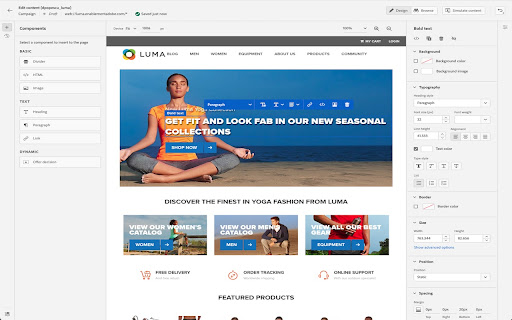
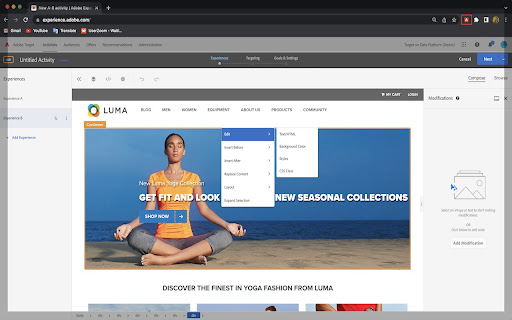
The Visual Editing Helper extension allows users to load their website into Adobe Target or Adobe Journey Optimizer. The Visual Editing Helper Chrome extension allows Adobe Experience Cloud users to load their website into Adobe Target or Adobe Journey Optimizer and to use a visual WYSIWYG editor to personalize it. The extension solves site-loading issues for which customers now rely on the Target Enhanced Experience Composer or third-party extensions to be able to author their websites. Benefits of using the Visual Editing Helper extension: - All iframe busting headers, such as X-Frame-Options and Content-Security-Policy, are implicitly removed from the website to enable authoring. - Extension sets SameSite attribute to the value "None" for the website's session cookies in order to be able to login using the visual editor. - Customers new to Target or to Journey Optimizer can use the extension to experiment even if their IT developers have not yet implemented Target or Journey Optimizer on their websites.

Launch and DTM Switch
Enables the developer to locally override the embedded Launch or DTM library for testing. Allows environment selection and debug toggling for DTM and Launch, by Adobe. This handy extension from the analytics team at Search Discovery allows you to select environments for Adobe Launch and to toggle the debug and staging mode for Adobe Dynamic Tag Management. The debug mode tells the DTM or Launch library to add application messaging to the console. The staging mode for DTM uses the staging library instead of the production library. For sites using Adobe Launch, the switch allows easy switching of environments within a property. Once installed, an icon will appear in the address bar when a site has Adobe Launch or DTM installed. Click on the icon to expose the control panel. Notice of anonymous usage tracking: This extension tracks anonymous usage data. This data helps us understand usage patterns in order to provide a better product. We track interactions within this extension and nothing else. If you would like to opt out of this tracking, just press the gear icon in the upper right of any panel and click “No.” v2.0.12 Update Notes - Another Fix for "Record Environments" functionality ("x-gw-ims-org-id" is now a required header for Launch API) v2.0.11 Update Notes - Fix for "Record Environments" functionality v2.0.10 Update Notes - Fixes for Adobe's new framing of Launch within experience.adobe.com v2.0.8 Update Notes - Support for 99 Environments per Launch Property (previously 25) v2.0.6 Update Notes - Added support for DTM linked launch properties - Added "Clear Environments" button on the settings tab - Allow for Launch debugging to be activated when no environments are recorded Our overhaul of this extension is part of Search Discovery’s larger commitment to the Launch, by Adobe platform and to our clients as they migrate. Find out more about Search Discovery’s solutions for Launch, by Adobe. Feedback : launch-switch-extension@searchdiscovery.com

AEM Sidekick
AEM Sidekick allows authors of AEM sites to easily preview and publish content. Edit, preview, and publish your AEM content simply and in-context using AEM Sidekick: • Jump to the editor from a published page to quickly make content changes • Switch between configured environments • Update the preview to see the latest content • Publish your changes Terms of use: https://www.adobe.com/legal/licenses-terms.html

AI Content Visibility Checker, powered by Adobe LLM Optimizer (LLMO)
See what LLMs can actually read and what they can’t on your page — in just one click. Instant AI Visibility Check for Any Webpage This free diagnostic tool lets you quickly check whether all content on your website is visible to large language models (LLMs) when they fetch pages for citation. See which text remains hidden from ChatGPT, Perplexity, Claude, and more that prevents your brand from being discovered and cited. 🔍 Citation Readability Score: See what percentage of your page is accessible to AI agents. This AI visibility checker helps you diagnose visibility on a single page basis. Adobe LLM Optimizer enables enterprises to measure, optimize, and act at scale. With the full product, teams can: Measure AI search visibility, citations, and share-of-voice Track how AI systems present and position their brand Receive prescriptive suggestions and deploy fixes with one-click optimizations Start with diagnostics. Scale with Adobe LLM Optimizer. Adobe blog: https://business.adobe.com/blog/introducing-the-llm-optimizer-chrome-extension

MiaProva
MiaProva facilitates organizational scale and visibility into optimization programs. This extension is for Adobe Target end users. MiaProva's Chrome Extension 2.2.0.2 Update Updated the colors of the icon to make it easier to see when the extension is on or off and improved the loading/unloading of the Chrome Extension MiaProva's Chrome Extension 2.1.0.2 Update: We've added support to copy and download the Adobe Target server calls (mbox calls) as well as the WebSDK network calls. This will be helpful as organizatations enhance their WebSDK use or migrate from at.js to the WebSDK. MiaProva's Chrome Extension 2.1.0.1 Update: Added support for sites that have site injectors and don't provide a URL to Adobe Target. MiaProva's Chrome Extension 2.1.0.0 Update: New Branding and Design. MiaProva's Chrome Extension 2.0.1.0 Update: Added additional support for older at.js versions and made some CSS tweaks. MiaProva's Chrome Extension 2.0.0.0 Update: - Support for Adobe's WebSDK and Adobe Target - New Network Panel exposing Adobe Target Server calls along with any WebSDK requests and search functionality - Highlighting of tested content areas when the VEC was used - Visibility into Response Tokens with each modification from an Adobe Target Activity - A feed into the MiaProva Blog - Updates to Profile retrieval based on the Adobe ECID and Client ID (when WebSDK is detected) Below is a small list of features by each MiaProva Chrome Extension tab. We also have more information available here: https://www.miaprova.com/blog/adobe-target-chrome-extension-brought-to-you-by-miaprova/. ACTIVITIES tab: Here, Adobe Target users can easily see what activities and experiences they are members of as they traverse their digital properties. They can also see what other activities are mapped to their Adobe Target ID, which is very helpful for understanding cross-test participation. Target users will also see the data communicated to Adobe Target and a response from Adobe with the order of activities and offers execution for QA purposes. MiaProva also makes the offer code available for easy consumption. The premium feature on the Activities tab is that MiaProva customers can access reporting for any live Adobe Target Activity managed within MiaProva. MiaProva users can also upload test screenshots to those tests within this tab. PROFILE tab: This tab gives Adobe Target users a window into what Profile Attributes and values are associated with their Adobe Target ID. This feature creates an incredible opportunity for Adobe Target users to become more familiar with what Profiles are and how to use them for their personalization efforts. You can view all of your attributes within this tab, add additional attributes (helpful for many reasons!), and edit any of your current non-user—profile attributes. ID tab: Users can quickly see and copy any visitor ID values used in their optimization efforts. We purposely put the mbox3rdPartyId or 1st party ID in the first spot to highlight this underutilized component, which allows Adobe Target users to coordinate tests across devices and use all the rich data available in internal databases. IDEAS tab: Premium Feature—MiaProva's Chrome Extension is directly linked to end-user MiaProva accounts. Users can add test ideas in the context of their site and research. MiaProva will communicate ideas submitted here to its Idea Board for voting and prioritization. Subscribers to new ideas will receive an email letting them know. REPORTS tab: Premium Feature - MiaProva customers can access their test results via MiaProva's Adobe I/O integration. MiaProva also provides lift and statistical confidence calculations and makes them available here. Thank you for checking out the MiaProva Chrome Extension. We would love any feedback, thoughts, or ideas you may have. Please contact us at support@miaprova.com, and we will respond immediately.
