
igkmdomcgoebiipaifhmpfjhbjccggml
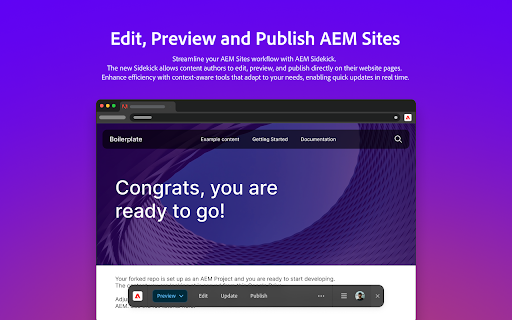


AEM Sidekick allows authors of AEM sites to easily preview and publish content. Edit, preview, and publish your AEM content simply and in-context using AEM Sidekick: • Jump to the editor from a published page to quickly make content changes • Switch between configured environments • Update the preview to see the latest content • Publish your changes Terms of use: https://www.adobe.com/legal/licenses-terms.html

AEM CRX - Power Editor
The purpose of this extension is to allow AEM Developers to have better editing experience on AEM CRX Editor. CRX Power Editor provides below features: 1. Smart Code Editor : This extension on the fly changes the CodeMirror IDE to better IDE such as Visual Studio Editor or Code Mirror 6. 2. Colour Themes: Colour themes are supported to enjoy the personalized colour schemes such dark/light etc. This extension can be disabled or enabled for specific site. Please note that this extension can be enabled only on the /crx/de/index.jsp pages and cannot be used for any other purposes. --------------------------------------Update 1.2.1---------------------------------- * Minimap Toggle Switch Introduced --------------------------------------Update 1.2.0---------------------------------- * Fixed broken UI when query tool is opened * Fixed themes * Fixed internal build process * Enhanced UI --------------------------------------Update 1.1.0---------------------------------- Removed in 1.1.0 => Editor Hook(ms): This timer in milliseconds will check new crx tabs opened after specific time and convert them into the better editor. * Removed EditorHook and used the Mutation Observer to avoid infinite loop of setInterval to observe files opened. * Fixed blank file issue when there is delay of opening large files or over slow network. * Fixed bugs in the Visual Studio editor for loading Markdown/Properties/Handlebar files. * Added bunch of exciting themes for Visual Studio Code and Code Mirror.

AI Content Visibility Checker, powered by Adobe LLM Optimizer (LLMO)
See what LLMs can actually read and what they can’t on your page — in just one click. Instant AI Visibility Check for Any Webpage This free diagnostic tool lets you quickly check whether all content on your website is visible to large language models (LLMs) when they fetch pages for citation. See which text remains hidden from ChatGPT, Perplexity, Claude, and more that prevents your brand from being discovered and cited. 🔍 Citation Readability Score: See what percentage of your page is accessible to AI agents. This AI visibility checker helps you diagnose visibility on a single page basis. Adobe LLM Optimizer enables enterprises to measure, optimize, and act at scale. With the full product, teams can: Measure AI search visibility, citations, and share-of-voice Track how AI systems present and position their brand Receive prescriptive suggestions and deploy fixes with one-click optimizations Start with diagnostics. Scale with Adobe LLM Optimizer. Adobe blog: https://business.adobe.com/blog/introducing-the-llm-optimizer-chrome-extension

Tech Insiders Learning
Manage your dynamic variables for the One Adobe Tutorial on Experience League. The One Adobe tutorial on https://experienceleague.adobe.com/en/docs/platform-learn/tutorial-one-adobe/overview can now be personalised using this extension.

Altair GraphQL Client
A beautiful feature-rich GraphQL Client for all platforms. Ever needed to query a graphQL server when you don't have access to the server code? Want to just quickly test a graphQL query? Altair makes this quite easy. You can provide your query and even specify headers to be sent with the request. Altair comes with a number of useful features including pretty printing your query, linting your query, showing schema docs, providing autocomplete functionality, the ability to set headers for your request, etc. Data is stored so you can continue from where you stopped. The schema docs are also available offline once they have been retrieved.
