
fhkechjkbbenaaoghnlmcepoolbfdmca
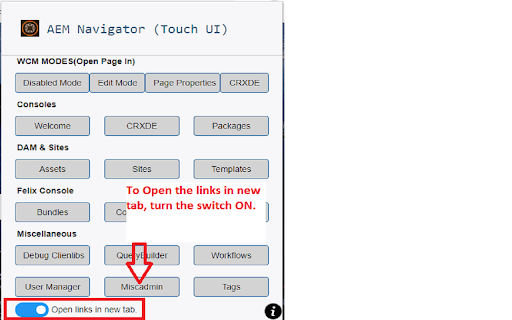

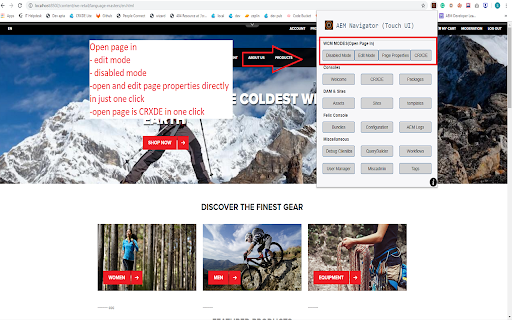
Useful for AEM developers for easy navigation.Useful for Touch UI. AEM Navigator is meant for AEM developers to ease them to navigate through various consoles easily and way faster. Read the complete blog here https://howtoaem.blogspot.com/2019/10/aem-navigator-chrome-extension-aem_24.html 1. Open page in- Edit Mode Disabled Mode Open Page Properties directly and edit them Open page in CRXDE directly 2. Most used consoles CRXDE Package Manager Welcome Page 3. Assets and Sites Open DAM Open Sites Open Templates

AEM CRX - Power Editor
The purpose of this extension is to allow AEM Developers to have better editing experience on AEM CRX Editor. CRX Power Editor provides below features: 1. Smart Code Editor : This extension on the fly changes the CodeMirror IDE to better IDE such as Visual Studio Editor or Code Mirror 6. 2. Colour Themes: Colour themes are supported to enjoy the personalized colour schemes such dark/light etc. This extension can be disabled or enabled for specific site. Please note that this extension can be enabled only on the /crx/de/index.jsp pages and cannot be used for any other purposes. --------------------------------------Update 1.2.1---------------------------------- * Minimap Toggle Switch Introduced --------------------------------------Update 1.2.0---------------------------------- * Fixed broken UI when query tool is opened * Fixed themes * Fixed internal build process * Enhanced UI --------------------------------------Update 1.1.0---------------------------------- Removed in 1.1.0 => Editor Hook(ms): This timer in milliseconds will check new crx tabs opened after specific time and convert them into the better editor. * Removed EditorHook and used the Mutation Observer to avoid infinite loop of setInterval to observe files opened. * Fixed blank file issue when there is delay of opening large files or over slow network. * Fixed bugs in the Visual Studio editor for loading Markdown/Properties/Handlebar files. * Added bunch of exciting themes for Visual Studio Code and Code Mirror.

AEM Sidekick
AEM Sidekick allows authors of AEM sites to easily preview and publish content. Edit, preview, and publish your AEM content simply and in-context using AEM Sidekick: • Jump to the editor from a published page to quickly make content changes • Switch between configured environments • Update the preview to see the latest content • Publish your changes Terms of use: https://www.adobe.com/legal/licenses-terms.html

Launch and DTM Switch
Enables the developer to locally override the embedded Launch or DTM library for testing. Allows environment selection and debug toggling for DTM and Launch, by Adobe. This handy extension from the analytics team at Search Discovery allows you to select environments for Adobe Launch and to toggle the debug and staging mode for Adobe Dynamic Tag Management. The debug mode tells the DTM or Launch library to add application messaging to the console. The staging mode for DTM uses the staging library instead of the production library. For sites using Adobe Launch, the switch allows easy switching of environments within a property. Once installed, an icon will appear in the address bar when a site has Adobe Launch or DTM installed. Click on the icon to expose the control panel. Notice of anonymous usage tracking: This extension tracks anonymous usage data. This data helps us understand usage patterns in order to provide a better product. We track interactions within this extension and nothing else. If you would like to opt out of this tracking, just press the gear icon in the upper right of any panel and click “No.” v2.0.12 Update Notes - Another Fix for "Record Environments" functionality ("x-gw-ims-org-id" is now a required header for Launch API) v2.0.11 Update Notes - Fix for "Record Environments" functionality v2.0.10 Update Notes - Fixes for Adobe's new framing of Launch within experience.adobe.com v2.0.8 Update Notes - Support for 99 Environments per Launch Property (previously 25) v2.0.6 Update Notes - Added support for DTM linked launch properties - Added "Clear Environments" button on the settings tab - Allow for Launch debugging to be activated when no environments are recorded Our overhaul of this extension is part of Search Discovery’s larger commitment to the Launch, by Adobe platform and to our clients as they migrate. Find out more about Search Discovery’s solutions for Launch, by Adobe. Feedback : launch-switch-extension@searchdiscovery.com

AEM+
An extension to improve AEM authoring productivity AEM is cool, but for heavy users, such as developers and testers, the experience is sometimes not perfect. This extension attempts to make up for these shortcomings to increase the speed of development and testing and enhance the user experience: ★ Useful Links If the extension detects that you are working a AEM page, it will show useful links in the popup: CRX DE, Assets, XF... ★ Double Click+ If the checkbox was checked, you double click the page title, then the edit mode page will be opened. ★ Cloud Server Labeling When you need to use multiple AEM cloud servers at the same time, you will encounter the problem of identifying the project or environment. This extension helps you clearly mark which project it belongs to, whether it is a development environment or a production environment. ★ Double click to open the preview page If you need to preview the page, you have to enter the edit page first. When you double-click the page name, this extension helps you directly open the preview page, saving you valuable time. ★ Recognize and link to JIRA If the page subtitle contains the JIRA ID, this extension will recognize and convert it into a clickable JIRA link. ★ Import and Export Projects & Servers settings Export server settings by project, share your settings with clients or colleagues. ★ Data Security All data is stored in the local system and will not be uploaded to any server. Hope this extension can save you a few minutes every day to have a cup of coffee and keep happy & healthy every day!
