
ppjhoknoadhakhhdbbjjinlopefmehik
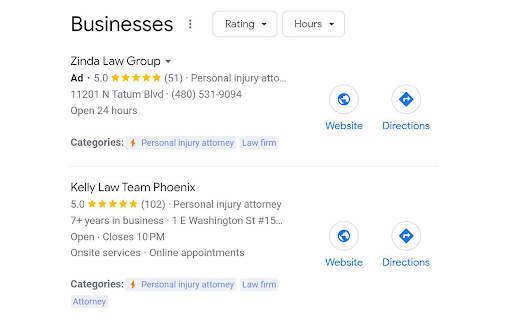
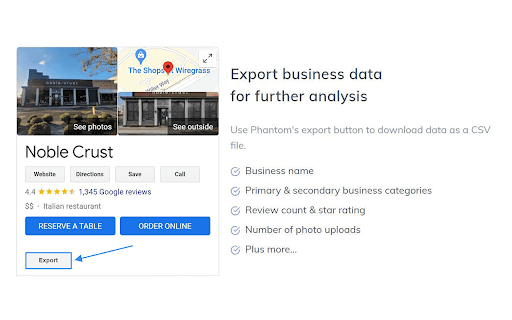
A GMB audit tool that provides enhanced insight in Google Search & Maps. Identify SEO opportunities for any Google Business Profile. Phantom is a GMB audit tool that provides enhanced insight in Google Search & Maps. Perform an audit and benchmark against top ranking competitors to easily identify SEO opportunities for your Google Business Profile. Currently, the Phantom Chrome Extension supports the following features: ⚡Google Business Categories - Find primary and secondary categories for any Google Business Profile. This is one of the biggest ranking factors for Local 3-Pack and Maps. 📁 Export Business Data - Export data from any Google Business Profile including business name, primary business category, any additional categories, website URL, review count, star rating, total number of photo uploads, and address information. ⭐ Review Audit - Run a review audit to get in-depth insights regarding Google reviews. This feature makes it possible to analyze review frequency and other metrics. This also makes it possible to download all Google Reviews from any business profile. Total reviews, review frequency, and quality of review all have a major impact on rankings. 📣 Post Audit - Perform a post audit to better understand how competitors are leveraging Google Business Posts. This includes frequency, linked landing pages, and a visual graph that represents strategy. 📸 Photo Audit - The photo audit makes it possible to analyze media uploads. This includes the frequency, total amount of uploads, and other helpful metrics. Photo uploads can help drive engagement to your business profile to improve visibility in Google Search & Maps. 📝 Note: You can enable or disable Phantom's functionalities by clicking the extension icon.

SEO Pro Extension
Are you ready to save at least 5 hours/week on daily SEO checks? If your answer is yes, then SEO Pro is exactly what you need.… Are you ready to save at least 5 hours/week on daily SEO checks? If your answer is yes, then SEO Pro is exactly what you need. SEO Pro helps you get all the necessary information about a website page at a glance. Here are 11 examples of what you can do with this free extension in under 3 seconds: 1️⃣ See all main page information at a glance, including: ✅ Title tag ✅ Meta description ✅ Canonical URL ✅ Meta robots ✅ Core Web Vitals (Field data) ✅ Word count on the page 2️⃣Export all page copy in just 1 click 3️⃣ Instantly check Core Web Vitals metrics for a page The SEO Pro extension shows the Core Web Vitals: The SEO Pro extension will show you hints when the page you’re looking at: • Has meta-robots set to ‘noindex’ • Has the canonical tag pointing to a different page 5️⃣ Easily analyze the headings hierarchy of any page It’s handy when you want to see how many H1s the page is using. Or when you want to spot any heading opportunities your competitors are using. 💡 You can also export all the headings found on a page in a CSV with just 1 click! 6️⃣ See status codes and redirect chains at a glance 💪 Pro tip: You can also check if the most common duplicates – like http/https and www/non-www – are handled properly on the website you’re analyzing. 7️⃣Get the number of links on a page, their type and anchor text - Internal links - External links - Anchor text for each of these links 💪 Pro tip: Export the links and their anchor text for further analysis 8️⃣ Highlight nofollow links on a page You can easily see nofollow links on any page with the SEO Pro extension. On the Images tab of the SEO Pro extension, you can easily see the alt tags of the images on a page. It will help you quickly spot the images that are missing alt tags. 💪 Pro tip: Export all images along with their dimensions in a CSV in 1 click for further analysis. 🔟 See what a page preview will look like when shared on social media No need to look for Open graph tags in the source code anymore! The SEO pro extension will show you the preview image, website, title and description of any page so that you can make sure it looks great when you share it online. SEO Pro extension makes it easy for you to check all types of Schema markup so that you don’t need to open the Rich Snippets tool and wait minutes for it to show the results. Just check out the Schema tab.

GMB Audit - Local SEO Audit
Discover GMB categories, GMB audits. Monitor, analyze, and outshine your GMB competitors using this powerful Local SEO tool 𝗦𝗽𝘆, 𝗔𝘂𝗱𝗶𝘁, 𝗮𝗻𝗱 𝗗𝗼𝗺𝗶𝗻𝗮𝘁𝗲 𝗬𝗼𝘂𝗿 𝗚𝗼𝗼𝗴𝗹𝗲 𝗠𝘆 𝗕𝘂𝘀𝗶𝗻𝗲𝘀𝘀 (𝗚𝗠𝗕) 𝗖𝗼𝗺𝗽𝗲𝘁𝗶𝘁𝗼𝗿𝘀 𝘄𝗶𝘁𝗵 𝗢𝘂𝗿 𝗟𝗼𝗰𝗮𝗹 𝗦𝗘𝗢 𝗧𝗼𝗼𝗹!🔍 Elevate your Local SEO game and crush your competition with our powerful GMB tool. Analyze GMB categories, perform in-depth audits, review your competitor’s GMB strategy, and boost your own Google Business Profile ranking—directly in your browser. 🚀 𝗬𝗼𝘂𝗿 𝗣𝗲𝗿𝘀𝗼𝗻𝗮𝗹 𝗚𝗼𝗼𝗴𝗹𝗲 𝗕𝘂𝘀𝗶𝗻𝗲𝘀𝘀 𝗣𝗿𝗼𝗳𝗶𝗹𝗲 𝗧𝗼𝗼𝗹 Easily access Google My Business (GMB) categories, conduct basic audits, review audits, post audits, check location ranking, and so much more—all without leaving Google. Turbocharge your GMB listing, spy on competitors, and dominate local search results with real-time insights. 💥 🚀 𝗛𝗼𝘄 𝘁𝗼 𝗨𝘀𝗲 𝗜𝘁? 1️⃣ 𝗜𝗻𝘀𝘁𝗮𝗹𝗹 𝘁𝗵𝗲 𝗘𝘅𝘁𝗲𝗻𝘀𝗶𝗼𝗻 from this page. 2️⃣ 𝗛𝗲𝗮𝗱 𝘁𝗼 𝗚𝗼𝗼𝗴𝗹𝗲, and you’ll instantly see the GMB categories and audit buttons on every business page and search result page by default. It works seamlessly on Google Search, Google Local Finder, and more. ⭐ 𝗞𝗲𝘆 𝗙𝗲𝗮𝘁𝘂𝗿𝗲𝘀 We aim to provide exceptional value to our customers by offering a comprehensive Local SEO solution. Here’s what you can do with the extension: ⭐ 𝗚𝗠𝗕 𝗖𝗮𝘁𝗲𝗴𝗼𝗿𝗶𝗲𝘀 One of the most important factors in Google Map rankings is the categories assigned to your business. With this extension, you can easily view these categories on various pages, including: Google Business Pages Google Search Results Local Finder Pages Google Business Pages with bottom selectors ⭐ The primary category is marked with a ⭐, making it easier to identify the main category driving your rankings. ⭐ 𝗕𝗮𝘀𝗶𝗰 𝗚𝗠𝗕 𝗔𝘂𝗱𝗶𝘁 Conduct quick, detailed audits of any business, uncovering essential information such as: Business claimed status Location information Place ID, CID, and Business Profile ID Knowledge Panel link GMB Review & Post Links Other businesses at the same address or using the same website Website auditing shortcuts ⭐ 𝗧𝗲𝗹𝗲𝗽𝗼𝗿𝘁 𝗙𝗲𝗮𝘁𝘂𝗿𝗲 Ranking on Google Maps can vary based on the searcher’s location. With Teleport, simulate searches from different locations to see your ranking and competition at those spots. 🚀 Features include: Add a search term, select a location, and view rankings Analyze competition in that specific location Measure the distance of your business from any location ⭐ 𝗚𝗠𝗕 𝗥𝗲𝘃𝗶𝗲𝘄 𝗔𝘂𝗱𝗶𝘁 Reviews play a huge role in GMB rankings. Our Review Audit helps you analyze the health of any business’s reviews, giving you: Graphical representation of reviews over time Review rating calculation Review content analysis Quality analysis Strategic insights for improving your review game 📈 ⭐ 𝗚𝗠𝗕 𝗣𝗼𝘀𝘁 𝗔𝘂𝗱𝗶𝘁 Analyze your competitors' GMB post strategy, including: Post frequency Content strategy Graphical representation of post trends Insights for crafting an effective post strategy 📝 ⭐ 𝗖𝗮𝘁𝗲𝗴𝗼𝗿𝘆 𝗙𝗶𝗻𝗱𝗲𝗿 Find the most relevant categories and services for your business with the Category Finder tool. Discover related categories Uncover associated search traffic Identify relevant services Analyze seasonal changes in category searches ⭐ 𝗢𝘁𝗵𝗲𝗿 𝗞𝗲𝘆 𝗙𝗲𝗮𝘁𝘂𝗿𝗲𝘀 Transparent data calculations Display results directly in Google, Google Local Finder, and M Search No data export from GMB 🚀 𝗜𝗺𝗽𝗼𝗿𝘁𝗮𝗻𝘁 𝗡𝗼𝘁𝗲𝘀: We are not affiliated with Keyword Everywhere, Keyword Surfer, or PlePer. We also don’t export data, but provide links to external audit tools like GatherUp and UberSuggest.

Detailed SEO Extension
Get SEO insights at the click of a button to any website you're currently on. Built by full-time SEO's for daily analysis. Get SEO-related insights at the click of a button to any website you're currently on. Pull back their title tag, meta description, meta robots tag and much more. Save hours of time looking through the source code of this page with our SEO analysis extension.

PlePer Local SEO Tools
Useful shortcuts and quick analyzes for Local SEO`s The extension offers collection of tools and shortcuts for Local SEO's. With this extension you get detailed information for every google my business listing in Maps, Local Finder, Knowledge panel and making four different analysis based on maps search results. Listing details returned by the extension: Name / Address / Phone / All Categories / Verification status / Attributes / Coordinates / All important Google ID’s (CID, Place ID, Knowledge Graph ID) / Export function / Pin function / Links to popular business directories, search engines, different website analysis tools (Speed Test / Mobile Friendly Test / Whois information / Domain backlink analysis etc ). For US listing direct link to corespondig Secretary of state business lookup website. Four different analyzes when searching in Maps: - Categories - top categories used, average categories per listing, max categories per listing; - Reviews - average rating and reviews, maximum/minimum rating and reviews, listings without reviews; - Attributes - all the attributes used; - Business Hours - when business are open and the average business hours; Pin function - the listing information on any website with keyboard combination (CTRL + ALT + E). Easiest way to compare / enter data anywhere. The chrome extension is plug and play - no settings or configuration needed! Instructions: 1. Install the extension 2. Open in new tab google maps 3. Make a search and you will see the analyses. 4. Select any listing from the results and you will see the details.
