
cpdkchkkmcpnfgbpjjgfhcbcaceeandd

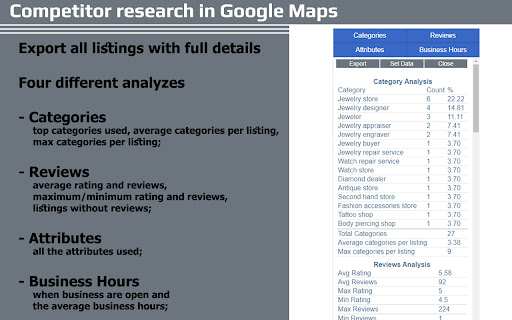

Useful shortcuts and quick analyzes for Local SEO`s The extension offers collection of tools and shortcuts for Local SEO's. With this extension you get detailed information for every google my business listing in Maps, Local Finder, Knowledge panel and making four different analysis based on maps search results. Listing details returned by the extension: Name / Address / Phone / All Categories / Verification status / Attributes / Coordinates / All important Google ID’s (CID, Place ID, Knowledge Graph ID) / Export function / Pin function / Links to popular business directories, search engines, different website analysis tools (Speed Test / Mobile Friendly Test / Whois information / Domain backlink analysis etc ). For US listing direct link to corespondig Secretary of state business lookup website. Four different analyzes when searching in Maps: - Categories - top categories used, average categories per listing, max categories per listing; - Reviews - average rating and reviews, maximum/minimum rating and reviews, listings without reviews; - Attributes - all the attributes used; - Business Hours - when business are open and the average business hours; Pin function - the listing information on any website with keyboard combination (CTRL + ALT + E). Easiest way to compare / enter data anywhere. The chrome extension is plug and play - no settings or configuration needed! Instructions: 1. Install the extension 2. Open in new tab google maps 3. Make a search and you will see the analyses. 4. Select any listing from the results and you will see the details.

Plerdy SEO Analyzer
A Chrome extension for instant on-page SEO auditing of any website 🚀 Boost Your SEO Strategy with One Click! Plerdy SEO Analyzer is a powerful SEO extension for Chrome, acting as your go-to analyzer and checker to deliver in-depth SEO insights for any webpage. With just one click, you can access a comprehensive SEO audit and technical overview—optimizing pages for higher rankings and lightning-fast performance. 🔍 Key Features: ✅ AI-Powered SEO Tips – Instantly receive tailored, actionable recommendations for improving your page’s meta tags, headings, and content, complete with concrete examples and best-practice guidelines. ✅ Contextual Content Suggestions – Get precise, context-aware tips to optimize your keyword placement, readability, and internal linking strategy based on your specific page analysis. ✅ SEO Audit & Checker – Automatically analyze meta tags (title, description, H1), robots.txt, canonical tags, hreflang attributes, and other critical SEO parameters to ensure every element is optimized. ✅ Content Analysis – Gain insights into word count, keyword density, stop words, readability scores, and Flesch-Kincaid readability index to fine-tune your content for both users and search engines. ✅ Open Graph & Schema Markup – Ensure your website is optimized for social media previews and rich snippets with detailed Open Graph and Twitter Card analysis. ✅ Heading Structure Overview – Identify missing, duplicate, or incorrectly structured headings (H1–H6) with visual highlights for better on-page organization. ✅ Image Analysis – Detect missing ALT tags and view image file sizes directly on the page to improve SEO and accessibility. ✅ Outgoing Links Report – Check dofollow, nofollow, and duplicate links to refine your link-building strategy, with automatic “nofollow” badge detection. ✅ Keyword Relevance Checker – See the most frequent words on the page and evaluate their SEO relevance in title, description, and H1 tags. ✅ SEO Score – Instantly calculate an overall SEO score (0–100) with a visual progress bar to gauge your page’s SEO performance at a glance. ✅ Performance Metrics – Analyze page load speed, DNS lookup, TCP connection time, TTFB, DOM Content Loaded, and more with automatic performance status indicators. ✅ URL Information – View detailed information about the current URL, including HTTP Status (e.g., 200 OK), Response Size (e.g., 101.7 KB), and Detected Language (e.g., en). ✅ Slow Resources Checker – Identify JS, CSS, and IMG files that take longer than 300 ms to load, so you can optimize or replace them to boost page speed. ✅ Detected Technologies – Instantly see which analytics tools, pixels, CMS, frameworks, and libraries are present on the page. ✅ Hreflang Checker – Verify correct hreflang attributes to improve international SEO and avoid duplicate-content issues. ✅ Live Highlighting – Click any keyword in the report to highlight it directly on the webpage for better visibility. ✅ HTTP Mixed Content Analysis – Detect insecure HTTP images to ensure your website delivers fully secure content. ✅ Fast & Lightweight – Runs instantly without slowing down your browser, making this SEO extension ideal for quick audits on the fly. ✅ New SEO Insight Blocks – Expanded content analysis with stronger E-E-A-T, AEO, semantic HTML checks, and clearer visibility into how page structure supports search intent. 💡 Who Can Benefit? 🔹 SEO Specialists – Perform instant audits on client websites and competitor pages using a dedicated analyzer and checker. 🔹 Content Marketers – Optimize content based on real-time data and AI-powered insights from this SEO extension. 🔹 Web Developers – Identify technical SEO issues (broken links, slow resources, mixed content) that affect rankings and user experience. 🔹 Business Owners – Gain a full SEO overview—status codes, performance bottlenecks, and technology stacks—to improve website visibility and search performance. 🔥 Install Plerdy SEO Analyzer today and take control of your website’s SEO performance! 🚀

SEOSpace - The SEO Plugin for Squarespace
SEO Tool for Squarespace websites SEOSpace is a Chrome extension designed to help Squarespace users monitor and improve their website’s SEO. With one click, you can run scans, discover keyword opportunities, and review practical suggestions to make your site more search-friendly. Key Features • Site Scans – Check your Squarespace site for technical or content issues that may affect SEO. • Keyword Insights – Explore keyword ideas related to your pages and content. • Actionable Suggestions – Receive practical recommendations to improve titles, meta descriptions, and headings. • Tutorial Library – Access a collection of step-by-step, beginner-friendly guides for common SEO tasks. • Squarespace Integration – Works directly with your Squarespace site for faster insights. SEOSpace is made for Squarespace website owners, freelancers, and small businesses who want an easier way to keep track of their SEO and learn best practices without needing advanced technical knowledge.

Simple SEO Tool
A minimalistic tool for SEO on-page analysis. "Simple SEO Tool" is a minimalistic extension that simplifies SEO on-page analysis and optimization processes. In version 2 of the extension, many old features were removed, and it was aligned with up-to-date Google Chrome policies. With a user-friendly interface and minimalistic design, it helps SEO practitioners in their daily work. Key features and functionalities include: - Indexing status: Quickly determine whether a page is open or closed for indexing by search engines. - Metadata verification: Verify crucial metadata elements such as title, description, canonical URL, and H1 tags; - Microformats and page speed: Perform quick assessments of microformats implementation and page loading speed. - External links analysis: Check if a page has external links; - Headings structure: Analyze the structure and organization of page titles to ensure maximum effectiveness of H1-H6. - Hreflang: Check for hreflang attributes for multi-language and regional content optimization. - Pagination: Check for marking with prev/next. This tool lets you check and improve your pages quickly and drive organic traffic.

Mr. Joel's Seller Tools & SEO Helper
Stop guessing and start growing your TPT store. The Mr. Joel’s Seller Tools extension is the ultimate browser companion for the main Mr. Joel Web App. It brings powerful SEO data, AI writing tools, and rank tracking directly onto your TPT product and edit pages. Instead of switching tabs constantly, get live insights and optimization tools right where you work. 🚀 5 Powerful Tabs to Supercharge Your Workflow: 1. 🏆 Hub (Product Improvement Dashboard) Your central command center. The Hub analyzes your currently viewed product to surface high-leverage opportunities instantly. Health Score: Get an instant 0-100 quality score based on title length, readability, and keyword usage. Seasonal Cues: Automatically detects if your product matches upcoming holidays or seasons. Quick Wins: Identifies "low-hanging fruit" fixes that can boost your visibility immediately. 2. 🧠 Coach (On-Page Audit) Your personal SEO consultant. The Coach tab scans your listing in real-time to ensure it meets best practices. Actionable Checklist: Checks for bullet points, clear CTAs, grade/subject tagging, and keyword density. Live Feedback: See your score update in real-time as you edit your description. 3. 🔍 Research (Keyword Analyzer) Find winnable keywords without leaving the search bar. Competition & Popularity: Instantly see total product counts and popularity signals for any search term. Opportunity Badges: Keywords are labeled as "Gold Mine," "Good," or "Niche" to help you prioritize. Avg Price Data: See the average pricing on page one to position your product competitively. 4. 📈 SEO (Live Rank Tracker) Stop guessing where you rank. Live Position Tracking: See exactly where your product lands in search results for specific keywords. Historical Data: View a graph of your rank history to see if your recent changes are working. Competitor Insights: Analyze the top 5 ranking products for any keyword to see why they are winning. 5. ✨ Rewrite (AI Description Generator) Writer’s block is a thing of the past. Full Description Rewrites: Turn a few bullet points into a professionally formatted, HTML-ready description with "How to Use" sections, Learning Objectives, and more. Direct Integration: Load your current description from the page, rewrite it with AI, and save it back to your app library in one click. 💡 How It Works This extension works as a companion to the Mr. Joel's Seller Tools Web App. Navigate to any Product Page or "Edit Product" page on TeachersPayTeachers. Open the extension to sync the product data. 🔒 Privacy & Security Secure: We use secure authentication to sync data with your main dashboard. Private: Your store data is yours. We do not sell or share your product insights. 📝 Disclaimer Not affiliated with Teachers Pay Teachers. "Mr. Joel's Seller Tools & SEO Helper" is an independent tool created by sellers, for sellers. It is not affiliated with, endorsed by, or partnered with Teachers Pay Teachers (TPT) or its parent company.
