
inkgmbielfdchdigcjenpllfkoghbpal


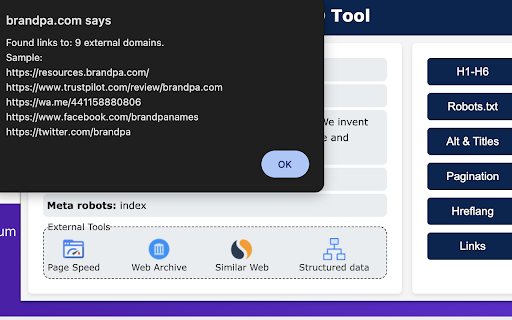
A minimalistic tool for SEO on-page analysis. "Simple SEO Tool" is a minimalistic extension that simplifies SEO on-page analysis and optimization processes. In version 2 of the extension, many old features were removed, and it was aligned with up-to-date Google Chrome policies. With a user-friendly interface and minimalistic design, it helps SEO practitioners in their daily work. Key features and functionalities include: - Indexing status: Quickly determine whether a page is open or closed for indexing by search engines. - Metadata verification: Verify crucial metadata elements such as title, description, canonical URL, and H1 tags; - Microformats and page speed: Perform quick assessments of microformats implementation and page loading speed. - External links analysis: Check if a page has external links; - Headings structure: Analyze the structure and organization of page titles to ensure maximum effectiveness of H1-H6. - Hreflang: Check for hreflang attributes for multi-language and regional content optimization. - Pagination: Check for marking with prev/next. This tool lets you check and improve your pages quickly and drive organic traffic.

SEO Buddy - On-Page SEO Analyser
A complete On-Page SEO tool to help you analyse your webpage and optimize it for better ranking SEO Buddy is a complete On-Page SEO tool to help you analyse your webpage and guide you to optimise it for better ranking. ✅ Analyse On-Page SEO: This extension analyse the existing On-Page SEO following good practices and get a performance score ✅ Reliable Benchmark: Most essential On-Page SEO conventions are used to calculate the score of your current On-Page SEO score. ✅ Checklist for Improvement: It suggests checklist containing best practices to improve the SEO ranking. ✅ Detail overview of each factors: All the best On-Page SEO practices are presented in a detail manner like External/Internal/ Broken Links, Images missing alt, useful integrations etc. ✅ Technologies Detection: It has technology detection feature like Built-With and Wappalyzer to detect which technologies are being used on the webpage. ✅ Super fast and efficient: On-Page SEO analysis are done very efficiently within seconds ensuring reliable results. ✅ Clean and User friendly UI/UX: Ensuring a great experience is important to us. In every aspects we tried to guide the user through as less cluttered informations as possible. Besides all the above mentioned features, we are actively working bringing newer features. If you have questions, concerns or feature request, please send an email to rahulbaruri1@gmail.com. We will to reply you as early as possible.

Majestic Backlink Analyzer
Majestic backlink analysis straight into your browser. Over 60,000 installations. Get instant link counts and see who is linking to the page you are browsing without having to go to a separate link analysis tool. FREE backlink count data with much more detail for Majestic.com account holders. This backlink checker from Majestic gives you a really fast way to see the strength of any page based on its backlink information. Because Majestic crawls the whole web, it does not have to rely on a third party for the data. You can immediately see the Trust Flow, Citation Flow and Visibility Flow for any web page directly on the URL bar and you can see summary information about the number of domains and URLs linking to this page. Topical Trust Flow is now integrated into the tool. This now shows you the topic (or category) of each backlink. Information provided free includes: Link Profile charts, link counts at the URL, subdomain and root level and three Flow Metric scores from 0-100 for pages you visit (speed limits apply). Majestic subscribers can very easily link their account to the extension and can then see more detail about links to the page your browser is on. including: *Backlink Detail*: A list of the 10 strongest backlinks to the page (with a link to more), including the URL, anchor text, Citation Flow, Trust Flow, Visibility Flow and the dates first and last seen. The primary Topical Trust Flow is also embedded. *Anchor Text Detail*: A list of the 10 strongest anchor texts (with a link to more) used in links to the URL, including the link counts and domain counts linking with this text and the relative Citation Flow and Trust Flow associated with these links. The primary Topical Trust Flow is also embedded. *Tools*: You can easily delve deeper into URLs by using many of Majestic's backlink analysis tools directly from the extension. *Add to Bucket*: If you are interested in reviewing the URL later, you can press the "Add to Bucket" button to add the URL straight into your Majestic account for later backlink analysis. Who wrote this Analyzer and How? Majestic is one of the UK's fastest growing tech companies, ranked 18th in 2014 in the Deloitte fast 50 list. Unlike many tools that rely on scraping third party data, Majestic is one of the largest web crawlers on the planet, collecting data directly from the web. It even has its own search engine. This independence has made Majestic's Trust Flow metric one of the most reliable and consistent ways to evaluate pages on the internet at scale the score, which is a log score between 0 and 100, gives a valuable insight. More recently, Majestic has launched and integrated Topical Trust Flow into into the Chrome extension, giving more precise analysis of a URL's power and influence. Majestic does not track your crawling behavior at all in this plugin and it will not slow down your browsing. Until you click on the extension, it remains idle and passes no data at all. At that point it simply looks up the data we have already indexed regarding the URL you are currently visiting. Majestic's full privacy policy is described at https://majestic.com/company/privacy-policy

Serpstat Website SEO Checker
Instantly check your website's SEO, analyze competitors and get advantage of powerful search analytics in one place. Serpstat Website SEO Checker allows you to find the key metrics of any site or page in just a few clicks. It provides you with an extensive list of SEO metrics, analysis, and tips. To examine a domain/page, you don't need to open a new tab. Click on the icon and you'll get an SEO audit of domain or page: visibility, traffic, number of keywords, top competitors in the region, etc. Three sections are now available: * On-page SEO parameters - Free Lifetime * Page analysis - Freemium * Domain analysis - Freemium Some features work without API requests to Serpstat servers so they are available without signing up, right after installation of the extension. Some reports require to sign up and get a token for API access. Serpstat Website SEO Checker makes analyzing competitors data easier than ever. The extension helps you to provide quickly a keyword research and trust me, it's much better than Keyword Planner tool. The major features: #1 On-page search engine optimization: Page Source Google Cache PageSpeed Insights Site start date Meta tags HTML tags Words Count / Symbols Count Favicon checker and many others. #2 Page analysis: Top 10 keywords in Google ranking URL that ranks for this request Ranking position for this keyword Position change and search volume Keyword CPC URL Competitors Keywords the site ranks in Missing keywords #3 Domain analysis Domain visibility Domain traffic Number of keywords Improved and declined keywords New and lost keywords PPC keywords Number of results in Google, Bing Yandex Quality Index Number of images in Google Image Search Alexa Rank. Visibility change graph In fact, we've brought together the most useful SEO features, so you no longer need a bunch of tools like Ahrefs, Semrush, Majestic and others. Keep an eye on this - it's just the beginning, you'll see many exciting updates soon. Important: To get full access to all functionality, you'll need to sign up on Serpstat.com For information regarding data collection please visit: https://serpstat.com/users/privacy-policy/

Redirect Path
The HTTP Header & Redirect Checker for SEO Redirect Path flags up 301, 302, 404 and 500 HTTP Status Codes as well as client side redirects like Meta and Javascript redirects, bringing potential issues that may not otherwise be seen to your attention immediately. As well as flagging up redirects and errors, the plugin also displays other HTTP Headers (such as server types and caching headers) and the server IP Address at the click of a button. All the magic happens on your computer, so it doesn’t “phone home” to anyone (except when auto-updating itself) and is instantaneous. The redirect path logo is from the "Iconic" icon set, which can be found here: http://somerandomdude.com/work/iconic/ Please note, by using this extension you agree to our End User Licence Agreement: https://www.ayima.com/browser-extensions-eula 4.0: Fixed runtime bugs and potential security flaws, plus added support for Ayima AI 3.0: Updated the extension to support Googles Manifest V3 roll out, no other major changes 2.0.0.6: Major rewrite - a lot of logic has been changed under the hood allowing us to display Meta and Javascript redirects for the first time.
