
fcgbopaomlpldhbinhgebmkcnkfconmn
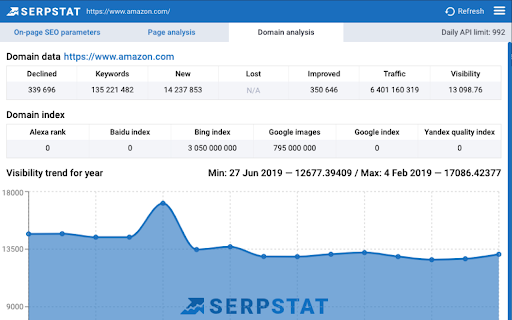


Instantly check your website's SEO, analyze competitors and get advantage of powerful search analytics in one place. Serpstat Website SEO Checker allows you to find the key metrics of any site or page in just a few clicks. It provides you with an extensive list of SEO metrics, analysis, and tips. To examine a domain/page, you don't need to open a new tab. Click on the icon and you'll get an SEO audit of domain or page: visibility, traffic, number of keywords, top competitors in the region, etc. Three sections are now available: * On-page SEO parameters - Free Lifetime * Page analysis - Freemium * Domain analysis - Freemium Some features work without API requests to Serpstat servers so they are available without signing up, right after installation of the extension. Some reports require to sign up and get a token for API access. Serpstat Website SEO Checker makes analyzing competitors data easier than ever. The extension helps you to provide quickly a keyword research and trust me, it's much better than Keyword Planner tool. The major features: #1 On-page search engine optimization: Page Source Google Cache PageSpeed Insights Site start date Meta tags HTML tags Words Count / Symbols Count Favicon checker and many others. #2 Page analysis: Top 10 keywords in Google ranking URL that ranks for this request Ranking position for this keyword Position change and search volume Keyword CPC URL Competitors Keywords the site ranks in Missing keywords #3 Domain analysis Domain visibility Domain traffic Number of keywords Improved and declined keywords New and lost keywords PPC keywords Number of results in Google, Bing Yandex Quality Index Number of images in Google Image Search Alexa Rank. Visibility change graph In fact, we've brought together the most useful SEO features, so you no longer need a bunch of tools like Ahrefs, Semrush, Majestic and others. Keep an eye on this - it's just the beginning, you'll see many exciting updates soon. Important: To get full access to all functionality, you'll need to sign up on Serpstat.com For information regarding data collection please visit: https://serpstat.com/users/privacy-policy/

Website SEO Checker
Get free on-page SEO report by 100+ parameters with the best website SEO checker ☑️ Overview – quickly check essential SEO data: URL structure, metadata, indexation, and canonical settings. ☑️ Content – analyze headings, keyword density, text length, and text-to-code ratio for better structure. ☑️ Links – identify external, internal, and subdomain links, plus dofollow/nofollow status and anchor text. ☑️ Hreflangs – instantly verify hreflang setup and language targeting for international SEO. ☑️ Images – detect missing alt/title tags, broken images, and check sizes with on-page highlighting. ☑️ Structured Data – instantly identify and validate Schema.org markup for better SEO performance. ☑️ PageSpeed – measure mobile and desktop performance with actionable optimization insights. ☑️ GSC+GA4 Insights – assess search performance & indexing plus user behavior and conversion metrics. ☑️ Issues & Monitoring – detect SEO issues, track technical changes, and monitor page updates over time. Deep dive into Sitechecker Chrome Extension’s capabilities to unlock the full potential of your SEO workflow. 1️⃣ Get a quick technical overview of any page to ensure it meets SEO best practices. • Inspect URL structure, status code, and page size. • Review meta title, description, and H1 heading. • Analyze indexation settings, including robots meta tags, X-Robots-Tag directives, and robots.txt rules. • Validate canonical tag settings to prevent duplicate content issues. 2️⃣ Analyze content structure to improve keyword relevance and readability. • Review heading hierarchy (H1–H6) and highlight them on the page. • Copy the entire heading structure in one click for easy documentation. • Measure text length in words and characters. • Calculate text-to-code ratio to optimize content efficiency. • Get keyword density insights for single, two, and three-word phrases. 3️⃣ Audit all links on a page to improve internal linking and track external references. • Detect external, internal, and subdomain links. • Check dofollow/nofollow status and analyze HTTP response codes. • Review anchor text usage and link destinations. • Search for specific links and highlight them directly on the page. • Copy all detected links in one click for easy analysis and outreach. 4️⃣ Ensure proper hreflang implementation for international SEO. • Detect missing or incorrect hreflang attributes. • Validate language targeting and regional settings. • Check backward links to confirm proper hreflang setup. 5️⃣ Optimize images to improve SEO and user experience. • Identify missing alt and title attributes. • Detect broken images and oversized files. • Highlight image details directly on the page for easy fixes. 6️⃣ Validate structured data for better search visibility. • Detect Schema.org markup and review structured data implementation. • Identify missing or incorrect structured data elements. • Ensure key rich snippet attributes are correctly applied. 7️⃣ Measure page speed and get actionable insights for optimization. • Check page loading speed for desktop and mobile. • Identify slow-loading elements affecting performance. • Get recommendations to improve Core Web Vitals. 8️⃣ Unlock real-time GSC + GA4 insights to track performance, user behavior, and conversions. • View clicks, impressions, CTR, and average position over 7/30/60/90 days. • Analyze top search queries and how they drive traffic. • Inspect URL crawling, indexing status, and mobile usability issues. • Measure user behavior with engagement metrics like bounce rate and average session duration. • Track conversions with key events and key event rate. • Break down performance by traffic source (Google Organic, Direct, Social, Bing, etc.). 9️⃣ Monitor SEO issues and track page changes over time. • Detect technical errors, broken links, and missing metadata. • Track content updates and structural modifications. • Get alerts for critical SEO changes.

Link Research SEO Toolbar
Enjoy looking at the most advanced SEO metrics while you search the Web. You can use the Link Research SEO Toolbar to customize your searches in Google, Bing and Yandex. You can also enable it as a page toolbar, so you look at advanced SEO metrics for every page. Here’s what you can do with the Link Research SEO Toolbar: • See the Power and Trust of a domain or page • Discover great places to get links from • See how successful a page is on social media • Understand user engagement • See the strongest pages by Keyword Ranking • Spot drastic changes in the number of links • See how many backlinks a page has. All this is possible by looking at a set of powerful SEO metrics: • LRT Power*Trust for domains • LRT Power*Trust for pages • Buzz - social media signals • Impact - long-term user engagement metrics • Keyword Ranking • Link Velocity Trends • Number of Backlinks Why LRT Power*Trust? Because LRT Power*Trust is a precise, reliable and stable metric built by LinkResearchTools shortly after the first Google Penguin update in 2012, as a result of many years of research and calculations. Forget about Google’s Toolbar PageRank. Google stopped updating it many years ago and completely removed it from their toolbar in April 2016. You can think of LRT Power*Trust as a replacement for Google’s toolbar PageRank, but it’s so much more. LRT Power*Trust is the metric to look at when you want to assess the quality and trustworthiness of a page, domain or top domain. Why Keyword Ranking? The Link Research SEO Toolbar’s “Keyword Ranking” metric allows you to take a quick look at your competitors’ keyword rankings. By evaluating the keywords your competitors rank for, you will easily come up with new ideas for your content optimization. Why Buzz? Buzz is Impactana’s aggregate of social media signals, divided into shares and likes. By using the Link Research SEO toolbar to sort the search results by Buzz, you can quickly find out what sort of content is “HOT” on social media. You can use Google’s time filter to see only the pages indexed in the past year, month or week. Why Impact? The Impact metric helps you discover strong content that people linked to a lot and engaged with by commenting or downloading it. This metric measures user engagement for any content, not only for the one that goes viral on social media. A good article about construction will not get shared on social media, but it may get many links or comments if it’s great. Why link velocity trends? A website needs to have a steady link growth. Search engines can interpret unnatural link growth as a negative signal, which can lead to a loss in the rankings. Google uses link growth trends to detect any algorithm manipulation attempts. If your backlink profile grows too fast, you’re out. If you’re too slow, you won’t ever get on the first page. Why backlinks? Google confirmed links to be a top ranking factor. That's a very strong reason to look at links whenever you analyse the strength of a page or domain. Update 0.0.3 - Now with option to follow REL-Canonicals for Metrics of pages (requires fetch) - Loading animation Update 0.0.4 NEW: SEO Toolbar for every page with all the important metrics - three different toolbar styles mini, bulky and skyscraper - drag&drop the toolbar around where you need it - open backlink checker right from the toolbar (requires LRT account) NEW: Fetch results from SERP to resolve redirects and show real SEO metrics SERP overlay - Backlink count shown for every SERP result - Sorting by backlink count in the SERPs Update 0.0.5 - Domain exclusion feature: you can now choose to disable the Link Research SEO Toolbar for certain domains. Update 0.0.9 - Minor layout fixes and improvements. - Added knowledge graph hint. Update 0.1.2 - Fixed issues with Google reCAPTCHA Update 0.1.3 - Fixed issues with Google SERP overlay

SEO META in 1 CLICK
Displays all meta data and main SEO information for the best SEO SEO META in 1 CLICK is a tool that displays all meta tags/data and main seo information clearly. By using this tool, we hope you can better manage and improve your SEO and visibility on Internet We focus on displaying: ✔ title and its length, ✔ description and its length, ✔ URL (and meta-canonical url too), ✔ meta-robots, ✔ displaying headers in order of their appearance in HTML (H1, H2, H3, H4, H5 and H6), ✔ number of images with and without ALT, ✔ the number of links (internal, unique, ...) ✔ Open Graph and twitter social data ✔ Robots.txt and sitemap.xml ✔ and much more... (See printscreens) You can also via ETERNAL TOOLS analyse your site and know how improve it (html, css, Google Rich Snippet, PageSpeed...)

SEO-анализ сайта от Be1.ru
Анализ сайта, поможет проверить состояние важных показателей, от которых зависят позиции ресурса в выдаче поисковых систем. Выявление технических ошибок оптимизации сайта при помощи нашего автоматического онлайн анализатора сэкономит Ваше время. Инструмент предназначен для проведения комплексной бесплатной проверки сайта по ряду важных при продвижении показателей. Включает в себя следующие продукты: - Wordstat Assistant от Be1.ru - Анализ сайта - Анализ страницы
