
lajfdngpocmchpihjecojjllfjeehgnl
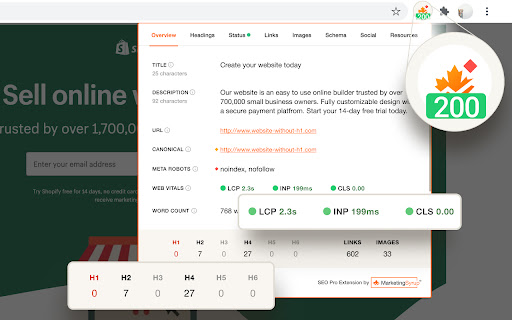

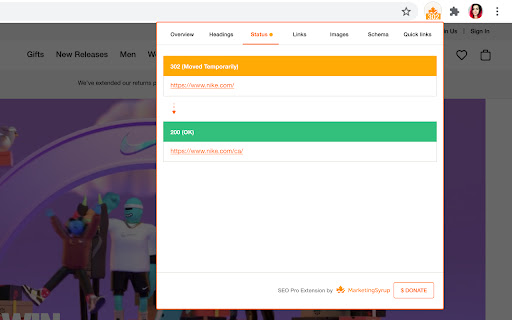


Are you ready to save at least 5 hours/week on daily SEO checks? If your answer is yes, then SEO Pro is exactly what you need.… Are you ready to save at least 5 hours/week on daily SEO checks? If your answer is yes, then SEO Pro is exactly what you need. SEO Pro helps you get all the necessary information about a website page at a glance. Here are 11 examples of what you can do with this free extension in under 3 seconds: 1️⃣ See all main page information at a glance, including: ✅ Title tag ✅ Meta description ✅ Canonical URL ✅ Meta robots ✅ Core Web Vitals (Field data) ✅ Word count on the page 2️⃣Export all page copy in just 1 click 3️⃣ Instantly check Core Web Vitals metrics for a page The SEO Pro extension shows the Core Web Vitals: The SEO Pro extension will show you hints when the page you’re looking at: • Has meta-robots set to ‘noindex’ • Has the canonical tag pointing to a different page 5️⃣ Easily analyze the headings hierarchy of any page It’s handy when you want to see how many H1s the page is using. Or when you want to spot any heading opportunities your competitors are using. 💡 You can also export all the headings found on a page in a CSV with just 1 click! 6️⃣ See status codes and redirect chains at a glance 💪 Pro tip: You can also check if the most common duplicates – like http/https and www/non-www – are handled properly on the website you’re analyzing. 7️⃣Get the number of links on a page, their type and anchor text - Internal links - External links - Anchor text for each of these links 💪 Pro tip: Export the links and their anchor text for further analysis 8️⃣ Highlight nofollow links on a page You can easily see nofollow links on any page with the SEO Pro extension. On the Images tab of the SEO Pro extension, you can easily see the alt tags of the images on a page. It will help you quickly spot the images that are missing alt tags. 💪 Pro tip: Export all images along with their dimensions in a CSV in 1 click for further analysis. 🔟 See what a page preview will look like when shared on social media No need to look for Open graph tags in the source code anymore! The SEO pro extension will show you the preview image, website, title and description of any page so that you can make sure it looks great when you share it online. SEO Pro extension makes it easy for you to check all types of Schema markup so that you don’t need to open the Rich Snippets tool and wait minutes for it to show the results. Just check out the Schema tab.

Conductor for Chrome - SEO Extension
Experience faster, better, smarter SEO insights in one click. The most advanced SEO extension is now free for all marketers. Conductor for Chrome is designed to make the day-to-day lives of marketing teams easier. 🔎 Discover insights around page performance and new topic opportunities 📈 Easily uncover website optimizations to improve visibility and performance 👍 Take action and collaborate more efficiently across teams Make impactful changes to your website by leveraging the best of Conductor right in your browser. Conductor for Chrome is available to anyone with a Conductor or Google account. Perform keyword research and better understand how your content is optimized for Search. Experience faster, better, and smarter SEO with the most advanced Organic Marketing browser extension ever created! == v4.10.11 == - Infinite loading and styles fixes. == v4.10.6 == - Minor bug fixes and performance improvements. == v4.10.4 == - Minor bug fixes and performance improvements. == v4.10.2 == - Minor bug fixes and performance improvements. == v4.10.0 == - Minor bug fixes and performance improvements. == v4.9.4 == - Minor bug fixes and performance improvements. == v4.9.2 == - Minor bug fixes and performance improvements. == v4.7.0 == - Minor bug fixes and performance improvements. == v4.6.0 == - Minor bug fixes and performance improvements. == v4.4.2 == - Minor bug fixes and performance improvements. == v4.4.0 == - Upgraded to Manifest V3 - Minor bug fixes and performance improvements. == v4.3.7 == - Fixed an issue where some users received an error when integrating Actions with Asana. - Minor bug fixes and performance improvements. == v4.3.5 == - Minor bug fixes and performance improvements. == v4.3.4 == - Minor bug fixes and performance improvements. == v4.3.3 == - Fixed issues related to correctly identifying and parsing sitemaps. - Fixed an issue where some users were unable to make edits using Conductor Live. - Fixed issue with reporting incorrect status code in Redirects widget. - Other minor fixes and performance improvements. == v4.3.2 == - Fixed and issue where related keywords would not load for certain pages. - The Live Editor Reset button didn't do anything before, now it does! == v4.3.0 == - NEW: Live Editor can now be used to make edits to page headings and image alt descriptions! A Conductor account is required. - Overview tab has been updated to bring live editor functionality to your fingertips. - Social Preview widget has been moved to the Social Tab. - Other bug fixes and improvements. ==V4.2.3 == Thank you for your continued use of Conductor for Chrome. In order to make sure the Chrome Extension is as secure as possible, unnecessary permissions were removed. ==v4.2.2== Minor Live Editor bug fixes and improvements. ==v4.2.1== - Minor bug fixes and performance improvements. == v4.2.0 == - NEW: Actions in Conductor for Chrome! Conductor customers can take action and seamlessly manage their SEO workflows by creating Content Briefs, To-do's, and Keyword Lists directly from the extension. Share them to your productivity tool of choice such as Jira, Asana and more or download them for easy team collaboration without leaving the page. - Fixed an issue when logged in using a Google account, it was then not always possible to login using a Conductor account. - Other bug fixes and performance improvements. == v4.1.1 == - Fixed an issue with Conductor Live that prevented publishing changes for some users. - Other bug fixes and performance improvements. == v4.1.0 == - Fixed an issue where the chrome extension would open sporadically on it own. Now it will only open when you want it to! - Other bug fixes and performance improvements. == v4.0.0 == - Now users who do not have a Conductor account can use the extension with their Google account. - Perform keyword research and navigate the extension with a new redesigned layout.

Advanced GSC Visualizer
Advanced charting with annotations & AI assistant for Google Search Console. One-click API access for data visualization. 𝐏𝐫𝐢𝐯𝐚𝐜𝐲 & 𝐭𝐞𝐫𝐦𝐬 (𝐀𝐩𝐫𝐢𝐥 𝟐𝟎𝟐𝟔) We refreshed our Privacy Policy and Terms of Service so they match how the product works today—especially optional AI: if you turn it on and add your key, relevant GSC-related content can be sent from your browser to the AI provider you choose, not through our servers for that flow. 𝐕𝐞𝐫𝐬𝐢𝐨𝐧 𝟑.𝟑.𝟔 𝐔𝐩𝐝𝐚𝐭𝐞𝐬: (𝐌𝐚𝐫𝐜𝐡 𝟐𝟎𝟐𝟔) 𝐌𝐮𝐥𝐭𝐢𝐥𝐚𝐧𝐠𝐮𝐚𝐠𝐞 𝐒𝐮𝐩𝐩𝐨𝐫𝐭: Language support added for Spanish (Español), French (Français), and Ukrainian (Українська) 𝐕𝐞𝐫𝐬𝐢𝐨𝐧 𝟑.𝟑 𝐔𝐩𝐝𝐚𝐭𝐞𝐬: (February 2026) AI Assistant (Beta): Chat with your GSC data using your OpenAI API key. Powered by GPT-4o mini, more models coming soon. Chart Improvements: Faster performance chart with custom metric colors and improved annotations. Visualizer Compare Mode: Overlay two filter sets on one chart in the API Visualizer, compare different pages, queries, or date ranges side by side. 𝐕𝐞𝐫𝐬𝐢𝐨𝐧 𝟑.𝟐 𝐔𝐩𝐝𝐚𝐭𝐞𝐬:(January 2026) URL Inspector Enhancement: View exactly what Google indexed and compare it side-by-side with your live page in real-time. Render Comparison Tool: Instantly spot differences between cached and live versions with synchronized scrolling and device switching (mobile/desktop). 𝐕𝐞𝐫𝐬𝐢𝐨𝐧 𝟑.𝟎 𝐔𝐩𝐝𝐚𝐭𝐞𝐬: (November 2025) One-Click API Access: Instantly connect to Google Search Console API to fetch massive datasets (up to 25k rows). Advanced Filtering: Dive deeper into your data with precise, custom API query filters. Enhanced Annotations: You can now store annotations for each property. 𝐕𝐞𝐫𝐬𝐢𝐨𝐧 𝟐.𝟓 𝐔𝐩𝐝𝐚𝐭𝐞𝐬: • In the "Top 10 Subfolders" section, you can now view level 2 folders for a more detailed insight. • Visualize your website structure with enhanced clarity and depth. 𝐕𝐞𝐫𝐬𝐢𝐨𝐧 𝟐.𝟒 𝐔𝐩𝐝𝐚𝐭𝐞𝐬: • Difference Chart View: In compare mode, you can now click on the chart to toggle a new difference view. 𝐕𝐞𝐫𝐬𝐢𝐨𝐧 𝟐.𝟑 𝐔𝐩𝐝𝐚𝐭𝐞𝐬: • Metric Summary Cards: Interactive dashboard cards displaying key performance metrics (clicks, impressions, CTR, position) with comparison mode support. 𝐕𝐞𝐫𝐬𝐢𝐨𝐧 𝟐.𝟎 𝐔𝐩𝐝𝐚𝐭𝐞𝐬: • Crawl Stats Visualization Dashboard: Transform raw crawl data into actionable insights with interactive charts and analytics • Multiple UI improvements and performance optimizations for a smoother experience 𝐕𝐞𝐫𝐬𝐢𝐨𝐧 𝟏.𝟕𝟎 𝐔𝐩𝐝𝐚𝐭𝐞𝐬: • Period Comparison Tool: Compare first and second half of selected date ranges with a single toggle. 𝐕𝐞𝐫𝐬𝐢𝐨𝐧 𝟏.𝟔𝟓 𝐔𝐩𝐝𝐚𝐭𝐞𝐬: • Force English Interface: Toggle English language mode for consistent data formatting and visualization across all regions. 𝐕𝐞𝐫𝐬𝐢𝐨𝐧 𝟏.𝟔𝟎 𝐔𝐩𝐝𝐚𝐭𝐞𝐬: • Top 10 Folders Analysis: Instantly see how your website sections perform with detailed performance data. 𝐕𝐞𝐫𝐬𝐢𝐨𝐧 𝟏.𝟓𝟎 𝐔𝐩𝐝𝐚𝐭𝐞𝐬: (New year update) • Charts now available in Discover and News modes, expanding beyond just search results • Latest algorithm updates of December 2024 now included • Export and import annotations: draw annotations, save them as JSON files, and reuse them later with import functionality • Enhanced annotation system: annotations are now responsive, tied to specific timeframes, and will snap to dates when drawn – ensuring accuracy and persistence when revisiting different timeframes 𝐕𝐞𝐫𝐬𝐢𝐨𝐧 𝟏.𝟒𝟐 𝐔𝐩𝐝𝐚𝐭𝐞𝐬: • Fixed the problem of loading the chart for users with multiple Google accounts. 𝐕𝐞𝐫𝐬𝐢𝐨𝐧 𝟏.𝟒𝟏 𝐔𝐩𝐝𝐚𝐭𝐞𝐬: • Fixed an issue where the extension stopped working after Google introduced the new 24-hour data feature in GSC. Thanks to your emails and feedback, we were able to resolve this sooner! 𝐕𝐞𝐫𝐬𝐢𝐨𝐧 𝟏.𝟒𝟎 𝐔𝐩𝐝𝐚𝐭𝐞𝐬: • Google algorithm updates with date ranges now visible on the chart with a click • New tool to draw arrows directly on the chart • Enhanced responsiveness for smaller screens 𝐕𝐞𝐫𝐬𝐢𝐨𝐧 𝟏.𝟑 𝐔𝐩𝐝𝐚𝐭𝐞𝐬: • Added CSV export functionality - download your chart data with one click • Introduced data labels for weekly and monthly views 𝐓𝐡𝐚𝐧𝐤 𝐲𝐨𝐮! We've reached 2,000+ users in just one week! 🎉 𝐕𝐞𝐫𝐬𝐢𝐨𝐧 𝟏.𝟐 𝐔𝐩𝐝𝐚𝐭𝐞𝐬: • Fixed average position display (now correctly shows position 1 as best) • Resolved button visibility issues when applying filters • Added automatic English interface switch for non-English users ▬ ▬ ▬ ▬ Advanced GSC Visualizer brings dynamic data visualization directly to your Google Search Console. With a single click, transform key metrics—such as clicks, impressions, CTR, and average position—into interactive, customizable charts. Choose from bar, line, or area chart types and view data daily, weekly, or monthly. Add trendlines and moving averages for deeper insights, and annotate charts by drawing vertical and horizontal lines, creating boxes, or adding text. All tools are integrated seamlessly, without storing or accessing any data outside of your Google Search Console environment. 𝐅𝐞𝐚𝐭𝐮𝐫𝐞𝐬 • Instantly add a chart button to Google Search Console • View metrics in daily, weekly, or monthly intervals • Select from bar, line, and area charts • Apply trendlines and moving averages • Annotate charts with lines, boxes, and text • No data storage or sharing beyond your Google Search Console view 𝐏𝐫𝐢𝐯𝐚𝐜𝐲: This extension only enhances your GSC experience—no data is stored, shared, or accessed outside of your account.

SEO Extension [Metrics, Backlinks, On-Page]
Speed up your SEO routine with SEO extension by Mangools. See the important metrics & website insights on a click. CHECK THE DOMAIN AUTHORITY AND POPULARITY The most popular SEO metrics by Moz, Majestic and popularity charts give you a great overview of any website. Metrics included: - Domain Authority - Page Authority - Citation Flow - Trust Flow - Alexa Rank - Referring IPs - Facebook shares - Followers on social profiles See what the currently visited website already ranks for without visiting any keyword tool: - See the list of keywords with positions in search results - Get the exact search volume for each keyword - See the estimated visits of the currently visited website - Check PPC metrics - Evaluate the keywords with Keyword Difficulty by Mangools rated as (one of) the most accurate metrics on the market Get the list of your competitor's backlinks directly in your browser. The “Backlinks” tab includes the backlinks with the most critical metrics: - The Link Strength developed by Mangools - Source URL - Citation Flow - Trust Flow - HREF - Anchor text - DoFollow/NoFollow tags Click on the "Expand" button to proceed to LinkMiner if you want to further backlink analysis. ON-PAGE SEO ANALYSIS What's the appearance of the website in Google SERP? Are there any on-page errors? Find out with: - Google SERP snippet preview tool - Meta tags, Headings and Structured data checker - Keyword usage analysis - Outbound links analysis (broken link checker) - Page Speed checker - Social previews Identify what long tail keywords are used on the website, what's their density and where are they used. - 1/2/3 word terms - tags usage - title tag and the meta description usage - keyword count - keyword density. If you want to analyze the keywords, just click on the magnifier to see the keyword difficulty and other metrics in KWFinder. You can also copy and import all the keywords. This is super-useful to find any broken links on the website. They are a great opportunity for broken link building or if you look at your own website, you'll be able to fix any errors thanks to the following information: Track the organic positions of your website or competitors: - Start tracking the keywords the currently visited website already ranks for (we'll show you their top organic keywords) - The Dominance Index and Estimated Visits inform you about the overall organic traffic share - Spot the biggest ranking changes with the Top Rankers and Top Outrankers We've included quick context menu integrations so you can access all the popular features of the Mangools SEO tools package at any time. Advanced features that are available directly in SERP to boost the SEO analysis are great huh? And that's exactly what's included in the search results: - SERP positions - Shortcuts to Mangools SEO tools for further analysis You can use this extension with the 10-day FREE trial account. No strings attached, no credit card required. If you are already subscribed to Mangools SEO tools, you'll see the data from the tools in the extension ;)

MST SERP Counter - SEO Free SERP Checker Tool
SERP Counter is a free checker tool that allow you to fastly check google rank. Using the MST SERP Counter Google Chrome extension, you can examine the live numerical search results to see where you currently stand in the rankings.
