
pnffahcjemjliibgcafjpklgmbeknldi


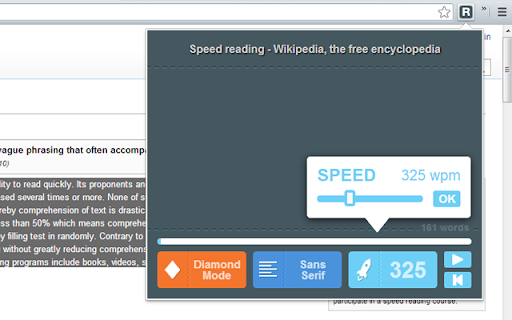
A beautiful speed reading extension Want to improve your reading speed? 1- Select some text on the webpage 2- Click on the "R" icon And here you go, ready to rock =) Version 0.9.4 - Added a new shortcut, Backspace, to go back to start. - Added some tips on the options page that may improve your reading experience. - Fixed an issue caused by the spacebar key. Version 0.9.3 - A link to the options page has been added - A loading animation has been added - Fixed a couple of bugs caused by the spacebar key Version 0.9.1 - Possibility to set the delay before the reading starts (on the options page) - Performance improvement

Pacer speed reading
An assistant to help you boost your reading speed! Pacer speed reading is nothing more than a visual guide that guide your eyes across as well as down lines of text. Using a pacer speed reading has many benefits. By guiding your reading, your eyes are forced into moving in the direction of the pacer. In other words, pacer speed reading forces your eyes to focus when and where you want them to focus. With pacer speed reading, it’s nearly impossible to lose your place on a page and it’s a lot easier to advance to each successive line. All of this helps increase reading speed. Since pacer speed reading involves using other parts of the body, it’s easier to stay alert while reading and that helps improve concentration, too. Fingers, hands, plastic rulers and cards aren’t very effective when trying to speed read on screen. That's why pacer speed reading is created to help. Just simply click START button then click on any text you want to read, a highlighting pacer will appear and move with a speed you want. It stops when reaching the end of a paragraph. Click on the next paragraph to continue. The pacer speed, its color and movement are customizable in the browser action popup. Show popup by clicking on pacer speed reading icon on browser toolbar.

Testing Reading Speed
Read at double or triple your normal speed. Read at double or triple your normal reading speed. Test your original reading speed. Use our software for 2 weeks and see how much faster you read online. Train yourself to read faster once you download and install our speed reading software. Increase the rate at which you can absorb knowledge and grow smarter, use this free extension to help boost your reading speed today. This is an software extension that trains you to read faster while eliminating the subvocalization that most people naturally do while reading. The average person reads at 200 words per minute; using our software, you can easily train yourself to read at double the speed, 400 words per minute, or faster. Our software allows you to adjust the speed at which words flash across the screen so that you naturally read faster. Think of how much time you save every day! Save hours each week by using our software extension to read any article you wish. Our software extension allows you to speed read at a pace you set and you can slowly boost your reading speed from 200 to 300 to 400 to 1000 words a minute at the end. Disclaimer: Please note this extension is NOT made by Google and is made by an independent development team. All copyrights belong to their respective owners. Google doesn’t endorse or sponsor this Chrome extension. Speed Read is not owned by, is not licensed by and is not a subsidiary of Google Inc. Here is how you can begin using our software. Download and install Speed Read Go to the article/website you wish to read Click on our software icon to begin speed reading Adjust the reading speed inside the options of our software extension

ReadFast - Speed Reading
Read faster with RSVP technology. Select text and double-click or right-click to speed read. ReadFast - Speed Reading with RSVP Technology Dramatically improve your reading speed and comprehension using RSVP (Rapid Serial Visual Presentation) technology. ReadFast works on any webpage with text content: * Double-click any text to start speed reading * Select text and right-click to read just that section * No selection? The entire page will be displayed word-by-word * From clipboard: Copy text from anywhere and press Ctrl+B to read content from outside the browser * Adjustable speed: Configure your reading pace via slider (up to 1000+ WPM) * Customizable: Adjust colors, font size, vertical position, progress bar, and background transparency * Full PDF support: Works seamlessly with PDF documents * Keyboard shortcuts: Fully configurable via options menu 🎯 ORP Technology ReadFast uses the Optimal Recognition Point (ORP) technique—displaying one word at a time with precise letter alignment so your eye doesn't need to move, allowing you to read at incredible speeds without sacrificing comprehension. Version 3.0 Manifest V3: Fully migrated to Chrome's modern extension standards for better security, performance, and future compatibility Replace the spritz SDK that is no longer available by a custom OPR algorithm Rebrand the product RELEASE NOTES 2.5.0 -Added the Spritz from clipboard functionality. Just hit CTRL+B -Added the possibility to change most of the colors 2.3.3 -You can now Spritz PDF without selecting text first 2.2 -Added the possibility to disable the double click detection from the BrowserAction icon or the keydoard shortcut Alt+S 2.1 -"Spritz the full page" now work on local content 2.0 -Added "Read the full page" context menu -Added ESC key to close -Fixed compatibility issue with Evernote Clearly -Integration with Spritz SDK v1.2 1.2 - Added Pause functionnality - Added Rewind 1 sentence - Improved text readability by variation of the display speed according to words and sentences length

BeeLine Reader
BeeLine helps you read more quickly and easily. Try it free and see how much it can help you! Our innovative reading technology has won awards at MIT, Stanford, and the United Nations. Read about us in The Atlantic (http://theatln.tc/24LsoX8) or listen to our interview on NPR (http://bit.ly/1Tl3tpp). To try BeeLine, install now and start reading easier for free! BeeLine uses a color gradient to guide your eyes from the end of one line to the beginning of the next. This seemingly simple tweak makes reading easier and faster because it allows you to transition between lines quickly and effortlessly. Many people are able to read 20% or 30% faster with BeeLine, even on their first try. BeeLine is used by students from grade school to grad school, including at leading schools around the world. BACKED BY EDUCATIONAL RESEARCH AND NON-PROFIT PARTNERS Independent, educator-led research on BeeLine has shown dramatic reading fluency and comprehension gains for students. BeeLine has been adopted by the California Public Library System, Reading Is Fundamental, and Blackboard Ally. USE BEELINE ON YOUR FAVORITE WEBSITES The BeeLine extension works on millions of news websites and blogs. You can also get our PDF extension, which works on any text-based PDF (available at http://bit.ly/1Fo1hXa), or our iOS extension (http://bit.ly/1xNs76J) TRY FOR FREE BeeLine now offers a free mode that lasts forever. In this mode you can use BeeLine as much as you want on your list of favorite websites. You can add and remove sites from your favorites list as often as you like. • BeeLine Pro: only $1.99/mo, with annual discounts available • BeeLine Pro, Family Pack: Get BeeLine for 5 browsers and save even more! Just $8/yr per browser! Teachers can also apply on our website for free access for their students (certain limitations apply). What you read is your business, and even our free tier does not intrude on your privacy. We do not sell, rent, license, or otherwise monetize your data in any way. Please consider subscribing to support privacy-conscious businesses like ours. BeeLine Reader is supported by grants and awards from MIT Solve, Stanford BASES, Newschools Venture Fund, and the Tech Museum of Innovation. See our website for more information about our mission and impact: www.BeeLineReader.com. If you'd like to cancel your subscription, please contact us (via the extension settings, our web contact form, or our web chat) before your monthly/annual renewal date and we will cancel it immediately. If you forget to contact us before your subscription renews, we may still be able to provide a partial refund. Asking nicely helps! Fine print: text extraction based on Readability from Arc90 Labs, licensed under the Apache License, Version 2. All other rights reserved; US Patent number US20150234788A1; foreign patents also issued and additional US and foreign patents pending. Please send us your feedback (bug fixes, new color scheme requests, etc.) via Twitter, Facebook, or email
