
blbpafkooanpdcdcndkcckblghjddpke
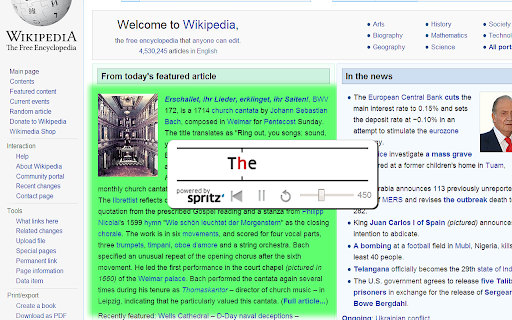

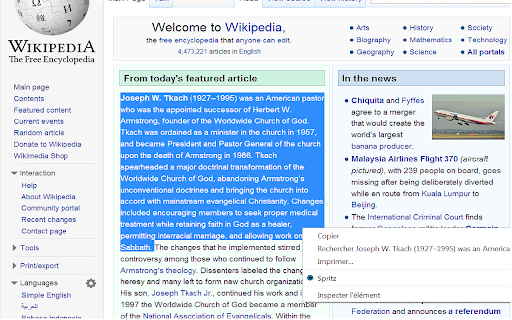
Read faster with RSVP technology. Select text and double-click or right-click to speed read. ReadFast - Speed Reading with RSVP Technology Dramatically improve your reading speed and comprehension using RSVP (Rapid Serial Visual Presentation) technology. ReadFast works on any webpage with text content: * Double-click any text to start speed reading * Select text and right-click to read just that section * No selection? The entire page will be displayed word-by-word * From clipboard: Copy text from anywhere and press Ctrl+B to read content from outside the browser * Adjustable speed: Configure your reading pace via slider (up to 1000+ WPM) * Customizable: Adjust colors, font size, vertical position, progress bar, and background transparency * Full PDF support: Works seamlessly with PDF documents * Keyboard shortcuts: Fully configurable via options menu 🎯 ORP Technology ReadFast uses the Optimal Recognition Point (ORP) technique—displaying one word at a time with precise letter alignment so your eye doesn't need to move, allowing you to read at incredible speeds without sacrificing comprehension. Version 3.0 Manifest V3: Fully migrated to Chrome's modern extension standards for better security, performance, and future compatibility Replace the spritz SDK that is no longer available by a custom OPR algorithm Rebrand the product RELEASE NOTES 2.5.0 -Added the Spritz from clipboard functionality. Just hit CTRL+B -Added the possibility to change most of the colors 2.3.3 -You can now Spritz PDF without selecting text first 2.2 -Added the possibility to disable the double click detection from the BrowserAction icon or the keydoard shortcut Alt+S 2.1 -"Spritz the full page" now work on local content 2.0 -Added "Read the full page" context menu -Added ESC key to close -Fixed compatibility issue with Evernote Clearly -Integration with Spritz SDK v1.2 1.2 - Added Pause functionnality - Added Rewind 1 sentence - Improved text readability by variation of the display speed according to words and sentences length

Half Bold: Speed Reading & Dyslexic Font for ADHD
Speed reading extension with dyslexic-friendly fonts. Helps with ADHD, dyslexia, and focus. Highlights text for faster reading. Boost reading speed and focus. The ultimate ADHD reader and speed reading tool with Dyslexic friendly fonts (Open Dyslexic) and Half Bold text conversion. Elevate your online reading journey with the Half Bold Chrome Extension — your ultimate aid for speed reading and a seamless, accessible experience! This extension refines digital text, catering to the needs of those with Dyslexia and ADHD. By highlighting the first part of every word, our tool acts as a powerful speed reading aid, guiding your eyes smoothly through the text. 🔡 Discover the Brilliance of Half Bold & Speed Reading ➤ Effortlessly increase reading speed with our smart bionic-style highlighting. ➤ Customize your experience with dyslexic friendly fonts. ➤ Receive gentle guidance while reading complex text, perfect for reading with ADHD. 💻 Break Barriers: The Ultimate ADHD Reader Struggling to focus? This tool transforms your browser into an effective ADHD reader. 1️⃣ Interactive design: A game-changer among ADHD apps for adults and students. 2️⃣ Improve focus: Uses speed reading techniques to keep your brain engaged. 3️⃣ Enhance comprehension: Proven method to help you read quickly and retain more. 📚 Dyslexia Friendly Fonts & Tools We understand the challenges of neurodiversity. That's why we integrated support for the Open Dyslexic font. - Dyslexic Font: Switch instantly to the best font for dyslexia to reduce visual stress. - Inclusive Space: Works as a comprehensive dyslexia reading program right in your browser. - Boost Fluency: Say goodbye to struggles with our dyslexic friendly fonts. 💡 Enlighten Your Reading: How to Read Quickly You can leverage the benefits of speed reading, a mode that facilitates a faster pace without compromising comprehension. This innovative feature breaks down complex texts, allowing you to retain more information. Whether you are looking for how to improve reading speed , a student researching, or someone looking for dyslexia reading tools, this feature empowers you to conquer any challenge. 👁️ Empower Your Reading with Focus Tools ➤ Enhance fluency with our ADHD reading extension. ➤ Experience the power of bold first letter technology. ➤ Transform your journey with one of the best apps for ADHD. 1.Speed Reading Practice: Turn any website into a training ground to develop speed reading. 2.Comfortable Reading: Reduce eye strain with half bold chrome extension features. 3.Accessibility: A true dyslexia font google docs alternative for the entire web. 🔍 Dive Deeper into Functionality The unique functionality of this tool not only enables individuals to stay focused but also makes content easier to digest. For people seeking apps for ADHD or dyslexia apps, this can be a game-changer. It’s not just a tool; it's a bridge to information. The Half Bold Chrome Extension ensures that no one is left behind. 🤔 FAQs About Our Chrome Extension How can I become a faster reader with this tool? 🔹 By highlighting the initial letters of words, the extension minimizes eye movement, effectively acting as speed reading software. This is a proven technique on how to read quickly. Does this support Dyslexic Friendly Reading? 🔹 Yes! Our extension includes the Open Dyslexic font and serves as one of the best dyslexia reading tools available for Chrome. Is this good for ADHD? 🔹 Absolutely. Many users rate it as one of the best adhd apps for productivity. It helps maintain focus and prevents "drift" while reading. Can I use this extension on any website? 🔹 Yes! Unlike some speed reading apps, our extension is designed to work across all websites. Want to enjoy reading even in low light conditions? 🔹 Absolutely! Our extension comes with a Dark Mode feature. Simply navigate to the extension settings and switch on the Dark Mode for an eye-friendly interface. Transparency Note: This extension may use affiliate links. If you click on a link and make a purchase, we may receive a small commission at no extra cost to you. This helps support the development of this free tool. This application is independently developed and has no affiliation with Bionic Reading AG or any of its subsidiaries. This application is not endorsed by, directly affiliated with, maintained, authorized, or sponsored by Bionic Reading AG. All product and company names are the registered trademarks of their original owners.

Speed Reading
Reedy Speed Reading, learn how to increase reading speed in a sec and read faster today. Take words per minute test. Boost wpm Wondering, how can I increase my reading speed and comprehension? Look no further! Behold, the “Reedy” — the magical Speed Reader app for fast reading test and learning. Key to unlocking the power of the fast speed reading. 🐼 Like the swift winds that carry whispers across the bamboo forests, we use advanced rapidreading techniques, helping you speedread. Whether you’re a scholar, a student, or a curious wanderer, it will enhance your quest for written wonders, allowing you to absorb tales and tomes as swiftly as the wind. Embrace this enchanted tool and let your mind soar across realms of knowledge. The wisdom of countless scrolls is within your grasp with speedreading! 🌐 Hey! It isn’t just about grasping content faster — it’s about making the whole experience better for you. • Imagine transforming how you consume and comprehend all the content you encounter online. • Be it a web article, news page, PDF, custom pasted text, or anything else you come across anywhere on the web. • Get through more content in less time. 🔥 Why the Speed Reading app? → Accelerate daily textual tasks. → Enhance productivity and learning efficiency immediately. → Increase textual fluency dramatically — double, triple, or even quadruple your average reading pace! → Train your brain to process information faster. → Comprehension examination, ace and keep retention. 🏃♂️ How fast can you go? Ever wondered about average read speed? Take our reading speed test and discover your current WPM (words per minute)! Then use Reedy to maximize your potential and become a fastreader in no time. Curious about the normal speed of reading? According to multiple studies and meta-analyses, the typical rate of silent absorbing content varies depending on the type of material, but in general: ► For 5th grade, 10-11 years old: 139-194 wpm ► Average reading speed: 200-300 wpm ► **Speedreaders: 300-700 wpm (average speed reading rate even among untrained Reedy users!)** ► Fastest reader in the world: 25,000+ words a minute tested! Where do you stand? Find out with a speed reading test! 📚 Speed reading and features ✓ RSVP-reading (Rapid Serial Visual Presentation) technique presents words one at a time. ✓ Focus point shifted closer to the beginning of a word for increased comprehension. ✓ Gradual acceleration, start at a lower pace and gradually elevate it. ✓ Customizable tempo, fonts, colors, shortcuts, etc. ✓ Smart slow down at punctuation marks. ✓ Reading comprehension test. ✓ Test wpm (wpm reading test). RSVP allows you to significantly increase reading speed without sacrificing comprehension. It reduces eye movement so you can focus better and absorb information faster. Think of it as a fast-forward button for your brain! 🧠 How to speed read Set your desired speed, test reading and comprehension, watch your words-per-minute soar! 💡 Tips on how to read faster 1. Practice regularly; 2. Focus on key words; 3. Minimize subvocalization, do not pronounce in your head! Remember, learning to speedread is a skill that takes time to master. Reedy boosts your ability to grasp and comprehend content effortlessly, but with practice, you can go even faster and become a true speedreading pro. 🌟 Who can benefit from the speedreading? - 🎓 Students cramming for exams, academics and researchers. - 💼 Professionals dealing with heavy workloads. - 📗 Speedreaders who want to tackle more books. - 🧒 Children or literacy skills practicioners. - 👵 Seniors keeping their minds sharp and checking their skills. - 🦥 Slowreaders controlling desired pace. - 📖 Anyone looking to improve speedreading. 🌈 Accessibility, game changing for speedreaders with diverse needs: ◦ Dyslexia: Simplifies text processing, easing comprehension difficulties (dyslexia-friendly font available!); ◦ ADHD/ADD/ASD: Enhances focus, reduces distractions for better comprehending; ◦ Visual impairment: Larger text with no scrolling; 🏆 Become the fastest reader in your circle Challenge your friends to a read speed test! See who is a fastreader and can achieve the highest wpm while maintaining good comprehension. ⚡ Quickread, fastreading, spritzreading, swiftread — whatever you call it, Reedy has got you covered! Whether you’re looking to speedread a textbook, skim through your emails, or simply breeze through the content for fun in lightning pace. 🚀 Get Reedy — your personal rapid reading app right away!

SwiftRead - read faster, learn more
Read three times faster, with SwiftRead. Absorb knowledge and learn more. SwiftRead helps you finish more reading on the web with speed-reading focus modes and natural narration. Use it on web pages, PDFs, and many web-based readers you already use (for example: Kindle Cloud Reader and Libby). KEY FEATURES • Start SwiftRead on the current page from the toolbar (or a shortcut) • Read visually with focus modes — RSVP, paced highlighting, and guided word display • Listen while you read — follow along with synced highlighting • Natural TTS voices — 90+ languages with human-like narration • SwiftRead selected text from the right-click menu • Open PDFs with SwiftRead from your browser • Customize your experience — fonts, themes, spacing, and speed HOW IT WORKS 1) Open the page (or PDF) you want to read 2) Click the SwiftRead extension (or use a keyboard shortcut you set) 3) SwiftRead opens the content in its reader so you can read and/or listen PERMISSIONS (PLAIN ENGLISH) • SwiftRead needs access to the active tab to extract text from the page you choose. • The extension only runs when you activate it (click the icon, use the shortcut, or use the context menu). • Settings are stored in your browser so your preferences persist. Note: SwiftRead is not affiliated with Amazon, OverDrive, or any third-party reader.

Sprint Reader - Speed Reading Extension
Ah, Sprint Reader! A digital marvel that promises to turn us all into literary Usain Bolts, dashing through prose at breakneck speed. This marvelous extension, free as the air we breathe (though considerably less essential), attaches itself to your browser like a benevolent parasite. With a flick of the wrist and a right-click as casual as a royal wave, it transforms your chosen text into a high-speed literary Grand Prix. Gone are the days of laboriously dragging your eyes across the page like a sloth on tranquilizers. No, no! Sprint Reader catapults words at your eyeballs with the relentless efficiency of a tennis ball machine gone berserk. It's RSVP - Rapid Serial Visual Presentation. Not to be confused with the rather more civilized "Répondez s'il vous plaît", though both may leave you equally breathless. The creators, bless their optimistic hearts, assure us that this method will break us free from the shackles of "sub-vocalization" - that quaint habit of actually hearing the words in our heads as we read. How terribly 20th century! Why bother with the music of language when you can have a silent disco in your cranium? But wait, there's more! This digital wonder comes with a veritable smorgasbord of features. Multiple color schemes! Optimal letter highlighting! Automatic language detection! It's like having a polyglot chameleon as your personal reading assistant. And for those of us who find the idea of reading one word at a time a tad pedestrian, fear not - you can adjust the "chunk size". Because nothing says "I'm a serious intellectual" like absorbing "War and Peace" three words at a time. The creators, in their infinite wisdom, have even provided for "grammar delays". Commas, periods, and paragraphs can now be savored for a microsecond longer. It's the literary equivalent of a speed bump - just enough to remind you that punctuation exists before hurtling onward. And should you find yourself enamored with this breakneck bibliophilia, you can profess your love on Facebook. Nothing says "I have a rich inner life" quite like publicly declaring your affection for a speed reading app. In a final flourish of magnanimity, the creators have made Sprint Reader open source. So if you find yourself with a burning desire to tinker with the code that's melting your retinas, by all means, dive in. After all, why settle for reading at the speed of light when you could be going warp speed? In the end, one can't help but wonder: in our mad dash to devour information, are we savoring the meal, or merely counting calories? But such ponderous thoughts are perhaps best left for those plodding readers of yesteryear. We, the sprint readers of the future, have no time for such luxuries. Onward, at dizzying speed, to the next page! Or word. Or letter. Whatever comes first. Sprint Reader is an easy to use FREE speed reading extension. Simply select text on a webpage, right-click and select 'Sprint read selected text' from the menu. This will launch the reader window, the selected text is displayed word-by-word in a fixed focal position. The duration of each slide is calculated based upon a word-per-minute (WPM) setting. This method of reading is known as “Rapid Serial Visual Presentation” or RSVP for short. Studies have shown the habit of internally “sounding out” (sub-vocalizing) words is a limiting factor which prevents faster reading speeds from being obtained. RSVP eliminates the “sounding out” of words as individual words are not displayed long enough for sub-vocalization to occur. RSVP proves that humans are capable of absorbing information at speeds much faster than standard reading rates with the same level of comprehension. Please show us your love and support and spread the word. Sprint Reader is under constant development and we're always looking to improve. Key features of Sprint Reader: - Multiple color schemes - Optimal letter highlighting - Automatic language detection - Adjustable font and font size. - Adjustable word-per-minute (WPM) - Intelligent hyphenation of words - Focal guides to improve attention - Adjustable words-per-slide (chunk size) - Provision for different display algorithms - Optimal word positioning to improve comprehension - Optional grammar delays: 1. Comma 2. Period 3. Paragraph Sprint Reader is an open source project which means you can contribute, fix bugs and add functionality. Become a developer for Sprint Reader: https://github.com/anthonynosek/sprint-reader-chrome For version release information please refer to the update page displayed by Sprint Reader after an update has been downloaded. Sprint Reader is under constant development so get in touch with us if you'd like new features added! Stay tuned for more exciting features! --- DISCLAIMER AND PRIVACY Sprint Reader does not collect your usage data. Copyright All rights reserved.
