
jcofnjnjaijcgkcdklddpokkdmdnmckn
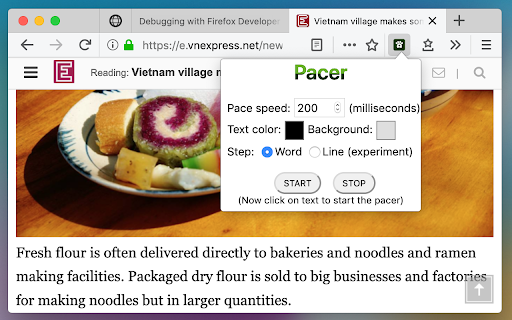
An assistant to help you boost your reading speed! Pacer speed reading is nothing more than a visual guide that guide your eyes across as well as down lines of text. Using a pacer speed reading has many benefits. By guiding your reading, your eyes are forced into moving in the direction of the pacer. In other words, pacer speed reading forces your eyes to focus when and where you want them to focus. With pacer speed reading, it’s nearly impossible to lose your place on a page and it’s a lot easier to advance to each successive line. All of this helps increase reading speed. Since pacer speed reading involves using other parts of the body, it’s easier to stay alert while reading and that helps improve concentration, too. Fingers, hands, plastic rulers and cards aren’t very effective when trying to speed read on screen. That's why pacer speed reading is created to help. Just simply click START button then click on any text you want to read, a highlighting pacer will appear and move with a speed you want. It stops when reaching the end of a paragraph. Click on the next paragraph to continue. The pacer speed, its color and movement are customizable in the browser action popup. Show popup by clicking on pacer speed reading icon on browser toolbar.

Speed Tweaks
Speed up your browser with few tweaks via toolbar popup! Speed Tweaks is an addon that helps you speed up your browser by using a few different tweaks. Simply open the toolbar popup and mark the desired item(s). Please note that none of the tweaks are selected by default. Currently, there are 7 tweaks available for this addon: 1. Blocking most common ads. 2. DNS pre-fetching. 3. Blocking images from loading. 4. Speed-up rendering on page-scroll. 5. Loading mobile version of sites. 6. Discarding all inactive tabs from memory. 7. Clearing the browser's cache. Note 1: depending on your browser version and platform, this addon might behave differently. Note 2: to report bugs, please fill out the bug report form on the addon's homepage (https://mybrowseraddon.com/speed-tweaks.html).

Page Pacer - read faster, stay focused
Trains you to read faster by setting a pace. Read Faster and Stay Focused with the Page Pacer! 🧠 1) Select the text you want to read. 📖 2) Input your desired reading speed (WPM). ⏱️ 3) Click "Start Reading" and watch as Page Pacer guides you through the text at a steady, efficient pace. ⚡ Reducing unnecessary eye movements is crucial for improving reading speed because it minimizes the time and effort spent on scanning and refocusing across the text. Typically, your eyes jump around the page, a process known as saccadic movement, which can slow down the overall reading process. By reducing these movements, you can focus more directly on the content, leading to quicker comprehension and less cognitive strain. Page Pacer 2.0 UPDATE: 🚀 Major Upgrade Alert! 🚀 NEW Premium Experience: Uncapped reading speeds up to 3000 WPM for PRO users Unlimited daily usage with PRO subscription Custom themes for personalized reading Improved Free Plan: Clearer FREE vs PRO feature indicators 1 free use per day Basic reading pace control up to 250 WPM Progress tracking with visual history Enhanced UI: Modern, sleek interface with intuitive controls Better visibility of remaining free usage time Premium upgrade prompts when limits are reached Limited Time Offer: 25% OFF Premium - Only $4.99/month! Try our 7-day Free Trial and experience the full power of Page Pacer 2.0! Version 1.4 UPDATE: *Updated Slider UI *Track your progress! Version 1.3 UPDATE: PAGE PACER PRO!!! Highlight any text and read with Page Pacer! Now compatible with: PDF Files, DOCX Files, PowerPoint .pptx Files, and anything you can highlight!!

Read fast - Speed Reading Extension
A beautiful speed reading extension Want to improve your reading speed? 1- Select some text on the webpage 2- Click on the "R" icon And here you go, ready to rock =) Version 0.9.4 - Added a new shortcut, Backspace, to go back to start. - Added some tips on the options page that may improve your reading experience. - Fixed an issue caused by the spacebar key. Version 0.9.3 - A link to the options page has been added - A loading animation has been added - Fixed a couple of bugs caused by the spacebar key Version 0.9.1 - Possibility to set the delay before the reading starts (on the options page) - Performance improvement

Bionify | Read faster!
Open source text converter designed to help you read faster! Read any kind of public website faster with Bionify! Bionify converts any public website into Bionified format, which alters texts so that the most concise parts of words are highlighted. This guides the eye over the text and the brain remembers previously learned words more quickly. This extension is 100% free and open source, and you may find the source code here: https://github.com/Cveinnt/bionify. As Bionify is open source and free, it is NOT associated with the paid Bionic Reading® APIs. We use our own highlighting algorithms and do not violate their copyrights. If this extension helped you, feel free to leave a star! Please note that the extension currently don't support any kind of locally uploaded contents, such as PDFs. INSTRUCTIONS * Pin the Bionify extension to your Chrome extension bar * Go the the public website you want to read * Click on the extension icon * Click on the toggle button to start reading with Bionic Reader! If you have any questions or comments, feel free to submit an issue on the GitHub repo. This is in early development and improvements, features, and fixes will be soon to come!
