
oflnmeohkhahdmnmbemakhbgkfefbfnn
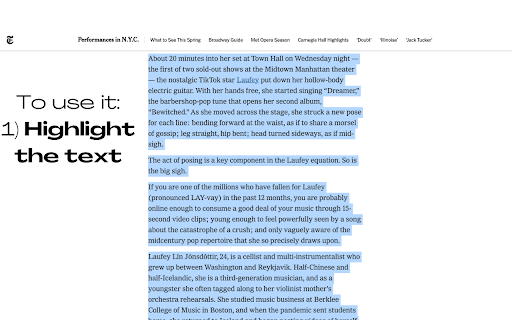
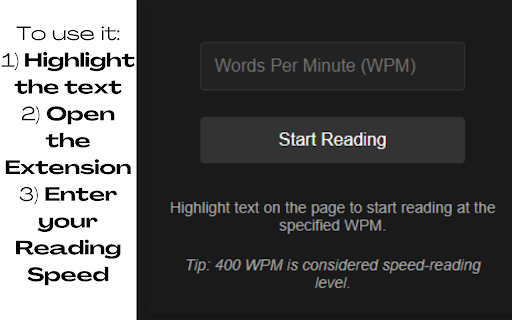
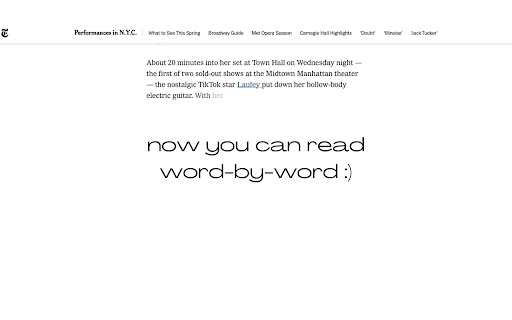
Trains you to read faster by setting a pace. Read Faster and Stay Focused with the Page Pacer! 🧠 1) Select the text you want to read. 📖 2) Input your desired reading speed (WPM). ⏱️ 3) Click "Start Reading" and watch as Page Pacer guides you through the text at a steady, efficient pace. ⚡ Reducing unnecessary eye movements is crucial for improving reading speed because it minimizes the time and effort spent on scanning and refocusing across the text. Typically, your eyes jump around the page, a process known as saccadic movement, which can slow down the overall reading process. By reducing these movements, you can focus more directly on the content, leading to quicker comprehension and less cognitive strain. Page Pacer 2.0 UPDATE: 🚀 Major Upgrade Alert! 🚀 NEW Premium Experience: Uncapped reading speeds up to 3000 WPM for PRO users Unlimited daily usage with PRO subscription Custom themes for personalized reading Improved Free Plan: Clearer FREE vs PRO feature indicators 1 free use per day Basic reading pace control up to 250 WPM Progress tracking with visual history Enhanced UI: Modern, sleek interface with intuitive controls Better visibility of remaining free usage time Premium upgrade prompts when limits are reached Limited Time Offer: 25% OFF Premium - Only $4.99/month! Try our 7-day Free Trial and experience the full power of Page Pacer 2.0! Version 1.4 UPDATE: *Updated Slider UI *Track your progress! Version 1.3 UPDATE: PAGE PACER PRO!!! Highlight any text and read with Page Pacer! Now compatible with: PDF Files, DOCX Files, PowerPoint .pptx Files, and anything you can highlight!!

Readima
Readima simulates many reading techniques such as Meta Guiding, or RSVP to help you read faster with high comprehension. Readima is a Chrome extension designed to help people improve their speed reading skills through the use of various methodologies, including Meta Guiding and Rapid Serial Visual Presentation (RSVP). With Readima, users can customize their reading experience to better suit their individual needs and preferences, choosing from a variety of options such as font size, color scheme, and reading speed. One of the key features of Readima is its ability to implement Meta Guiding, a technique that involves using a visual cue, such as a cursor or a highlighted line, to guide the reader's eye as they move through the text. This can help improve reading speed and comprehension by focusing the reader's attention on the most important information and eliminating the need for unnecessary eye movements. Another useful feature of Readima is its support for RSVP, which presents text one word at a time, rather than in traditional sentence or paragraph form. This can help to improve reading speed by forcing the reader to focus on each individual word and eliminating the tendency to re-read or skim over words. It can also help improve comprehension by allowing the reader to fully process and comprehend each word before moving on to the next. In addition to these features, Readima also offers a variety of customization options, such as the ability to adjust the font size and color scheme to suit the reader's preferences, and the option to set a specific reading speed to help optimize the reading experience. Whether you're a student looking to improve your reading skills for school, a professional looking to increase your productivity, or simply someone who enjoys reading, Readima is an excellent tool to help you improve your speed reading skills and get more out of your reading experience. ✔ Reading pointer: Readima simulates the best speed reading technique called Meta Guiding. Meta guiding involves visually guiding your eye using some sort of pointer (finger, pen, or this Readima app) for the eye to move faster along the length of a passage of text. The point is to decrease distraction and focus on the specific words to increase your reading speed. Try to keep moving your pointer slightly faster than your comfort zone to increase the reading speed. ✔ Rapid Serial Visual Presentation (RSVP): In RSVP, a series of words appear rapidly in time at the same point in visual space. Indeed, the words may appear as fast as 10 items per second. ✔ Reading Mode: distraction-free & ad-blocking reading viewer focusing on the main content. ✔ Scan & Skim: highlight the first and last sentence of each paragraph in a custom color that the user can choose. This allows the reader to quickly scan through a piece of text and get a sense of the main ideas and key points without having to read every single word. Additionally, by highlighting the first and last sentence of each paragraph, the reader is able to quickly identify where one idea ends and another begins. ✔ Word List Checker: allows you to see new vocabulary in context, which can make it easier to understand and remember. We recommend moving your pointer with almost constant speed. Try to keep moving your pointer slightly faster than your comfort zone to increase the reading speed. Try to read faster so that you catch up with your pointer. If you start losing comprehension, slow your pointer down. Otherwise, consider moving your pointer even faster. What you read is your business. We do not sell, rent, license, or otherwise monetize your data in any way. By installing the extension, you agree to Readima's Privacy Policy. ★ Changelog 1.3.4 | 08 Mar 2026 New Features - Bionic Reading Mode - A new reading technique that bolds the first part of each word to help your eyes glide through text faster - Highlights & Annotations - Mark important passages and add notes while reading. Your highlights sync across sessions - Read Later Queue - Save articles to read later with right-click context menu. Access your reading list from the dashboard - Reading Streak - Track your daily reading habit with streak counters and stay motivated - Focus Mode - Dim distractions and focus on the content you're reading - Text-to-Speech - Listen to articles with built-in TTS support - Auto-Scroll - Hands-free reading with adjustable scroll speed - Reading History - Keep track of articles you've read with automatic history logging - Completely redesigned Dashboard with better organization and statistics - PDF & EPUB reader now properly saves bookmarks - Improved premium subscription management with direct billing portal access - Performance improvements through code refactoring Bug Fixes - Fixed bookmark saving in PDF/EPUB reader mode - Fixed highlight navigation issues - Fixed various UI bugs in the settings panel 1.3.3 | 02 Mar 2026 - Ebook Reader with epub, pdf files - Added a pause button in RSVP fullscreen mode 1.3.2 | 09 Nov 2025 - Fix bugs and activate subscription. 1.3.0 | 01, Feb 2023 - Fix bugs and add improvements 1.2.9 | 18, Jan 2023 - Improve side bar UI - Add Images overview feature. 1.2.7 | 11, Jan 2023 - Turn on/off media and links in the article - Page width and Line space settings 1.2.3 | 20, Dec 2022: - Add Notification for users to view the latest updates right on the extension - Update Activation page UI/UX - Add Word List Checker feature: Allow you to highlight words from a custom list. - Improve side menu user experiences 1.1.1 | 14, Aug 2022 - Fix bug when switching the reading mode 1.0.7 | 05, Aug 2022 - Improve the settings page UI - Update to manifest v3 1.0.6 | 04, Aug 2022 - Add Analytics and improve the speed reading sidebar 1.0.3 | 25, Jul 2022 - Rebranding to Readima - Add theme settings on the right sidebar Any questions and feature requests? Drop us a line at hello@readima.com

Reader
📖 Web page speed reader. Web page speed reader browser extension. Uses rapid serial visual presentation (RSVP), optimal recognition point (ORP), and other techniques to increase reading speed and retention. The recommended use is for content that takes under 5 minutes to speed read or articles you would otherwise skim over. Extended focus can lead to fatigue and diminished results. To read longer text, use the pause button to take a break when you feel fatigue creeping in. - Extracts the most meaningful text on any page or from your selection. - Shows one word at a time in quick succession with a highlighted focus point. - Simple, distraction-free, no-nonsense user interface. - Still works when JavaScript is disabled or when you're offline. - Far smaller, faster, and less intrusive than similar tools. - No user tracking, tight security, and no unexpected nastiness. It's open source, see the code for yourself; https://github.com/maxmilton/reader

HyperRead for Chrome
Read a lot on the web? Want to improve your reading speed? This extension is for you! Just select the text you want to read from any web page, choose the speed in words-per-minute at which you are gonna be reading and let HyperRead make your life easier. Want to pause? you can do it by pressing any key or clicking on the pause button. Just as easy is to go back to the last stop or even to the beginning of the selected text. Once configured, you can use the Zarathustra Hotkey (Shift+Ctrl+Z) to start reading immediately the selected text in any tab.

Text Speed-reading Extension
A Chrome extension that bolds parts of words to increase your reading speed Introducing the new chrome extension that can boost your reading speed! Our extension bolds the first few letters of every word on a webpage within text paragraphs, making it easier for you to scan through the text and identify the most important words. Studies have shown that this technique can significantly increase your reading speed, making it perfect for students, professionals, and anyone who wants to read faster and more efficiently. Try it out today and experience the benefits of this simple yet powerful tool!
