
omdficelahogdlielanbfdcefpckabai
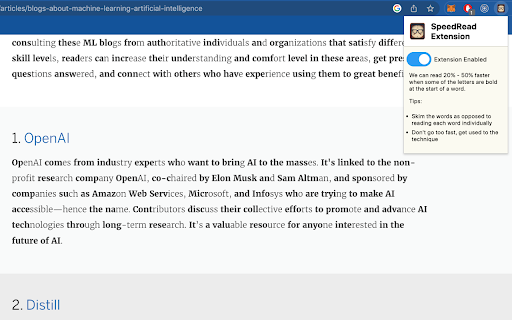
A Chrome extension that bolds parts of words to increase your reading speed Introducing the new chrome extension that can boost your reading speed! Our extension bolds the first few letters of every word on a webpage within text paragraphs, making it easier for you to scan through the text and identify the most important words. Studies have shown that this technique can significantly increase your reading speed, making it perfect for students, professionals, and anyone who wants to read faster and more efficiently. Try it out today and experience the benefits of this simple yet powerful tool!

Speed Reader Highlighter
Enhance your reading speed and focus with our Chrome extension! It combines paced highlighting to minimize subvocalization with a pop-up reader that keeps words in a fixed position. Easily adjust the reading pace, rewind, pause, and customize the tab's appearance to suit your preferences.

Page Pacer - read faster, stay focused
Trains you to read faster by setting a pace. Read Faster and Stay Focused with the Page Pacer! 🧠 1) Select the text you want to read. 📖 2) Input your desired reading speed (WPM). ⏱️ 3) Click "Start Reading" and watch as Page Pacer guides you through the text at a steady, efficient pace. ⚡ Reducing unnecessary eye movements is crucial for improving reading speed because it minimizes the time and effort spent on scanning and refocusing across the text. Typically, your eyes jump around the page, a process known as saccadic movement, which can slow down the overall reading process. By reducing these movements, you can focus more directly on the content, leading to quicker comprehension and less cognitive strain. Page Pacer 2.0 UPDATE: 🚀 Major Upgrade Alert! 🚀 NEW Premium Experience: Uncapped reading speeds up to 3000 WPM for PRO users Unlimited daily usage with PRO subscription Custom themes for personalized reading Improved Free Plan: Clearer FREE vs PRO feature indicators 1 free use per day Basic reading pace control up to 250 WPM Progress tracking with visual history Enhanced UI: Modern, sleek interface with intuitive controls Better visibility of remaining free usage time Premium upgrade prompts when limits are reached Limited Time Offer: 25% OFF Premium - Only $4.99/month! Try our 7-day Free Trial and experience the full power of Page Pacer 2.0! Version 1.4 UPDATE: *Updated Slider UI *Track your progress! Version 1.3 UPDATE: PAGE PACER PRO!!! Highlight any text and read with Page Pacer! Now compatible with: PDF Files, DOCX Files, PowerPoint .pptx Files, and anything you can highlight!!

VoiceMagic: Transform Text into Spoken Words
Select text and read it. Hear text read aloud. A Text to Speech Voice Reader. "VoiceMagic Chrome Extension" – selected text to speech IMPORTANT: After you install extension you have to refresh page. It does not work on webpage chrome web store. You need to go to a page you actually want it to read like Wikipedia, or google search. To use VoiceMagic, navigate to the web page you want to read: 1. Click the VoiceMagic icon on the Chrome menu, click "Enable". 2. Select text in web page and listen to it in the speakers/headset. 3. You can change the voice, reading speed and "Disable" text to speech. Right clicking anywhere on the page, will provide you with yet another option to enable/disable text to speech, via the context menu. 🔊 Tired of staring at your screen for hours on end? Wish you could absorb online content without the eye strain? Look no further! The VoiceMagic Chrome Extension is here to revolutionize your browsing experience. 📖 Picture this: You're scrolling through a captivating article, but your eyes are feeling the strain. With our powerful extension, you can effortlessly transform any webpage into an immersive audio adventure. Just select the text you want to hear, and voila! It's read aloud to you, right through your speakers. 🎉 Say goodbye to eye fatigue, and hello to convenience! Whether it's a lengthy article, a blog post, or breaking news, our extension puts the power of auditory learning at your fingertips. Here's why you'll love it: 🌟 Effortless Accessibility: Turn any webpage into an instant audiobook with just a few clicks. No more squinting or straining. Supports 40+ languages. Can be used by users who prefer to listen to content instead of reading, those with dyslexia or other learning disabilities, and children learning to read. 🌐 Universal Compatibility: Compatible with all websites, so you can enjoy an auditory experience wherever you browse. It works on a variety of websites, including news sites, blogs, fan fiction, publications, textbooks, school and class websites, and online university course materials. 📚 Enhanced Learning: Learn on the go, multitask with ease, and absorb knowledge effortlessly while doing other tasks. 💼 Productivity Booster: Listen to reports, research, or any online content while you work, freeing up your hands and time. 👂 Customize Your Experience: Adjust the voice, speed, and language to match your preferences. It's your reading experience, your way! 📢 Stay Updated: Stay in the loop with real-time updates. Our extension can read news articles to keep you informed. Ready to experience the future of web browsing? Download the VoiceMagic Chrome Extension now and immerse yourself in the world of audio exploration. Say goodbye to eye strain, and hello to a more enjoyable and productive online experience. Make the web come to life with the power of sound. Transform your online world with VoiceMagic. Get started today! 🎧✨

HyperRead for Chrome
Read a lot on the web? Want to improve your reading speed? This extension is for you! Just select the text you want to read from any web page, choose the speed in words-per-minute at which you are gonna be reading and let HyperRead make your life easier. Want to pause? you can do it by pressing any key or clicking on the pause button. Just as easy is to go back to the last stop or even to the beginning of the selected text. Once configured, you can use the Zarathustra Hotkey (Shift+Ctrl+Z) to start reading immediately the selected text in any tab.
