
hmpokgohkodofedicnmakcifalilemlj
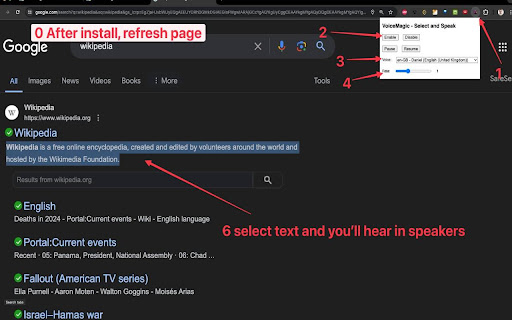
Select text and read it. Hear text read aloud. A Text to Speech Voice Reader. "VoiceMagic Chrome Extension" – selected text to speech IMPORTANT: After you install extension you have to refresh page. It does not work on webpage chrome web store. You need to go to a page you actually want it to read like Wikipedia, or google search. To use VoiceMagic, navigate to the web page you want to read: 1. Click the VoiceMagic icon on the Chrome menu, click "Enable". 2. Select text in web page and listen to it in the speakers/headset. 3. You can change the voice, reading speed and "Disable" text to speech. Right clicking anywhere on the page, will provide you with yet another option to enable/disable text to speech, via the context menu. 🔊 Tired of staring at your screen for hours on end? Wish you could absorb online content without the eye strain? Look no further! The VoiceMagic Chrome Extension is here to revolutionize your browsing experience. 📖 Picture this: You're scrolling through a captivating article, but your eyes are feeling the strain. With our powerful extension, you can effortlessly transform any webpage into an immersive audio adventure. Just select the text you want to hear, and voila! It's read aloud to you, right through your speakers. 🎉 Say goodbye to eye fatigue, and hello to convenience! Whether it's a lengthy article, a blog post, or breaking news, our extension puts the power of auditory learning at your fingertips. Here's why you'll love it: 🌟 Effortless Accessibility: Turn any webpage into an instant audiobook with just a few clicks. No more squinting or straining. Supports 40+ languages. Can be used by users who prefer to listen to content instead of reading, those with dyslexia or other learning disabilities, and children learning to read. 🌐 Universal Compatibility: Compatible with all websites, so you can enjoy an auditory experience wherever you browse. It works on a variety of websites, including news sites, blogs, fan fiction, publications, textbooks, school and class websites, and online university course materials. 📚 Enhanced Learning: Learn on the go, multitask with ease, and absorb knowledge effortlessly while doing other tasks. 💼 Productivity Booster: Listen to reports, research, or any online content while you work, freeing up your hands and time. 👂 Customize Your Experience: Adjust the voice, speed, and language to match your preferences. It's your reading experience, your way! 📢 Stay Updated: Stay in the loop with real-time updates. Our extension can read news articles to keep you informed. Ready to experience the future of web browsing? Download the VoiceMagic Chrome Extension now and immerse yourself in the world of audio exploration. Say goodbye to eye strain, and hello to a more enjoyable and productive online experience. Make the web come to life with the power of sound. Transform your online world with VoiceMagic. Get started today! 🎧✨

DOM TTS Reader
Select DOM blocks and convert text to speech! 🎉 Free version available now! ✨ Are you doing other important things but don't want to stop reading? The novel site doesn't have a text-to-speech feature? Then try this plugin! You can use this plugin to turn any block of text into speech, using the OpenAI TTS model to make the voice generation effect the best!

Read Aloud - Text to Speech AI Voice Generator
Text to speech (TTS) reads any text aloud using human-like, context-aware AI voices, with 30+ natural voice options. Text to speech lets you listen to docs, articles, PDFs, email, and other formats — anything you read. Convert text to audio so you can listen to your document for proofreading, for reasons of dyslexia or other learning disabilities. Features: ➤ Have 30+ lifelike spoken voices ➤ Supports 60 languages ➤ Supports webpages, Google Docs, PDF, Emails and images or text to audio The TTS model supports the following languages: Afrikaans, Arabic, Armenian, Azerbaijani, Belarusian, Bosnian, Bulgarian, Catalan, Chinese, Croatian, Czech, Danish, Dutch, English, Estonian, Finnish, French, Galician, German, Greek, Hebrew, Hindi, Hungarian, Icelandic, Indonesian, Italian, Japanese, Kannada, Kazakh, Korean, Latvian, Lithuanian, Macedonian, Malay, Marathi, Maori, Nepali, Norwegian, Persian, Polish, Portuguese, Romanian, Russian, Serbian, Slovak, Slovenian, Spanish, Swahili, Swedish, Tagalog, Tamil, Thai, Turkish, Ukrainian, Urdu, Vietnamese, and Welsh. You can generate spoken audio in these languages by providing the input text in the language of your choice.

Speech my text
Text to voice converter is a professional Chrome extension that can convert any text into speech. A Text-to-speech voice converter… Text to voice converter is a professional Chrome extension that can convert any text into speech. A Text-to-speech voice converter lets you read documents aloud on your laptop or desktop. Text-to-speech is now one of daily life's most commonly used features, especially if you are a teacher, student, working professional, or content creator. Text to sound extension enables users to do other activities simultaneously, such as noting down content or playing games while listening to stories or doing physical activities which would have been impossible without text to voice converter. Text to Sound Converter includes a plethora of useful features that will make your daily tasks much easier. This Chrome extension works efficiently and you can listen to the webpage content or document in voice form. It is a time-saver for kids, content creators, and working professionals. 2. Text Reading In Multiple Languages with Natural Voice Text to Speech converter is compatible with almost all of the languages of the world. It converts all your text into easily understandable natural speech voice. 3. Skip The Text Paragraph That You Do Not Need to Convert to Audio This extension has one unique feature that enables you to skip any paragraph that you are not interested in converting to speech. 4. Start Again from The Last Point Where You Paused Consider what you would do if you were listening to a voice converted from text and were interrupted by other tasks. Don’t worry, you do not have to start from all over the starting point because this extension allows you to start the text to speech conversion from the same point where you paused. -Click the Add to Chrome button to Install the extension -Visit any webpage -You will see a pop-up on the right corner -Edit the Voice & Font settings according to your requirements -Click the play & start listening text in audio format

Playtext — Text to Speech
Playtext – Turn any webpage into an audiobook with AI voices. 1. Save any page. 2. Press play. 3. Listen at up to 3x speed. — What can you do with Playtext? 🎧 Read + Listen Together – Follow along as you listen. Dual input helps you retain more of what you read. ✨ Distraction-Free Reader – A clean, focused reading environment. No ads, no clutter. 🚀 Speed Up Your Reading – Adjust playback up to 3x to get through content faster. 💻 Keyboard Shortcuts – Control playback without leaving the keyboard. 🌎 6 Languages – English, Spanish, Portuguese, German, Italian, and French.
