
ifjafammaookpiajfbedmacfldaiamgg
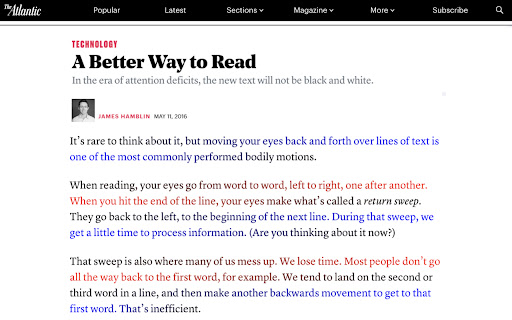
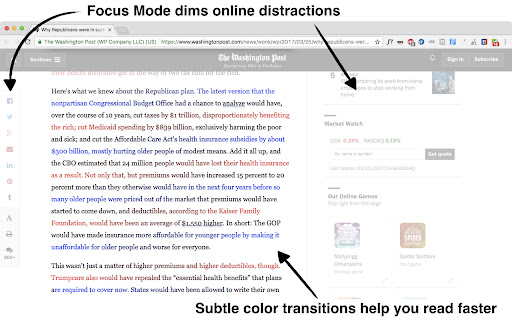
BeeLine helps you read more quickly and easily. Try it free and see how much it can help you! Our innovative reading technology has won awards at MIT, Stanford, and the United Nations. Read about us in The Atlantic (http://theatln.tc/24LsoX8) or listen to our interview on NPR (http://bit.ly/1Tl3tpp). To try BeeLine, install now and start reading easier for free! BeeLine uses a color gradient to guide your eyes from the end of one line to the beginning of the next. This seemingly simple tweak makes reading easier and faster because it allows you to transition between lines quickly and effortlessly. Many people are able to read 20% or 30% faster with BeeLine, even on their first try. BeeLine is used by students from grade school to grad school, including at leading schools around the world. BACKED BY EDUCATIONAL RESEARCH AND NON-PROFIT PARTNERS Independent, educator-led research on BeeLine has shown dramatic reading fluency and comprehension gains for students. BeeLine has been adopted by the California Public Library System, Reading Is Fundamental, and Blackboard Ally. USE BEELINE ON YOUR FAVORITE WEBSITES The BeeLine extension works on millions of news websites and blogs. You can also get our PDF extension, which works on any text-based PDF (available at http://bit.ly/1Fo1hXa), or our iOS extension (http://bit.ly/1xNs76J) TRY FOR FREE BeeLine now offers a free mode that lasts forever. In this mode you can use BeeLine as much as you want on your list of favorite websites. You can add and remove sites from your favorites list as often as you like. • BeeLine Pro: only $1.99/mo, with annual discounts available • BeeLine Pro, Family Pack: Get BeeLine for 5 browsers and save even more! Just $8/yr per browser! Teachers can also apply on our website for free access for their students (certain limitations apply). What you read is your business, and even our free tier does not intrude on your privacy. We do not sell, rent, license, or otherwise monetize your data in any way. Please consider subscribing to support privacy-conscious businesses like ours. BeeLine Reader is supported by grants and awards from MIT Solve, Stanford BASES, Newschools Venture Fund, and the Tech Museum of Innovation. See our website for more information about our mission and impact: www.BeeLineReader.com. If you'd like to cancel your subscription, please contact us (via the extension settings, our web contact form, or our web chat) before your monthly/annual renewal date and we will cancel it immediately. If you forget to contact us before your subscription renews, we may still be able to provide a partial refund. Asking nicely helps! Fine print: text extraction based on Readability from Arc90 Labs, licensed under the Apache License, Version 2. All other rights reserved; US Patent number US20150234788A1; foreign patents also issued and additional US and foreign patents pending. Please send us your feedback (bug fixes, new color scheme requests, etc.) via Twitter, Facebook, or email

Just Read
A feature-packed, customizable reader extension. Just Read is a feature-packed and customizable reader view. With one click (or less!), you can remove distractions like: - The page's styling - Ads - Popups - Comments And read the article in a customizable, simplified format - like a read mode but better! Users can: - Summarize the article using AI. - Use the default white and dark themes. - Modify their theme using a graphical editor or CSS. - Use a theme someone else has made (found at https://goo.gl/Z59SM4 ). - Use their very own custom styling. - Auto-run the reader format on specific sites. - Auto-run summarization. - Use a keyboard shortcut to run the reader. - Print the custom-styled version of the article. - Use the selection mode to choose exactly which text they want to select for reading. - Use the deletion mode to remove any unwanted content after selection. - Edit incorrect meta information generated. - Control which options the reader uses. - Go straight to the next chapter from the reader view. Just Read Premium has even more features! - Permanently save the reader version of pages - Share the reader version of pages with others - Link directly to a section of the page within the shared reader view - Highlight and annotate pages - Add comments - Use a custom scrollbar - Auto-scroll the article - Apply domain-specific selectors, which give ultimate control to the content auto-selection Just Read collects zero data from users by default. If you sign up for an account, only your email address is stored. No analytics are sent to anyone else. Any data that is stored is safely secured and private. Just Read is completely open source and can be found on GitHub here https://github.com/ZachSaucier/Just-Read Please read the README in the GitHub link above for more details!

Reader Line
Use Reader Line app to guide and enhance your experience with reading ruler to maintain your focus with reading line. Introducing Reader Line: revolutionising your reading experience! 📕 🚀 Quick start tips 1. Click "Add to Chrome" to install the extension seamlessly into your browser. 2. Open any webpage or document where you want to enhance your reading experience. 3. Adjust the color, height, and opacity of the read ruler to your preferences. 4. Move the reading ruler with your mouse cursor to focus on specific lines or paragraphs. 5. Dive into your reading material with improved clarity and focus, courtesy of reading help! 💎 Enhance your reading journey with reader ruler Reader line serves as your trusted reading companion, offering a range of features to cater to your unique reading needs. Whether you're a student, professional, or simply enjoy diving into a good book, focus ruler is here to elevate your reading journey. ⚙️ Customizable reading guide Here are the options of read ruler you can easily customize in extension settings: ✴️ Color and opacity. Changing reading ruler color enhance readability on websites with different backgrounds. ✴️ Ruler height. By setting height of the reading guide user can adapt to different font sizes and line spacing for optimal reading experience. ✴️ Reading mode. Reader line offers two modes of reading: line and focus. These specialized modes offer tailored solutions to enhance your reading experience. ✨ Seamless integration and accessibility 💡 Reader line seamlessly integrates into your Chrome browser, ensuring accessibility and ease of use for users of all skill levels. 💡 Enable or disable the extension with just a click, giving you full control over your reading experience. 💡 Designed with inclusivity in mind, reader line prioritizes accessibility, making it a valuable tool for individuals with diverse reading needs. 🛠 Future features 1️⃣ Focus mode. The focus mode feature enhances concentration by highlighting a single reader line, ideal for dyslexia. It utilizes the reading ruler to guide the reader's attention, making the reading line clearer and minimizing distractions, thus improving readability for dyslexic users. 2️⃣ PDF support. Seamlessly integrate read ruler's features into pdf files, offering a consistent reading experience across different formats and platforms. Whether you're studying academic papers, reviewing reports, or enjoying leisure reading, reading help will be there to provide invaluable support and assistance. ❓ Frequently asked questions 📌 What is reader line? Reader line is a Chrome extension designed to improve your reading experience by providing a customizable line guide to help you navigate through text. Once installed, reading helper adds a virtual reading ruler to your browser window. You can adjust its color, height, and opacity to suit your preferences. 📌 Can it help with specific reading challenges? Yes, reader line offers specialized modes such as dyslexia helper and focus line to assist individuals facing reading difficulties. 📌 Is reading line easy to use? Absolutely! Reader line features an intuitive interface and can be enabled or disabled with just a click, making it accessible to users of all skill levels. Reading helper can be easily disabled or re-enabled with a single click, giving you full control over your reading experience. 📌 Can I customize the appearance of the reading guide? Yes, you can customize the color, height, and opacity of the reading ruler to match your preferences and reading environment. 📌 Does reader line work on all websites? Reading ruler is compatible with most websites and web-based documents, providing a consistent reading experience across various platforms. 📌 How can reading guide improve my reading speed and comprehension? By providing a visual guide and minimizing distractions, reading ruler assist users focus on the text, leading to improved reading speed and comprehension. 📌 Is reader line suitable for students? Yes, read ruler is an excellent tool for students, helping them stay focused while studying, researching, and reading academic texts.

Dyslexia Reader Chrome
Change webpage styling for better readability Dyslexia Reader Chrome is a Google Chrome extension that makes text easier to read. It changes text attributes such as font, font size, character spacing, column with, background color, text color, line spacing to values that have been shown to be easier to read by people with dyslexia, but these values can be changed. There are options to enable/disable the extension both by domain and globally Dyslexia Reader Chrome is licensed under the MIT license. ===What's new in version 5.0.0?=== ---Compatibility with Chrome Manifest V3 ===What's new in version 4.0.0?=== ---New settings page ---More settings ---Sites can now be enabled when extension is disabled ---Site data can now be cleared via button ---Settings can now be reset to defaults via button ===What's new in version 3.5?=== --- Bugfix: extension no longer has trouble being enabled or disabled --- User-defined values: As requested, all values can now be user-defined, so it's really more "Style Changer Chrome" than "Dyslexia Reader Chrome" --- Forced injection: Injected values can now override other set values --- Changed Injection Methods: Style injection is now better and relies more on CSS and less on JS to make pages load faster. Note: The video is from a previous, more buggy version.

EasyReader
EasyReader can customize and improve the readability of long web articles Usage: 1. Click extension button. 2. Select content on the page to read. 3. Enjoy. Features: ★ Table of contents for headings are provided to the left. ★ Color, size, fonts and more are fully customizable. ★ Print, will print selected content only. ★ Code highlighting for code segments without other style. Tips: ☞ Drag right edge of content to change width. ☞ Background can be customized using images, not only colors. Example for background color use: url("http://antonj.se/resources/css/images/paper-texture-warm.gif") ☞ Hovering lables in option page will give you the actual CSS property that is used. Updates: 1.63 - Maintenance update to upgrade to chrome manifest version 3, since that was required. Keyboard shortcut moved from options to standard extension shortcuts 1.62 - Removed tabs permissions, since it was not needed 1.61 - Minor bug fixes (no scrolling in original page) 1.60 - Minor bug fixes 1.50 – Keyboard shortcut to activate/deactivate EasyReader (set in extension options) 1.46-7 – Bugfix: Print width always 100 % 1.45 – Printing with EasyReader activated will only print selected content. 1.44 – Bugfix: Flash content temporary hidden, when ER is activated. Since Chrome7 Flash would otherwise always be above ER content. 1.43 – Bugfix: Google Dictionary (by Google) extension popup will be on top of EasyReader content. 1.40 – Syntax highlight for code segments of articles, using http://code.google.com/p/google-code-prettify/
