
fikijclmnnepcpijbljojpdaepikaicm
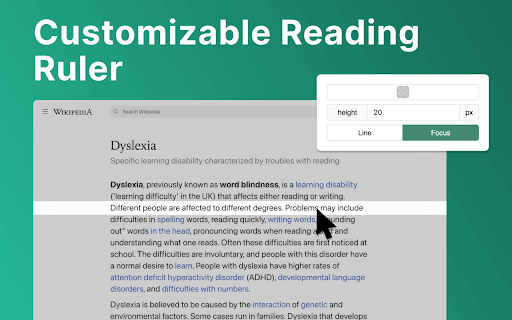
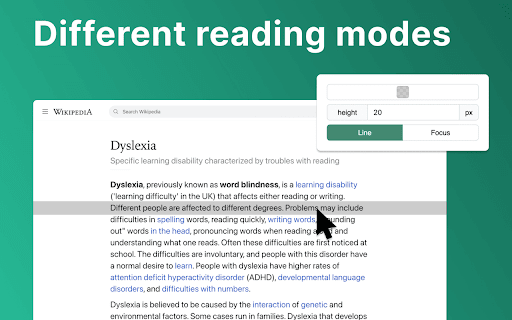
Use Reader Line app to guide and enhance your experience with reading ruler to maintain your focus with reading line. Introducing Reader Line: revolutionising your reading experience! 📕 🚀 Quick start tips 1. Click "Add to Chrome" to install the extension seamlessly into your browser. 2. Open any webpage or document where you want to enhance your reading experience. 3. Adjust the color, height, and opacity of the read ruler to your preferences. 4. Move the reading ruler with your mouse cursor to focus on specific lines or paragraphs. 5. Dive into your reading material with improved clarity and focus, courtesy of reading help! 💎 Enhance your reading journey with reader ruler Reader line serves as your trusted reading companion, offering a range of features to cater to your unique reading needs. Whether you're a student, professional, or simply enjoy diving into a good book, focus ruler is here to elevate your reading journey. ⚙️ Customizable reading guide Here are the options of read ruler you can easily customize in extension settings: ✴️ Color and opacity. Changing reading ruler color enhance readability on websites with different backgrounds. ✴️ Ruler height. By setting height of the reading guide user can adapt to different font sizes and line spacing for optimal reading experience. ✴️ Reading mode. Reader line offers two modes of reading: line and focus. These specialized modes offer tailored solutions to enhance your reading experience. ✨ Seamless integration and accessibility 💡 Reader line seamlessly integrates into your Chrome browser, ensuring accessibility and ease of use for users of all skill levels. 💡 Enable or disable the extension with just a click, giving you full control over your reading experience. 💡 Designed with inclusivity in mind, reader line prioritizes accessibility, making it a valuable tool for individuals with diverse reading needs. 🛠 Future features 1️⃣ Focus mode. The focus mode feature enhances concentration by highlighting a single reader line, ideal for dyslexia. It utilizes the reading ruler to guide the reader's attention, making the reading line clearer and minimizing distractions, thus improving readability for dyslexic users. 2️⃣ PDF support. Seamlessly integrate read ruler's features into pdf files, offering a consistent reading experience across different formats and platforms. Whether you're studying academic papers, reviewing reports, or enjoying leisure reading, reading help will be there to provide invaluable support and assistance. ❓ Frequently asked questions 📌 What is reader line? Reader line is a Chrome extension designed to improve your reading experience by providing a customizable line guide to help you navigate through text. Once installed, reading helper adds a virtual reading ruler to your browser window. You can adjust its color, height, and opacity to suit your preferences. 📌 Can it help with specific reading challenges? Yes, reader line offers specialized modes such as dyslexia helper and focus line to assist individuals facing reading difficulties. 📌 Is reading line easy to use? Absolutely! Reader line features an intuitive interface and can be enabled or disabled with just a click, making it accessible to users of all skill levels. Reading helper can be easily disabled or re-enabled with a single click, giving you full control over your reading experience. 📌 Can I customize the appearance of the reading guide? Yes, you can customize the color, height, and opacity of the reading ruler to match your preferences and reading environment. 📌 Does reader line work on all websites? Reading ruler is compatible with most websites and web-based documents, providing a consistent reading experience across various platforms. 📌 How can reading guide improve my reading speed and comprehension? By providing a visual guide and minimizing distractions, reading ruler assist users focus on the text, leading to improved reading speed and comprehension. 📌 Is reader line suitable for students? Yes, read ruler is an excellent tool for students, helping them stay focused while studying, researching, and reading academic texts.

Screen Mask
A website and web document reading aid. Screen Mask is website or web document reading tool that follows your mouse or touch to help eliminate page distractions so that you can focus on reading one passage at a time.

Pixie Reader: Text-to-Speech, TTS, PDF, Web Highlight & OpenDyslexic
Text-to-Speech (TTS) reader with web highlighter & OpenDyslexic font. Perfect for dyslexia, studying & making web content accessible 🌟 Pixie Reader: The Ultimate All-in-One Accessibility & Productivity Suite 🌟 Transform your web browsing experience with Pixie Reader - the only extension that correctly reads mathematical equations with Text-to-Speech (TTS). Whether you're a student dealing with complex STEM content, a professional seeking enhanced productivity, or someone who values accessibility, Pixie Reader adapts to your unique needs. ✨ WHAT MAKES PIXIE READER UNIQUE ✨ • Industry-first: The only Text-to-Speech that correctly reads mathematical equations • Available in 54 languages with many options for reading voices • Seamlessly integrates with your web browser side panel for distraction-free accessibility • Privacy-focused with minimal data collection and GDPR Complaince • Full support for ePub files with all accessibility features enabled 🔊 Advanced Text-to-Speech (TTS) • Revolutionary math equation reading capability • Customizable speed, pitch, and volume • Paragraph highlighting and word underlining • Multiple reading voices across 54 languages • Floating controls for easy access 📝 Smart Text Configuration • 10 dyslexia-friendly fonts including OpenDyslexic • Flexible text size adjustment • Bold and italic formatting options • Multiple text alignment choices • Custom text and background colors • Advanced spacing controls for lines, words, and letters 👁️ Visual Comfort Tools • Innovative Screen Shader with color customization • Smart Reading Ruler with adjustable height and color • High contrast and saturation controls • Customizable color schemes • Eye strain reduction features 📚 Enhanced Reading Experience • Distraction-free Reader View • Built-in ePub reader with full accessibility support • Persistent settings across all tabs, windows, and sessions • Web browser's side panel integration • Multiple theme options 📏 Advanced Reading Ruler Two versatile modes: 1. Focus Mode: Dims surrounding content while highlighting reading area 2. Highlight Mode: Emphasizes current reading line • Customizable ruler height • Adjustable colors and transparency • Mouse-following functionality 📚 Enhanced Reading Tools • One-click Reader View • Full ePub support • Custom reading environments • Distraction elimination • Cross-page persistence 💫 Innovative Color Control System Our unique color slider includes: • Integrated off state • Black and white presets • Full rainbow gradient • Transparency adjustment • Persistent settings across sessions 📱 Seamless Integration • Works directly in web browsers' side panel • Settings persist across all tabs, windows and sessions • No special configuration needed • Instant activation and deactivation • Website-specific controls 🎓 PERFECT FOR EDUCATION 🎓 • Math equation reading support • ePub textbook compatibility • Dyslexia-friendly features • Multi-language support • Distraction reduction tools 💼 IDEAL FOR PROFESSIONALS 💼 • Productivity-enhancing features • Eye strain reduction • Custom reading environments • Privacy-focused design 🌐 GETTING STARTED 🌐 1. Install Pixie Reader 2. Pin the extension to your browser 3. Choose your preferred theme 4. Customize your settings 5. Start enjoying a more accessible web! 💫 WHY CHOOSE PIXIE READER? 💫 • The only TTS that correctly reads math equations • Comprehensive accessibility suite • Intuitive user interface • Regular updates and improvements • Dedicated support team 🎯 WHO IS IT FOR? 🎯 • Students dealing with STEM content • Professionals requiring accessibility tools • Users with dyslexia or special needs • Language learners • Anyone seeking a more comfortable reading experience 📨 SUPPORT & FEEDBACK 📨 We're here to help! Reach out to us at "hello@mail.accsio.ai" for: • Technical support • Feature requests • General questions • Feedback and suggestions 🌍 MORE INFORMATION 🌍 For further information, visit our website at https://accsio.ai/ Join thousands of satisfied users who have transformed their web browsing experience with Pixie Reader. Install now and discover a more accessible, productive, and comfortable way to interact with online content! ✨ Try Pixie Reader Today - Your Personal Reading Assistant! ✨

The Reading Ruler
A ruler that overlays a webpage to help you read & retain information. Helpful for people who are neurodivergent. A common technique recommended for people who struggle to read and retain the information as they read is to use a ruler to read every line. This add-on creates a line across the webpage that follows the cursor and darkens the lower half to recreate this technique.

Read-Line
Show current read line on the page. Follow the mouse position to mark the reading progress of the current page.
