
mhccomhlpeimdkagphppaoefhkeopnho
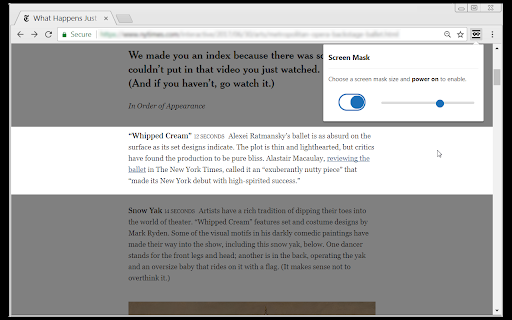
A website and web document reading aid. Screen Mask is website or web document reading tool that follows your mouse or touch to help eliminate page distractions so that you can focus on reading one passage at a time.

🛡️ StealthView – One-click privacy for your screen 🔒
🛡️ One-click privacy mode that blurs your screen and protects your data — 100% offline. ⚡ Ever catch someone glancing at your screen? 😏 StealthView instantly activates a cutting-edge privacy layer, transforming any webpage into an obscured, unreadable view for everyone but you. With real-time blur rendering, contrast modulation, and an intelligent hover-to-reveal system, your data stays visible only when you choose. Whether you're reviewing confidential files, managing finances, or working on-the-go — StealthView keeps your screen secure and your privacy intact. 🎛️ Customizable blur, contrast, and distortion levels 🌍 Works anywhere – ideal for cafés, airports, classrooms, or open offices 🔒 Local-Only Privacy Engine StealthView operates 100% offline — no tracking, no cloud processing, no data transmission. All transformations happen on your device, in real time. Your screen. Your rules. Stay focused. Stay protected. Stay stealthy. 😎 🛡️ StealthView – Privacy with Precision.

Mask & Blur Pro
Protects sensitive information by masking text and blurring content on webpages. Perfect for screenshots and screen sharing. 🛡️ PROTECT YOUR PRIVACY & BOOST PRODUCTIVITY Mask & Blur Pro is the ultimate privacy tool for protecting sensitive information and reducing distractions on any webpage. Perfect for screenshots, screen sharing, presentations, or focused browsing. ✨ WHAT IT DOES: • Instantly mask selected text with customizable characters (*, #, %, etc.) • Blur selected text or images with adjustable intensity (1-30px) • Click-to-blur pointer mode - click any element to blur it instantly • Persistent masking - masked content survives page refresh • Right-click context menu integration for quick access 🎯 WHY YOU NEED IT: ✓ Take screenshots without exposing sensitive data (passwords, emails, personal info) ✓ Share your screen confidently during meetings and presentations ✓ Create tutorials while protecting private information ✓ Focus on reading by hiding distracting content ✓ Protect personal details in demos and recordings 🚀 HOW TO USE: 1. Select any text → Right-click → Choose "Mask Text" or "Blur Text" 2. Click the extension icon for pointer mode → Click any element to blur it 3. Customize settings: adjust blur intensity and choose your mask character 4. Use "Mask Using..." to mask with any character you want ⚙️ POWERFUL FEATURES: • Customizable blur intensity (adjustable in settings) • Choose any mask character (*, #, %, •, etc.) • Works on all types of content: text, images, buttons, forms • Persistent masking survives page refresh • Clean, professional interface • No data collection or tracking 🔒 PRIVACY-FIRST DESIGN: • Works completely offline - no internet required • Zero data collection or tracking • Settings stored locally on your device • Only accesses current webpage when you use it • No monitoring of browsing history 💼 PERFECT FOR: • Content creators and streamers • Business professionals giving presentations • Educators creating tutorials • Anyone who values privacy and focus • Remote workers sharing screens 🎨 PROFESSIONAL QUALITY: • Smooth, high-quality blur effects • Preserves webpage layout and functionality • Clean, intuitive user interface • Reliable performance on any website Transform any webpage into a privacy-safe, distraction-free environment with one click. Download Mask & Blur Pro today and take control of your digital privacy! Created with ❤️ by Hasin Hayder | MIT License | Version 1.0

Reader Line
Use Reader Line app to guide and enhance your experience with reading ruler to maintain your focus with reading line. Introducing Reader Line: revolutionising your reading experience! 📕 🚀 Quick start tips 1. Click "Add to Chrome" to install the extension seamlessly into your browser. 2. Open any webpage or document where you want to enhance your reading experience. 3. Adjust the color, height, and opacity of the read ruler to your preferences. 4. Move the reading ruler with your mouse cursor to focus on specific lines or paragraphs. 5. Dive into your reading material with improved clarity and focus, courtesy of reading help! 💎 Enhance your reading journey with reader ruler Reader line serves as your trusted reading companion, offering a range of features to cater to your unique reading needs. Whether you're a student, professional, or simply enjoy diving into a good book, focus ruler is here to elevate your reading journey. ⚙️ Customizable reading guide Here are the options of read ruler you can easily customize in extension settings: ✴️ Color and opacity. Changing reading ruler color enhance readability on websites with different backgrounds. ✴️ Ruler height. By setting height of the reading guide user can adapt to different font sizes and line spacing for optimal reading experience. ✴️ Reading mode. Reader line offers two modes of reading: line and focus. These specialized modes offer tailored solutions to enhance your reading experience. ✨ Seamless integration and accessibility 💡 Reader line seamlessly integrates into your Chrome browser, ensuring accessibility and ease of use for users of all skill levels. 💡 Enable or disable the extension with just a click, giving you full control over your reading experience. 💡 Designed with inclusivity in mind, reader line prioritizes accessibility, making it a valuable tool for individuals with diverse reading needs. 🛠 Future features 1️⃣ Focus mode. The focus mode feature enhances concentration by highlighting a single reader line, ideal for dyslexia. It utilizes the reading ruler to guide the reader's attention, making the reading line clearer and minimizing distractions, thus improving readability for dyslexic users. 2️⃣ PDF support. Seamlessly integrate read ruler's features into pdf files, offering a consistent reading experience across different formats and platforms. Whether you're studying academic papers, reviewing reports, or enjoying leisure reading, reading help will be there to provide invaluable support and assistance. ❓ Frequently asked questions 📌 What is reader line? Reader line is a Chrome extension designed to improve your reading experience by providing a customizable line guide to help you navigate through text. Once installed, reading helper adds a virtual reading ruler to your browser window. You can adjust its color, height, and opacity to suit your preferences. 📌 Can it help with specific reading challenges? Yes, reader line offers specialized modes such as dyslexia helper and focus line to assist individuals facing reading difficulties. 📌 Is reading line easy to use? Absolutely! Reader line features an intuitive interface and can be enabled or disabled with just a click, making it accessible to users of all skill levels. Reading helper can be easily disabled or re-enabled with a single click, giving you full control over your reading experience. 📌 Can I customize the appearance of the reading guide? Yes, you can customize the color, height, and opacity of the reading ruler to match your preferences and reading environment. 📌 Does reader line work on all websites? Reading ruler is compatible with most websites and web-based documents, providing a consistent reading experience across various platforms. 📌 How can reading guide improve my reading speed and comprehension? By providing a visual guide and minimizing distractions, reading ruler assist users focus on the text, leading to improved reading speed and comprehension. 📌 Is reader line suitable for students? Yes, read ruler is an excellent tool for students, helping them stay focused while studying, researching, and reading academic texts.

Reading Mask
Enhance focus while reading with a customizable highlight that follows your cursor, reducing distractions and eye strain. ### Overview Reading Mask is a lightweight Chrome extension designed to reduce visual clutter and eye strain during extended reading sessions. By dimming the surrounding content and highlighting a customizable focus area that follows your cursor, it helps you maintain concentration on the text you're reading. - Movable Focus Area: A clear rectangular zone follows your cursor across the page, keeping your reading area in focus. - Customizable Size: Adjust both the height and width of the focus area to suit your preferences. - Adjustable Opacity: Control how dark the mask appears for optimal contrast. - Cross-page Compatibility: Works seamlessly across websites, including those with iframes. - Light/Dark Mode Support: Automatically adapts to your system theme preference. - Simple Controls: Easy-to-use interface with persistent settings. - Click the Reading Mask icon in your browser toolbar. - Toggle the mask on/off. - Adjust height, width, and opacity percentages to your preference. - Click "Apply Changes" to save your settings. - **Windows/Linux**: Alt+M to toggle the Reading Mask on/off - **macOS**: Option+Shift+M (⌥+⇧+M) to toggle the Reading Mask on/off ### Why Choose Reading Mask? Whether you're reading lengthy articles, documentation, or any web content, Reading Mask helps you stay focused by minimizing distractions. It's perfect for students, professionals, and anyone looking to improve their online reading experience.
