
pipdpiknbmkailamgfmpjckifkpepdga

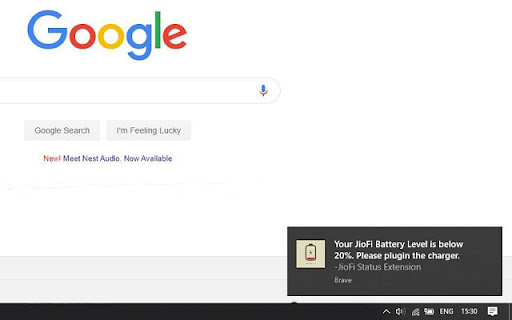
A chrome extension for JioFi to automatically check all JioFi status like Battery Level, Signal Strength, Connected users etc of any JioFi router(hotspot) when connected. This JioFi extension supports all JioFi devices. It is based on "JioFi Local". Features: * Get all JioFi status like Battery Level, Signals, Connected users etc. * Get current Download and current Upload speed statistics. * Get notified when battery level is less than 20%. (Note: The Extension is now updated for manifest version 3.)

Energy Saver
Optimize resource usage to save battery and reduce energy consumption. Updated Google Web Store Description for v1.4 Energy Saver is your all-in-one tool for automated tab management, resource optimization, and battery conservation. Version 1.4 introduces Smart Sleep Mode and a refreshed UI for better control over your browser's performance. 🔥 What’s New in v1.4? Automatically sleeps inactive tabs when CPU or memory usage is high. User-defined performance thresholds for better control. Works in the background to optimize browsing efficiency. Get notified when high resource usage is detected. Option to enable/disable Smart Sleep directly from the popup. Smoother interface with animated toggle switches for better usability. Tooltips added for easier feature explanation. Refined layout & spacing for a cleaner look. ✅ Manual & Auto Tab Sleep – Reduce memory & CPU usage by putting inactive tabs to sleep. ✅ Battery-Aware Mode – Automatically manage tabs when battery is running low. ✅ Smart Sleep Mode – Intelligent tab sleep management based on system performance. ✅ Media Optimization – Auto-pause/mute media in background tabs to save power. ✅ Whitelist – Keep selected websites active while managing inactive ones. ✅ Performance Alerts – Stay informed when Smart Sleep is triggered. ✅ User-Friendly UI – Quick access to all features with a sleek design. 🔸 Dark Mode & Custom Themes for a personalized browsing experience. 🔸 Detailed Performance Dashboard to track CPU, memory, and battery usage over time. 🔸 More UI Customization Options including font adjustments and layouts. Take control of your browser with Energy Saver, the smarter way to save battery, reduce CPU load, and improve browsing speed!

Network Information
Useful information about your system's connection including, type, speed, and rtt. Network Information is an extension that provides information about your system's connection. It is working based on a new JavaScript API called "navigator.connection". When you open the toolbar popup UI, there is a big speed gauge at the top center which shows the "downlink" speed for your browser. This speed refers to the estimated bandwidth in megabits per second (not related to the current internet speed). Other metrics for the network information API are connection type and round trip time (rtt). There is a reload button at the top right corner of the screen which is for reloading the app UI. The next button is for resetting the app to factory settings. The third button on the right toolbar is for switching the interface theme to dark. There is also a wifi icon at the middle right section of the screen which shows the online or offline status of your browser. If you found a bug to report, or have a feature request in mind, please fill out the bug report form on the add-on's homepage (https://mybrowseraddon.com/network-information.html).

System Monitor for CPU / Memory
A tool that display system CPU or Memory usage on the extension icon. This extension displays system's cpu or memory usage on the extension icon. Mouse over on it to show more details. You can set options in the popup page: • Display Type: CPU or Memory • Display Format: Number or Graph • Update Frequency • Enable or Disable Note: 1. Memory Usage: because system cache is also counted as used memory, high memory usage does not necessarily mean insufficient memory. 2. CPU Temperature: it is displayed in the tooltip of the extension icon when you select "Display Type: CPU", and it is only available on Chrome OS.

Night Time Data on SLT Usage Meter
ටෙලිකොම් Usage Meter එකෙහි රාත්රී දත්ත භාවිතය පෙන්වන්නේ නැත. මෙම Extension එක https://myslt.slt.lk/හෝ https://internetvas.slt.lk/dashboard වෙබ් පිටුව මත දැනට භාවිතා කර ඇති රාත්රී දත්ත ප්රමාණය පෙන්වයි. This extension adds a new section with Night time data balance on https://myslt.slt.lk/ or https://internetvas.slt.lk/dashboard Created by Thambaru Wijesekara with no affiliation to Sri Lanka Telecom PLC.
