
mlecpnenbjkhmoeielfjfknljfbncmgk
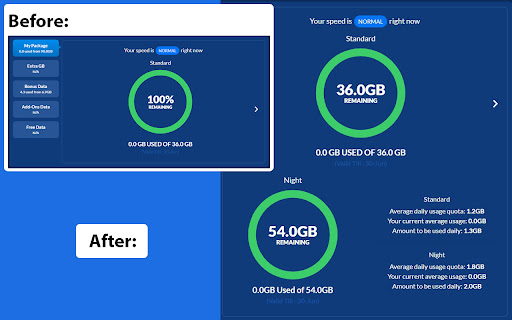

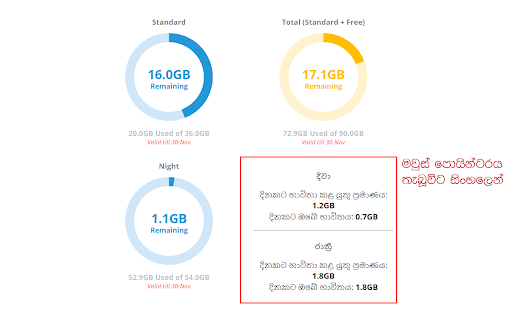

ටෙලිකොම් Usage Meter එකෙහි රාත්රී දත්ත භාවිතය පෙන්වන්නේ නැත. මෙම Extension එක https://myslt.slt.lk/හෝ https://internetvas.slt.lk/dashboard වෙබ් පිටුව මත දැනට භාවිතා කර ඇති රාත්රී දත්ත ප්රමාණය පෙන්වයි. This extension adds a new section with Night time data balance on https://myslt.slt.lk/ or https://internetvas.slt.lk/dashboard Created by Thambaru Wijesekara with no affiliation to Sri Lanka Telecom PLC.

ASIFY
The all-in-one extension for dropshipping with Aliexpress Asify adds new useful features to help you in your drop-shipping activity with Aliexpress! Completely free & unlimited uses! No registration, no trial period, you install it and you enjoy it instantly! ★ Product search by specific criteria Find your products easily by: Price, Orders, Rating, Sales / J, Keyword, With or without video, Country of dispatch, Processing time, Delivery type ... ★ C.A simulator Insert a sales price and automatically calculate your profitability (Purchase cost, Dues, Shopify / Paypal / Stripe transaction fees ...) ★ Sellers search Find reliable suppliers in the product category in 2 clicks ★ Consultation History Consult and return at any time on the last 200 products recently seen ★ Product tracking Track daily sales of the product from J-1 to J-7, automatically refresh every day ★ Tracking & Exporting Orders List them automatically with real-time tracking, follow them with ParcelApp in 1 click & export them for any duration for archived ★ Product search at other sellers Find another supplier for the same product, compare prices, shipping included in seconds only without consulting the product ★ Product search at the competition With the search from the image, find your competitors on Shopify, Amazon, Ebay, Cdiscount ... ★ Downloads images In one click download in a zip archive all images of the product: Presentation, Variant & Description This extension uses affiliation and commercial advertisements to support its development, its maintenance, as well as to maintain its free access to its users so that it can remain accessible to all. Privacy Policy Last updated: September 30, 2023 We are committed to protecting your privacy and ensuring the security of your personal information. This Privacy Policy outlines how we collect, use, and safeguard the data you provide while using our Chrome extension. 1. Information We Collect: We do not collect any personally identifiable information (PII) when you use the "Asify". We do not request or store your name, email address, or any other personal details. 2. Usage Data: To improve our services and enhance your gaming experience, we may collect non-personal, anonymous usage data. This data helps us analyze trends, understand user preferences, and make necessary improvements to the extension. 3. Cookies: "Asify" does not use cookies or any tracking technologies to gather information about your browsing activities. 4. Affiliate Links "Asify" replaces URLs in the search result page with affiliate links. This means that when a user clicks on a search result and makes a purchase through the affiliate link, we (the developers of the Chrome Extension) receive a small commission from the retailer or service provider. This commission helps support the development, maintenance, and operation of the Service without any extra cost to users. It is important to note that the use of affiliate links does not affect the quality or relevance of search results. The affiliate links are seamlessly integrated into the search results, ensuring a smooth browsing experience for users. 5. Third-Party Services: "Asify" does not integrate with or share data with any third-party services, websites, or applications. 6. Changes to the Privacy Policy: We reserve the right to modify or update this Privacy Policy at any time. Any changes will be reflected on this page with the updated effective date. We encourage you to review this policy periodically to stay informed about how we protect your privacy. By using the "Asify", you agree to the terms and conditions outlined in this Privacy Policy.

Donut@Home for ZLT S10
Unlocking the full features of Smart@Home LTE Wireless Router for model ZLT S10. To enable the full functionality available in the console. This work for LTE Wireless Router Model ZLT S10 from Smart Axiata only. This will enable features such as: - Network Lock Disable/Enable (Openline) - Frequency Band Selection - Cell ID Locking - Network Selection (4G/3G/2G) - USSD Dialer (Works on 3G Connection Only) - APN Settings - Internet / Data Limiter - NAT Disable/Enable - Firmware Upgrade - Virtual Private Network - Input Network Unlock Code

NetMeter Web
Web Data Consumption Monitor Extension: Stay Informed About Site Bandwidth Usage Ever wonder how much data a website really uses? NetMeter is a powerful extension that gives you a detailed, real-time look into the bandwidth consumption of any site you visit. From video streams to background API calls, NetMeter breaks it all down so you can browse smarter and manage your data more effectively. 🔗 Features: 📊 Granular Data Breakdown: Don't just see the total—see exactly what's using your data. NetMeter categorizes consumption into Media (videos, audio), Images, Scripts, Styles, Fonts, API Data, and more. ⚡ Real-Time Monitoring: Watch data usage live with an elegant floating monitor on your page and a dynamic badge on the extension icon that updates as you browse. 📈 Comprehensive Reports: Analyze your browsing habits with easy-to-read reports. View aggregated data for all sites or just the current one, filtered by Today, This Week, or This Month. ✅ Per-Site Control: Easily pause or resume monitoring for any website directly from the popup to customize your tracking. ✨ Modern & Clean Interface: A completely redesigned UI makes understanding your data usage simple and intuitive. Take control of your bandwidth and uncover the hidden data costs of the web. Install NetMeter today FAQ: Our Ongoing Efforts to Enhance Extension Accuracy and Website Support Q: How do you measure bandwidth usage for supported websites? A: We use several lightweight signals to estimate your data usage. Along with reading the Content-Length header, we apply carefully controlled patches to APIs like fetch, XHR, WebRTC, WebSocket, SSE, Beacon, native video/audio, and certain workers. These patches run quietly inside the page context and never alter how the site behaves. By combining all these sources, we provide accurate inbound and outbound bandwidth estimates without affecting your browsing experience. It's important to note that while we measure request payloads for bandwidth usage, we do not log or store any of the data contained in these payloads. Your privacy and data security are of utmost importance to us, and we do not collect or retain any sensitive information from your browsing activities. Q: Do these patches affect website performance or user experience? A: No. The instrumentation is minimal, non-intrusive, and designed to leave the website’s functionality completely unchanged. The site works exactly as it normally does; we simply provide helpful bandwidth metrics in the background. Q: Why are some websites not supported by your extension? A: We are continually working to improve our extension's accuracy and expand its compatibility with a wide range of websites. However, due to the dynamic nature of the internet and the diverse structure of web pages, it can be challenging to support every website right from the start. Here are some common questions regarding this ongoing process: Q: Why can't you support all websites immediately? A: Supporting websites requires significant development effort to ensure our extension functions correctly on each site. We prioritize popular and frequently visited websites to provide the best user experience for the majority of our users. While we aim to expand our coverage, it may take time to support less common or niche websites. Q: How can I request support for a specific website? A: We value user feedback and encourage you to let us know about websites you'd like our extension to support. You can typically submit website requests through our Contact email in Chrome Extension page or Reviews. Your feedback helps us prioritize which sites to work on next. Q: Are there any limitations in the types of websites your extension can support? A: Yes, there can be limitations. Websites with complex or unique structures may require more time and effort to support. Additionally, websites that frequently change their layout or content may experience occasional compatibility issues until we update our extension to accommodate these changes. Q: How often do you update the extension to include new websites? A: We aim to provide regular updates to enhance the extension's website support. The frequency of updates may vary based on user feedback and the complexity of the websites we're working on. We appreciate your patience as we work to make our extension more comprehensive and accurate. Q: What can I do if I encounter issues on a website that is not yet supported? A: If you encounter problems on a website that our extension doesn't support, please report the issue to us. We will do our best to address it in future updates. In the meantime, you can disable the extension for that specific website or use alternative methods to access the content you need. Q: Do you log my credentials or browsing history information when using this extension? A: No, we do not log your credentials or browsing history information when you use our extension. Your privacy and security are important to us, and we have designed our extension to respect your data and protect your online activity. We do not collect or store any sensitive information from your browsing sessions. Thank you for understanding our commitment to improving our extension's accuracy and expanding its website compatibility. Your feedback and patience are invaluable in helping us achieve this goal.

Singreesi
Singreesi is a Chrome extension that makes typing in Sinhala easy. By using this, you can type Sinhala Unicode text just like you're typing an SMS. For example, if you want to type අම්මා, in Singreesi you would type: ammaa The key map is the same as the one used in the Singreesi desktop app. You can download the desktop version (Windows only) at https://thameera.com/singreesi Please mail your suggestions or problems to thameera123@gmail.com Version 0.4: Fixed the garbled characters like 'tu' and 'thoa' Version 0.5: Added Help and minor fixes Version 0.6: Included Copy feature Version 0.7: Fixed extension not working issue in Chrome 67 onwards Version 0.8: Make the extension compatible with newer Chrome versions
