
aplgkncdgdlldhcghahpnlkokohpinfg
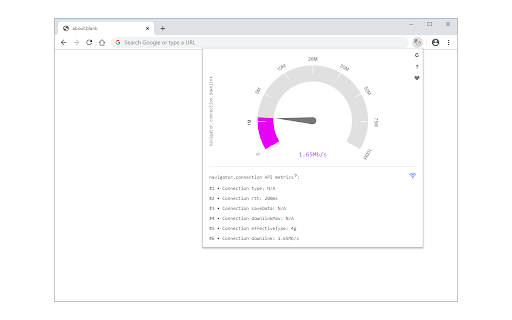
Useful information about your system's connection including, type, speed, and rtt. Network Information is an extension that provides information about your system's connection. It is working based on a new JavaScript API called "navigator.connection". When you open the toolbar popup UI, there is a big speed gauge at the top center which shows the "downlink" speed for your browser. This speed refers to the estimated bandwidth in megabits per second (not related to the current internet speed). Other metrics for the network information API are connection type and round trip time (rtt). There is a reload button at the top right corner of the screen which is for reloading the app UI. The next button is for resetting the app to factory settings. The third button on the right toolbar is for switching the interface theme to dark. There is also a wifi icon at the middle right section of the screen which shows the online or offline status of your browser. If you found a bug to report, or have a feature request in mind, please fill out the bug report form on the add-on's homepage (https://mybrowseraddon.com/network-information.html).

System Memory Usage
Monitor the system's memory via the toolbar popup or toolbar icon. System Memory Usage extension lets you easily monitor memory usage in your system via the browser toolbar. Just open the toolbar popup UI and monitor the amount of memory that is currently being used. Moreover, the color bar shows you the active memory usage every second (the color bar updates every second). The popup interface is simple and shows active memory usage. Moreover, the toolbar icon will change dynamically according to the current memory usage. The toolbar button's tooltip text shows you the available, used, and total memory on your system. Please note that color bars are random green colors for both the toolbar popup UI and the toolbar button's icon. If you have a feature request or found a bug to report, please fill out the bug report form on the addon's homepage (https://mybrowseraddon.com/system-memory-usage.html).

Speed Test Internet
Check your internet speed now for free. Our free software allows you to check your upload & download speeds from a few different countries. We have servers located in the United States, United Kingdom, Singapore and Germany. So you can check your ping/download speeds from these different countries and see if there are any issues with your internet provider. Try this speed test for your Internet connection now.

Security Tweaks
Improve your online security with few tweaks via toolbar popup! Security Tweaks is an extension that helps you improve your security while browsing by using eight different techniques. Simply open toolbar popup UI and mark a desired tweak. Please note that, only few tweaks are selected by default. There are few settings (related to JavaScript, inline-script and cookie) available in toolbar popup to adjust. Currently there are 8 tweaks available for this add-on: 1. Block most common ads. 2. Block third-party JavaScript. 3. Enable safe-browsing. 4. Block cookies. 5. Block inline-script. 6. Block Flash contents. 7. Disable window.eval(). 8. Block most common malware URLs. Note 1: I have made this extension with Yubi's collaboration. This add-on is inspired by Speed Tweaks made by Yubi: https://chrome.google.com/webstore/detail/speed-tweaks/afebilemcaepdkmhmibgmnpfppnjimjf Note 2: to report bugs, please fill the bug report form in the addon's homepage (https://mybrowseraddon.com/security-tweaks.html).

Fix-IT Mate: WiFi Speed Test & AI Tech Support
AI-Powered Speed Test for Chrome: Fast, Accurate WiFi & Internet Connection Tester Fyxit AI makes tech support simple for everyone. Whether it’s a Wi-Fi drop, a login loop, or a crashing app, our AI assistant runs the right checks, applies the fix, and keeps you moving. No tickets. No waiting. Just instant results. Built for Everyone, Trusted by IT Fyxit AI empowers everyday users to solve problems on the spot, while giving IT teams powerful tools to reduce tickets and keep fleets running smoothly. Deploys in minutes. Works anywhere.
