
cbfhjbllealmkfknkpfmpkpljmlcjpjl
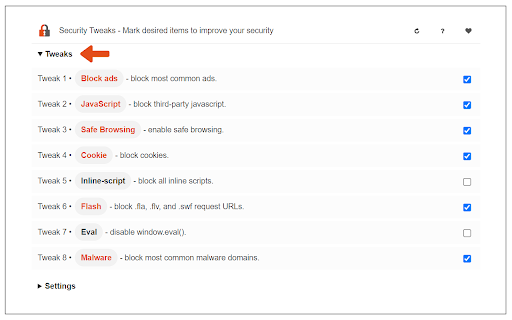

Improve your online security with few tweaks via toolbar popup! Security Tweaks is an extension that helps you improve your security while browsing by using eight different techniques. Simply open toolbar popup UI and mark a desired tweak. Please note that, only few tweaks are selected by default. There are few settings (related to JavaScript, inline-script and cookie) available in toolbar popup to adjust. Currently there are 8 tweaks available for this add-on: 1. Block most common ads. 2. Block third-party JavaScript. 3. Enable safe-browsing. 4. Block cookies. 5. Block inline-script. 6. Block Flash contents. 7. Disable window.eval(). 8. Block most common malware URLs. Note 1: I have made this extension with Yubi's collaboration. This add-on is inspired by Speed Tweaks made by Yubi: https://chrome.google.com/webstore/detail/speed-tweaks/afebilemcaepdkmhmibgmnpfppnjimjf Note 2: to report bugs, please fill the bug report form in the addon's homepage (https://mybrowseraddon.com/security-tweaks.html).

Speed Tweaks
Speed up your browser with few tweaks via toolbar popup! Speed Tweaks is an addon that helps you speed up your browser by using a few different tweaks. Simply open the toolbar popup and mark the desired item(s). Please note that none of the tweaks are selected by default. Currently, there are 7 tweaks available for this addon: 1. Blocking most common ads. 2. DNS pre-fetching. 3. Blocking images from loading. 4. Speed-up rendering on page-scroll. 5. Loading mobile version of sites. 6. Discarding all inactive tabs from memory. 7. Clearing the browser's cache. Note 1: depending on your browser version and platform, this addon might behave differently. Note 2: to report bugs, please fill out the bug report form on the addon's homepage (https://mybrowseraddon.com/speed-tweaks.html).

Host AdBlocker
The "Host AdBlocker" is an ad-blocking extension that uses host matching instead of RegExp matching to increase blocking performance and reduce memory footprint. How it works: This extension installs a static hostname list to the incoming filter to block advertisement, tracker, and analytic sources. If a hostname matches, the request gets blocked. If not, the request gets processed as usual. Extensions like "uBlock Origin" or "AdBlock Plus" use the RegExp matching method. Although this method is more powerful, it is computationally expensive. Features: 1. You can extend the default filtering list by adding your custom domain names in the backlist hostnames on the options page. 2. To completely ignore a hostname, add it to the whitelist 3. This extension runs on manifest v3. This means that blocking performance is native. 4. You can toggle the extension on and off with a single click on the action button.

Smart HTTPS
Automatically changes HTTP protocol to HTTPS, and if loading encounters error, reverts it back to HTTP. Smart HTTPS is an extension that helps you always use the secure HTTPS protocol if it is supported by the site's server. It automatically changes the HTTP protocol to the secure HTTPS, and if loading errors occur, the extension will revert to the original HTTP protocol. Key features a. Automatically change all HTTP requests to the secure HTTPS. b. All websites (addresses) that do not support HTTPS are remembered to speed up the protocol-check process. Note that you can see and delete these items from the extension's Options page. c. The toolbar button serves as the extension's ON|OFF switch. Blue indicates ON and Gray is OFF. d. Add desired websites to the whitelist (see Options page). Note: to report bugs, please visit the extension homepage (https://mybrowseraddon.com/smart-https.html) and find the bug report form.

JShelter
Extension for increasing security and privacy level of the user. JShelter is a browser extension to give back control over what your browser is doing. A JavaScript-enabled web page can access much of the browser's functionality, with little control over this process available to the user: malicious websites can uniquely identify you through fingerprinting and use other tactics for tracking your activity. JShelter aims to improve the privacy and security of your web browsing. Like a firewall that controls network connections, JShelter controls the APIs provided by the browser, restricting the data that they gather and send out to websites. JShelter adds a safety layer that allows the user to choose if a certain action should be forbidden on a site, or if it should be allowed with restrictions, such as reducing the precision of geolocation to the city area. This layer can also aid as a countermeasure against attacks targeting the browser, operating system or hardware. Please see the FAQ (https://jshelter.org/faq/) and our blog (https://jshelter.org/blog/) for more information about the extension. What is the threat model? Can I read a paper about the extension? Note that JShelter can also be used to learn the origin of the calls for JavaScript APIs that are often misused for browser fingerprinting with Fingerprint Detector report. The detected calls in a web page can be exported as JSON.
