
cmleijjdpceldbelpnpkddofmcmcaknm
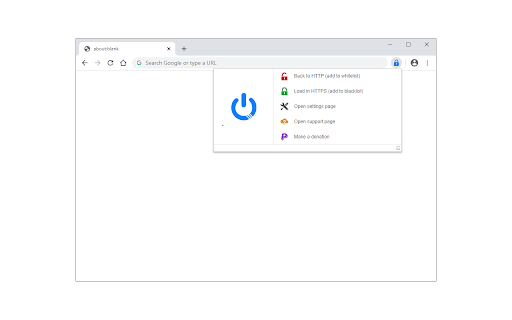
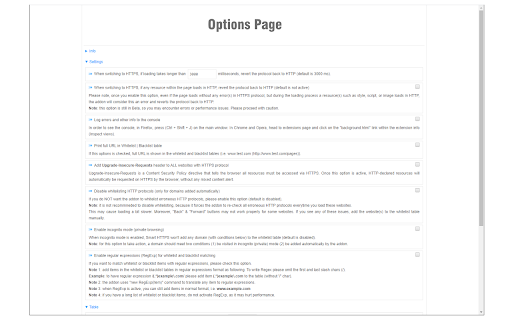

Automatically changes HTTP protocol to HTTPS, and if loading encounters error, reverts it back to HTTP. Smart HTTPS is an extension that helps you always use the secure HTTPS protocol if it is supported by the site's server. It automatically changes the HTTP protocol to the secure HTTPS, and if loading errors occur, the extension will revert to the original HTTP protocol. Key features a. Automatically change all HTTP requests to the secure HTTPS. b. All websites (addresses) that do not support HTTPS are remembered to speed up the protocol-check process. Note that you can see and delete these items from the extension's Options page. c. The toolbar button serves as the extension's ON|OFF switch. Blue indicates ON and Gray is OFF. d. Add desired websites to the whitelist (see Options page). Note: to report bugs, please visit the extension homepage (https://mybrowseraddon.com/smart-https.html) and find the bug report form.

WebAPI Blocker
Easily block (nullify) undesired Web API(s) and improve your privacy. WebAPI Blocker is a lite addon that lets you easily block and nullify a desired web API. Simply open the toolbar popup UI and choose an API from the drop-down list (top left side). Then, click on the (+) button to add the item to the API list. Once you add an item, you can remove it from the list by clicking on the "remove" button next to each item. Moreover, you can deactivate an item by removing the checkmark from the list. There is also a "reload" button at the top toolbar to reload the active tab. On the right side, you can add desired domains to the whitelist table. Please enter a domain name in the input field and then click on the (+) sign to add it to the table. To remove a domain, please click on the cross sign next to each item. Note: please be careful when you block (nullify) a web API. Because certain API(s) may cause websites to not fully load or even make them unresponsive. Therefore, please do enough research before disabling an API. To report bugs, please fill the bug report form on the addon's homepage (https://mybrowseraddon.com/webapi-blocker.html).

Privacy Tweaks
Improve your online privacy with few tweaks via toolbar popup! Privacy Tweaks is an extension that helps you improve your privacy while browsing by using ten different techniques. Simply open toolbar popup UI and mark a desired tweak. Please note that, only few tweaks are selected by default. Also, please keep in mind that, depending on your browser version and platform, this add-on might behave differently. There are few settings (related to timezone, geolocation and proxy) available in toolbar popup to adjust. Currently there are 10 tweaks available for this add-on: 1. Block most common ads. 2. Block canvas fingerprint. 3. Block font fingerprint. 4. Block webgl fingerprint. 5. Block audiocontext fingerprint. 6. Block webrtc IP leakage. 7. Change browser timezone. 8. Change browser geolocation. 9. Set custom socks5 proxy. 10. Block most common trackers. Note 1: I have made this extension with Yubi's collaboration. This add-on is inspired by Speed Tweaks made by Yubi: https://chrome.google.com/webstore/detail/speed-tweaks/afebilemcaepdkmhmibgmnpfppnjimjf Note 2: to report bugs, please fill out the bug report form on the addon's homepage (https://mybrowseraddon.com/privacy-tweaks.html).

HTTPS Everywhere
Navigate the web with confidence! HTTPS Everywhere is a Chrome extension designed to enhance your internet security with a simple yet powerful action: it automatically redirects you to the HTTPS version of websites whenever possible. - Automatic HTTPS Redirect: Seamlessly switches your connection from HTTP to HTTPS, ensuring that your browsing is encrypted and more resistant to eavesdropping. - Improved Privacy: Protect your sensitive information from prying eyes, especially on public Wi-Fi networks. - User Notifications: If you land on a webpage that doesn't support HTTPS, the extension will alert you, keeping you informed about your security status. - Simple & Lightweight: Runs quietly in the background without slowing down your browsing experience. - Regular Updates: The extension is maintained with regular updates to ensure compatibility with the latest websites and security standards.

Privacy Badger
Automatically learns to block hidden trackers. Made by leading digital rights nonprofit EFF to stop companies from spying on you. Privacy Badger sends the Global Privacy Control signal (https://globalprivacycontrol.org/) to opt you out of data sharing and selling, and the Do Not Track signal (https://www.eff.org/issues/do-not-track) to tell companies not to track you. If trackers ignore these signals, Privacy Badger will learn to block them. Besides automatic tracker blocking, Privacy Badger replaces potentially useful trackers (video players, comments widgets, etc.) with click-to-activate placeholders, and removes outgoing link click tracking on Facebook and Google, with more privacy protections on the way. To get help or to report bugs, email extension-devs@eff.org
