
fcofohckagnahikfankmacbepefilmof

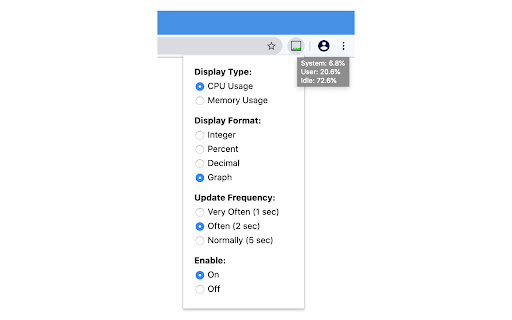
A tool that display system CPU or Memory usage on the extension icon. This extension displays system's cpu or memory usage on the extension icon. Mouse over on it to show more details. You can set options in the popup page: • Display Type: CPU or Memory • Display Format: Number or Graph • Update Frequency • Enable or Disable Note: 1. Memory Usage: because system cache is also counted as used memory, high memory usage does not necessarily mean insufficient memory. 2. CPU Temperature: it is displayed in the tooltip of the extension icon when you select "Display Type: CPU", and it is only available on Chrome OS.

Memory Monitor
Monitor memory usage with a graph. Put your mouse over it to get detailed information.

Performance Monitor
Gives system and tab information for developers. This extension was created mainly as practice for me working with Chrome extensions and its API. This extension can be used to monitor multiple system and tab-specific metrics including: CPU model, number of threads, memory capacity, screen resolution, CPU usage, CSS cache, image cache, JavaScript memory, network usage, script cache, and SQLite memory.

System Info
Displays information about the device's CPU,RAM,display and storage. System Info Chrome Extension The System Info Chrome extension is an essential tool for anyone who wants to keep a close eye on their computer's hardware performance and status. This extension provides detailed real-time information about your device’s CPU, RAM, storage, network, and display systems, all accessible with a single click on the browser toolbar. With a sleek and user-friendly interface designed using the latest Bootstrap framework, the extension ensures that critical system metrics are displayed in an organized and easy-to-read format. Here's a breakdown of what this powerful extension offers: CPU Information: Gain insight into your processor’s performance with detailed data on model name, architecture, and the number of cores. The extension also breaks down the usage statistics for each core, showing user, kernel, idle, and total times, making it easier to diagnose performance bottlenecks or identify high-load processes. RAM Usage: Monitor your system memory's status with precise information on available and total capacity. The extension calculates the percentage of RAM currently in use, helping you manage and optimize memory usage for better system performance. Storage Details: Keep track of your storage devices with a comprehensive overview that includes device IDs, types, and total capacities. This feature is invaluable for ensuring you have enough storage space and for identifying when upgrades or clean-ups are necessary. Network Interfaces: The extension lists all network interfaces along with their names and addresses. This is particularly useful for network troubleshooting, ensuring all connections are functioning correctly, and for understanding the network layout of your system. Display Configuration: View detailed information about your connected displays, including resolution, refresh rates, DPI, and whether each display is primary, mirrored, or enabled. This feature is perfect for multi-monitor setups, ensuring optimal configuration for productivity or entertainment. In summary, the System Info Chrome extension is an indispensable tool for IT professionals, gamers, developers, and anyone who demands a clear, comprehensive understanding of their system's hardware performance. Whether you're troubleshooting issues, optimizing performance, or simply staying informed, this extension provides all the necessary tools right at your fingertips. Install it today to start monitoring your system like a pro.

Get CPU Info
Get information about the CPU installed in your computer.
