
lhemjfjfepodolblmgmonhmbfkaaapam

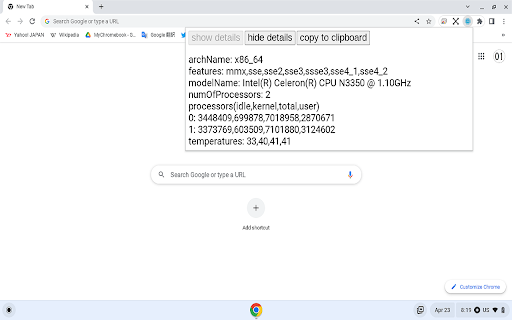
Get information about the CPU installed in your computer.

SysMonitor
SysMonitor is a simple system monitoring tool providing reliable information about: OS, CPU, memory usage, GPU, storage devices and IP address.

System Info Extension
Fetch and display GPU, CPU, and network information This script retrieves and displays detailed information about the system's GPU, CPU, and network configuration. It gathers data on the GPU's specifications, the CPU's model and performance metrics, and the network interfaces' status and addresses. The output provides a comprehensive overview of the system's hardware and network setup. Ideal for system diagnostics and performance monitoring.

Ram Info
A Chrome Extension to see RAM and CPU Info A small app to check RAM Usage and get CPU Info also.

System CPU Usage
Monitor the system's process via the toolbar popup or toolbar icon. System CPU Usage extension lets you easily monitor the CPU usage in your system via the browser toolbar. Please open the toolbar popup UI to see the current CPU usage (in percent). Moreover, the color bar shows you the active CPU usage every second (updates every second). Toolbar icon will change dynamically according to the current CPU usage. Please note that color bars are random blue colors for both the toolbar popup UI and the toolbar button's icon. If you have a feature request or found a bug to report, please fill out the bug report form on the addon's homepage (https://mybrowseraddon.com/system-cpu-usage.html).
