
gmpbhgbfihoiejmjgmifhikajbmjjajb

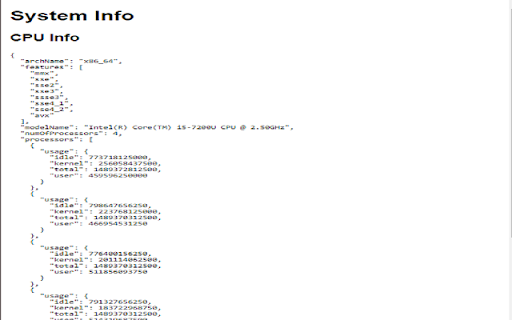
Fetch and display GPU, CPU, and network information This script retrieves and displays detailed information about the system's GPU, CPU, and network configuration. It gathers data on the GPU's specifications, the CPU's model and performance metrics, and the network interfaces' status and addresses. The output provides a comprehensive overview of the system's hardware and network setup. Ideal for system diagnostics and performance monitoring.

Focus Mode Pro - Block Distractions | Zovo
Block distracting websites and boost productivity with focus timers. Built-in Pomodoro timer. Whitelist your work sites. Struggling to stay focused while browsing? Between social media, news feeds, and endless tabs, your most productive hours slip away. Focus Mode puts you back in control -- block distractions instantly and build better browsing habits. - Smart Website Blocking -- Add distracting sites to your blocklist with one click, or toggle pre-built lists for Social Media, News, Entertainment, Gaming, and Shopping. During a focus session, blocked sites show a motivational page with an inspirational quote instead. - Pomodoro Focus Timer -- Start a Quick Focus session right from the toolbar. Work in focused intervals with automatic short and long break reminders. Track your remaining time on the blocked page so you always know when your next break is coming. - Nuclear Mode -- Lock your blocklist for a set duration. Once activated, blocking cannot be turned off until the timer expires. No exceptions, no override. Use keyboard shortcut Alt+Shift+N to activate instantly. - Blocking Schedule -- Set recurring schedules to automatically block sites on specific days and times. Define your start time, end time, and active days -- Focus Mode handles the rest without you thinking about it. - Focus Score & Streaks -- Track your daily Focus Score, day streaks, focus time, blocked attempts, and top distractions. See exactly which sites tempt you most and watch your habits improve over time. - Ambient Sound -- Play calming background audio during focus sessions to help you concentrate. Choose your sound type and adjust the volume to match your environment. - Notification Muting -- Suppress browser notifications during focus sessions so nothing breaks your flow. - Quick Toggle -- Start or stop Focus Mode with one click from the popup, or use the keyboard shortcut Alt+Shift+F. No complicated setup required. 1. Install Focus Mode -- it's ready to use in seconds with zero configuration 2. Add distracting websites to your blocklist or enable pre-built lists (Social Media, News, Entertainment, Gaming, Shopping) 3. Hit Quick Focus to start a Pomodoro session, or set a recurring schedule for hands-free blocking 4. Blocked sites show an inspirational quote and your session stats -- hit "Return to Work" to get back on track 5. Check your Focus Score, streaks, and top distractions in the Stats tab WHO IT'S FOR Perfect for students studying for exams, remote workers fighting tab overload, freelancers billing by the hour, developers in deep work, and anyone who wants to reclaim their attention from the internet. Focus Mode works entirely on your device. All data stays local -- your browsing activity, blocklists, and productivity stats never leave your browser. No accounts required, no tracking, no data collection. The extension uses declarativeNetRequest to redirect blocked sites and storage to save your settings. That's it. Install Focus Mode now -- your focused self will thank you.

TweakSync
TweakSync lets you style web elements in real-time from Chrome and sync changes with VS Code for a smooth development experience. TweakSync is a powerful tool designed for front-end developers and web designers who want to streamline their styling workflow. This Chrome extension enables real-time styling of web elements directly within Chrome, allowing you to see changes instantly as you tweak styles. Real-Time Styling: Easily select any element on a webpage and adjust its styles on the fly. With live previews, you can see the impact of your changes immediately, making the styling process more efficient and intuitive. Seamless Integration with VS Code: TweakSync syncs your style changes directly with your VS Code environment. This integration allows you to apply and save your CSS changes effortlessly, ensuring that your development process remains smooth and uninterrupted. Efficient Workflow: By bridging the gap between your browser and your code editor, TweakSync eliminates the need to switch back and forth between tools. This results in a more streamlined workflow, saving you time and effort. Boost Your Efficiency: Save time with instant style updates and seamless integration with VS Code. TweakSync helps you make changes faster and more accurately. Improve Your Design Process: Experience a smoother design workflow with live previews and direct synchronization between Chrome and VS Code. Streamline Your Development: Minimize context-switching and keep your development process focused with TweakSync is real-time styling and VS Code integration.

System Info
Displays information about the device's CPU,RAM,display and storage. System Info Chrome Extension The System Info Chrome extension is an essential tool for anyone who wants to keep a close eye on their computer's hardware performance and status. This extension provides detailed real-time information about your device’s CPU, RAM, storage, network, and display systems, all accessible with a single click on the browser toolbar. With a sleek and user-friendly interface designed using the latest Bootstrap framework, the extension ensures that critical system metrics are displayed in an organized and easy-to-read format. Here's a breakdown of what this powerful extension offers: CPU Information: Gain insight into your processor’s performance with detailed data on model name, architecture, and the number of cores. The extension also breaks down the usage statistics for each core, showing user, kernel, idle, and total times, making it easier to diagnose performance bottlenecks or identify high-load processes. RAM Usage: Monitor your system memory's status with precise information on available and total capacity. The extension calculates the percentage of RAM currently in use, helping you manage and optimize memory usage for better system performance. Storage Details: Keep track of your storage devices with a comprehensive overview that includes device IDs, types, and total capacities. This feature is invaluable for ensuring you have enough storage space and for identifying when upgrades or clean-ups are necessary. Network Interfaces: The extension lists all network interfaces along with their names and addresses. This is particularly useful for network troubleshooting, ensuring all connections are functioning correctly, and for understanding the network layout of your system. Display Configuration: View detailed information about your connected displays, including resolution, refresh rates, DPI, and whether each display is primary, mirrored, or enabled. This feature is perfect for multi-monitor setups, ensuring optimal configuration for productivity or entertainment. In summary, the System Info Chrome extension is an indispensable tool for IT professionals, gamers, developers, and anyone who demands a clear, comprehensive understanding of their system's hardware performance. Whether you're troubleshooting issues, optimizing performance, or simply staying informed, this extension provides all the necessary tools right at your fingertips. Install it today to start monitoring your system like a pro.

SysMonitor
SysMonitor is a simple system monitoring tool providing reliable information about: OS, CPU, memory usage, GPU, storage devices and IP address.
